The New iOS 11.4 Update Fixes Three Irritating Bugs

In addition to introducing support for Messages in iCloud, AirPlay 2, and stereo pairing for the HomePod, the new iOS 11.4 update, released this morning, introduces fixes for several high-profile bugs that have been plaguing iOS 11 users for months now.

First and foremost, the update addresses the "Black Dot" unicode bug that could crash apps on iOS devices with a specific character sequence involving certain emojis. Following the release of iOS 11.4, this particular sequence of characters will no longer cause apps like Messages to crash.
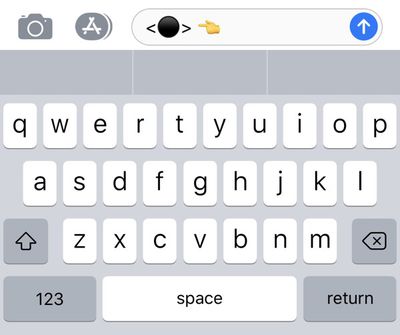
blackdotbug
Apple says the update also successfully fixes an issue that caused iMessages to appear out of order on some devices, a frustrating bug that's been around for quite some time and has been the subject of many complaints.

The third major bug addressed in today's update is one that caused an app on the Home screen to appear in the wrong location, often hovering out of place above other apps. This is another bug that received widespread attention given the high number of users who saw the problem occur.
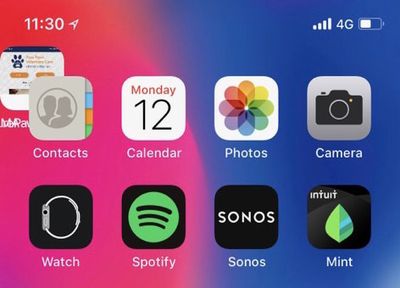
homescreenoutoforder

Image from MacRumors reader Paulold

There are several additional bug fixes included in iOS 11.4, as outlined below in Apple's release notes:

- Addresses an issue that could prevent logging in or accessing files on Google Drive, Google Docs and Gmail in Safari
- Fixes an issue that could prevent data syncing in Health
- Fixes an issue that could prevent users from changing what apps can access Health data
- Fixes an issue where CarPlay audio could become distorted
- Fixes an issue where selecting music from your iPhone could fail when playing music over Bluetooth or when connected to USB on some vehicles

The iOS 11.4 update is available for download on all devices capable of running iOS 11, which includes the iPhone 5s and later, the iPad mini 2 and later, the iPad Air and later, and the 6th-generation iPod touch. You can download the update by going to Settings --> General --> Software Update. All of the new features in iOS 11.4 are outlined in our video below.


We expect iOS 11.4 to be one of the last updates to the iOS 11 operating system as Apple is preparing to introduce iOS 12 at the Worldwide Developers Conference next Monday. iOS 12 will be available in a beta capacity for developers and public beta testers ahead of a public launch in the fall.


Related Forum: iOS 11

Popular Stories

Apple Logo Black

Apple Just Made Its Second-Biggest Acquisition Ever After Beats

Thursday January 29, 2026 10:07 am PST by
Apple today confirmed to Reuters that it has acquired Q.ai, an Israeli startup that is working on artificial intelligence technology for audio. Apple paid close to $2 billion for Q.ai, according to sources cited by the Financial Times. That would make this Apple's second-biggest acquisition ever, after it paid $3 billion for the popular headphone and audio brand Beats in 2014. Q.ai has...
Aston Martin CarPlay Ultra Screen

Apple's CarPlay Ultra to Expand to These Vehicle Brands Later This Year

Sunday February 1, 2026 10:08 am PST by
Last year, Apple launched CarPlay Ultra, the long-awaited next-generation version of its CarPlay software system for vehicles. Nearly nine months later, CarPlay Ultra is still limited to Aston Martin's latest luxury vehicles, but that should change fairly soon. In May 2025, Apple said many other vehicle brands planned to offer CarPlay Ultra, including Hyundai, Kia, and Genesis. At the time,...
14 inch MacBook Pro Keyboard

Apple Changes How You Order a Mac

Saturday January 31, 2026 10:51 am PST by
Apple recently updated its online store with a new ordering process for Macs, including the MacBook Air, MacBook Pro, iMac, Mac mini, Mac Studio, and Mac Pro. There used to be a handful of standard configurations available for each Mac, but now you must configure a Mac entirely from scratch on a feature-by-feature basis. In other words, ordering a new Mac now works much like ordering an...
imac video apple feature

Apple Unveils First New Products of 2026

Monday January 26, 2026 1:55 pm PST by
Apple today introduced its first two physical products of 2026: a second-generation AirTag and the Black Unity Connection Braided Solo Loop for the Apple Watch. Read our coverage of each announcement to learn more:Apple Unveils New AirTag With Longer Range, Louder Speaker, and More Apple Introduces New Black Unity Apple Watch BandBoth the new AirTag and the Black Unity Connection Braided...
apple unsold web store

Retail Accessories Apple Won't Sell You Now Available via New Site

Friday January 30, 2026 8:46 am PST by
A newly surfaced resale operation is seemingly offering Apple Store–exclusive display accessories to the public for the first time, potentially giving consumers access to Apple-designed hardware that the company has historically kept confined to its retail environments. Apple designs a range of premium MagSafe charging stands, display trays, and hardware systems exclusively for displays in ...

Top Rated Comments

ignatius345 Avatar
100 months ago
iMessage in the cloud is all well and good, but doesn't really solve anything for me since it's not yet supported on the Mac.
Score: 18 Votes (Like | Disagree)
No. 44 Avatar
100 months ago
Does it fix the issue where Siri doesn't understand anything?
Score: 16 Votes (Like | Disagree)
KoolAid-Drink Avatar
100 months ago
iMessage in the cloud is all well and good, but doesn't really solve anything for me since it's not yet supported on the Mac.
Same here. The bulk of my messages (since 2014) are on my Mac. I hope 10.13.5 is released today!
Score: 7 Votes (Like | Disagree)
JackieTreehorn Avatar
100 months ago
I updated, but I am still seeing those ‘Safari feels snappier’ posts.

One bug still remaining...
Score: 7 Votes (Like | Disagree)
itsmilo Avatar
100 months ago
7 or so iOS versions later and they still have not fixed this super annoying bug in iMessage where you delete a bunch of attached images at once. Go back inside and some of those pics you just deleted are still present which means you have to do the same thing all over multiple times. It even happens on the Mac

Also give me a freaking delete all button

It is also stupid that attached images do not sync with iCloud Message ... it’s what i was looking for, like why can I not delete images on Messages and they r gone on each device? Nope in fact they added another step. Now I have to load the images from the cloud to my device first before I can delete them, why not let me delete them straight from the cloud like iCloud Photos??? Stupid
Score: 6 Votes (Like | Disagree)
DipDog3 Avatar
100 months ago
FYI,

iCloud for iMessage wasn't turned on by default, had to go into settings to turn it on.
Score: 3 Votes (Like | Disagree)