Razer Launches New Core X External Graphics Enclosure, Adds Mac Support to Razer Core Lineup - MacRumors
Skip to Content

Razer Launches New Core X External Graphics Enclosure, Adds Mac Support to Razer Core Lineup

by

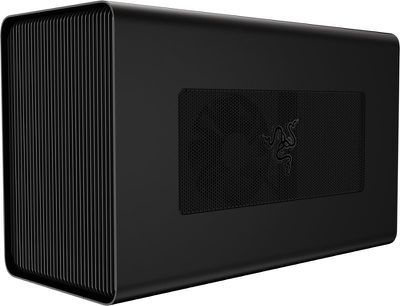
Razer today announced the launch of its latest external graphics enclosure, the Core X, and alongside the debut of the new accessory, the company is also adding Mac support to its enclosure lineup.

Both the new Core X and the existing Core V2 external graphics enclosure are now compatible with all Macs that offer support for Thunderbolt 3, including the MacBook Pro, iMac, and iMac Pro.
razercorex1
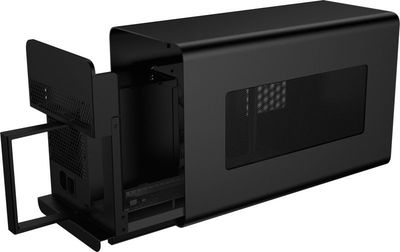
The Razer Core X, which also works with Windows machines, has been designed based on customer feedback Razer received after releasing the Core V2. Users wanted a wider external graphics enclosure able to fit larger 3 slot PCIe graphics cards, which the Core X delivers along with better cooling capabilities.


Razer designed the Core X to be future proof with the aforementioned larger enclosure and a 650W power supply that offers enough power to support all graphics cards on the market today and those coming in the future. While this is larger than the Core V2, Razer still designed it with desktop use in mind, so it's relatively slim and compact.
razercorex2
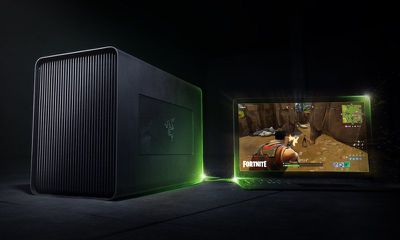
For those unfamiliar with Razer's Core series, the enclosures are designed to add additional graphics power to a Mac or a PC for tasks like gaming and system intensive workflows. With an external graphics enclosure, a machine not normally capable of handling GPU-intensive tasks can be hooked up to a powerful GPU. You will, of course, need to purchase a GPU alongside the Razer Core accessories - these are just enclosures.
razercorex3
To use the Razer Core X with a Mac, the machine must be running macOS 10.13.4 or later, and the Razer Core X needs to be equipped with an AMD Radeon card. It is not compatible with NVIDIA cards when used with a Mac at this time.

Pairing the Core X to a Mac is as simple as plugging the accessory into the Thunderbolt port on a compatible machine, with no restarting or fussing with settings needed. 100W passthrough charging is supported, so even the 15-inch MacBook Pro can charge when plugged into the Core X.

Razer designed the Core X to be more affordable than the slimmer V2 enclosure, and it is priced at $299. It can be purchased directly from the Razer Store starting today. Razer is also continuing to sell the Core V2 for $499.


Tag: Razer

Top Rated Comments

106 months ago
Wow. It looks good and it’s cheaper!

Score: 8 Votes (Like | Disagree)
iZac Avatar
106 months ago
i find it strangely amusing that every aspect of the PC industry has shrunk unbelively small, but the GPU still holds the line.

At this rate we’ll be sliding Mac mini’s into a 2019 Mac Pro GPU enclosure, like slices of bread into a toaster.
Score: 6 Votes (Like | Disagree)
106 months ago
Good to see a lower price and both Windows and Mac support. I’m hoping eGPU support continues to improve as its a really useful feature.
Score: 6 Votes (Like | Disagree)
106 months ago
Good looking piece of kit. At $300 it's still a dubious value proposition- unless you're comparison shopping against higher-spec versions of the same lineup from Apple (i.e. base-model MBP vs high end MBP). In that light, you might conceivably get away with (much) more GPU power for less cash, even with the expense of this box.

Pity that TB2 models are left in the dust, but such is the way of things.
Score: 4 Votes (Like | Disagree)
ikir Avatar
106 months ago
I need a Thunderbolt 2 version so I can bypass the unstable D300 cards in my 2013 Mac Pro. The D300s have the same fault as the D500 and D700s that Apple are replacing, but Apple won't admit it and fix them.
Maybe the dust in the years... anyway any eGPU is hardware compatible just need Thunderbolt 2-3 Apple adapter. Sadly there is not support in lastest macOS version, but there is an hack for this: https://egpu.io/forums/mac-setup/script-fr34ks-macos-egpu-sh-one-script-all-solutions-fully-automated/
Score: 3 Votes (Like | Disagree)
AndyUnderscoreR Avatar
106 months ago
I need a Thunderbolt 2 version so I can bypass the unstable D300 cards in my 2013 Mac Pro. The D300s have the same fault as the D500 and D700s that Apple are replacing, but Apple won't admit it and fix them.
Score: 3 Votes (Like | Disagree)

Popular Stories

iphone 16 teal

'Siri AI' Lawsuit Update: Apple to Pay Owners of These iPhone Models

Thursday July 9, 2026 7:08 am PDT by
In May, Apple agreed to pay $250 million to settle a U.S. class action lawsuit over Siri AI's delayed launch, and eligible iPhone users could receive up to a $95 payout. This week, the California court overseeing the case held a hearing regarding preliminary approval of the settlement, but the judge has not yet issued a ruling. It will likely be at least a few more months before eligible...
Apple TV Thumb 3

Everything Coming in the 2026 Apple TV 4K

Wednesday July 8, 2026 4:51 pm PDT by
The Apple TV 4K hasn't been updated since 2022, and it's due for a refresh. An update is planned for 2026, but Apple is likely going to wait to launch it after Siri AI launches in iOS 27. Design Apple TV design updates don't happen often, and that's not changing. The next Apple TV is going to have the same squircle shape as the current model, and it'll continue to be made from a black...
apple wallet drivers license feature iPhone 15 pro

Apple Says iPhone Driver's Licenses Will Expand to These 6 U.S. States

Thursday July 9, 2026 7:29 am PDT by
In select U.S. states, residents can add their driver's license or state ID to the Apple Wallet app on the iPhone and Apple Watch, and then use it to display proof of identity or age at select airports and businesses, and in select apps. To set up the feature, open the Wallet app on the iPhone and tap on the plus sign in the top-right corner. Next, tap on Driver's License and ID Cards,...