

iOS 11.2 Beta 3 Introduces Pop-up to Explain Control Center Wi-Fi/Bluetooth Functionality - MacRumors
Skip to Content

iOS 11.2 Beta 3 Introduces Pop-up to Explain Control Center Wi-Fi/Bluetooth Functionality

With iOS 11, Apple changed the way the Bluetooth and Wi-Fi toggles in Control Center work. The two buttons are no longer standard on/off switches, and instead disable Bluetooth and Wi-Fi only for a set period of time.

In the new iOS 11.2 beta released this morning, Apple has added new informational pop-ups to let users know exactly how these toggles work. The new pop-ups explain that Bluetooth and Wi-Fi will be disabled temporarily rather than permanently.
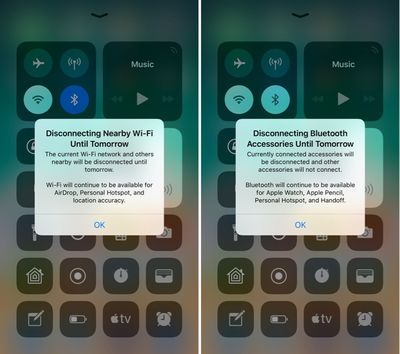
controlcenterwifitoggles
Prior to today's update, the Control Center toggles for Wi-Fi and Bluetooth could be somewhat confusing, because there was no on-device explanation. Apple outlined how the toggles work in a support document, but if you didn't see it, you might wonder why Wi-Fi or Bluetooth were turning themselves back on after being disabled via Control Center.

These new messages will appear the first time the Control Center toggles are used. Subsequent uses will show a message at the top that reads "Disconnecting Nearby Wi-Fi Networks Until Tomorrow" or "Disconnecting Bluetooth Devices Until Tomorrow."

bluetoothwifidisconnectingmessage
While Apple's new pop-ups offer a better explanation than was previously available, there are other situations where Wi-Fi or Bluetooth might be turned back on sooner than one day. When you use the Wi-Fi toggle in Control Center, Wi-Fi is disabled until one of the following conditions occurs:

- Wi-Fi is reactivated using Control Center
- You connect to a Wi-Fi network using Settings > Wi-Fi
- You walk or drive to a new location
- It's 5:00 a.m. local time
- Your iOS device is restarted

When you use the Bluetooth toggle in Control Center, Bluetooth is disabled until one of the following conditions occurs:

- Bluetooth is reactivated using control Center
- You connect to a Bluetooth accessory in Settings > Bluetooth
- It's 5:00 a.m. local time
- Your iOS device is restarted

To more permanently disable Bluetooth and Wi-Fi on an iOS device running iOS 11, it's necessary to go to the Settings app and toggle these features off in the Wi-Fi and Bluetooth sections. Apple likely made the change to Control Center in iOS 11 for a better overall user experience, as some iPhone and iPad owners might not realize the impact that turning Wi-Fi and Bluetooth off can have when it comes to iOS features like GPS directions, Continuity, and more.

In addition to introducing a message to let users know how Bluetooth and Wi-Fi work in Control Center, on the iPhone X, there's also a small UI change designed to make the Control Center gesture more obvious. Whenever you're on the Lock screen, there's a small bar underneath the icons on the right side of the device, letting you know there's more to see there. The bar is not displayed on the Home screen of an unlocked iPhone X, nor is it displayed within apps.
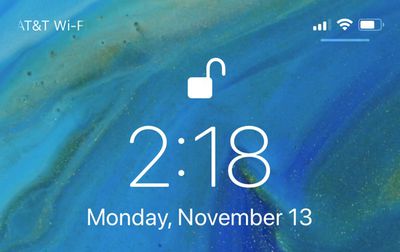
lockscreencontrolcenterbar
For those unfamiliar, accessing the Control Center on the iPhone X is done from a swipe down on the top right side of the device rather than a swipe upwards from the bottom.


Related Forum: iOS 11

Popular Stories

Apple MacBook Pro with PROLED XDR Display family lineup feature

Apple Announces OLED MacBook Pro With Touch Display

Wednesday October 28, 2026 10:11 am PDT by
Apple today announced a new high-end MacBook Pro, which is available in 14-inch and 16-inch sizes. The new device has a PROLED XDR display that supports touch gestures, and a glowing rear Apple logo. Pricing on the MacBook Pro starts at $2,899 for the 14-inch model and $3,399 for the 16-inch model. Apple says the MacBook Pro has the "world's best display in a pro laptop." The PROLED...

Apple MacBook Pro 14 in with M6 hero

Apple Announces New 14-Inch MacBook Pro With M6 Chip

Tuesday October 27, 2026 6:01 am PDT by
Apple today announced a refreshed 14-inch MacBook Pro featuring the M6 chip, upgraded connectivity specifications, and more. The M6 chip in the MacBook Pro features a 12-core CPU with 2 super cores, 4 performance cores, and 6 efficiency cores, paired with a 12-core GPU. This is up from the M5 chip with a 10-core CPU with 4 super cores and 6 efficiency cores, paired with a 10-core GPU. M6...
apple pro tell logo

Apple Opened Pre-Orders for Five New Products This Week

Wednesday October 28, 2026 2:49 am PDT by
Apple opened pre-orders for five new products on Wednesday, October 28, including its first touchscreen MacBook Pro models. Pre-orders opened for the following new products: iPad mini with OLED display and A20 Pro chip iMac with M6 chip 14-inch MacBook Pro with M6 chip 14-inch MacBook Pro with OLED touchscreen 16-inch MacBook Pro with OLED touchscreen Pre-orders for the iPad mini,...

Top Rated Comments

117 months ago
I understand what they’re trying to do, but I believe it’s unnecessary.

Off should be off, on should be on.

Keep it simple stupid.
Score: 134 Votes (Like | Disagree)
Scottsoapbox Avatar
117 months ago
Why keep it an intuitive on/off when you can add a pop up explaining it? :rolleyes:
Score: 76 Votes (Like | Disagree)
117 months ago
Why not long press for the option to turn it off completely?...
Score: 61 Votes (Like | Disagree)
theelysium Avatar
117 months ago
They are turned off to SAVE BATTERY DURPA-DURRRR Apple!

I want my OFF toggles back. I understand how to manage my antennas I don't need to be antenna coddled by Apple's OS.

We should be able to swap the toggles out or HOLD on the WiFi Bluetooth to switch them OFF!

So STUPID.
Score: 42 Votes (Like | Disagree)
117 months ago
iOS used to be such an elegant, simple and clear way of accessing a device.
That was a long time ago.
Score: 30 Votes (Like | Disagree)
spazzcat Avatar
117 months ago
I understand what they’re trying to do, but I believe it’s unnecessary.

Off should be off, on should be on.

Keep it simple stupid.
The new way is much better. When I get to my car for example at work, it has a very weak connection to wifi. I don't want to turn off wifi, I want to just disconnect from work. The old way I would forget to turn wifi back on.
Score: 29 Votes (Like | Disagree)
Latest Stories
New Apple TV 4K and iPad Mini: RAM Amounts Revealed
7 hours ago
Apple Executive Comments on New iPad Mini Lacking 120Hz Display
11 hours ago
Here's a Hands-On Look at HomePod Mini 2's New Two-Tone Colors
11 hours ago
Apple Lowers App Store Fees in Taiwan Starting October 31
12 hours ago
HomeView Pre-Order Returns to $289.99 on Amazon
13 hours ago
Apple Avoids Showing Pinched Fingers on iPad Mini Page in South Korea
13 hours ago
Old 'Popcorn Time' App Left Hundreds of Thousands of Macs at Risk
14 hours ago
You Can Turn Off the New MacBook Pro's Touchscreen Functionality
14 hours ago
MacBook Pro Mini-LED vs. OLED Buyer's Guide: Every Difference
15 hours ago
Where to Pre-Order Apple's New MacBooks, iPad Mini, and iMac
17 hours ago
Apple Releasing HomePod Mini 2 Tomorrow With These New Features
18 hours ago
How macOS Adapts Its Controls for Touch on the New MacBook Pro
19 hours ago
Just Got an iPhone Duo? Try These Features First
21 hours ago
Apple Announced Scott Forstall's Departure 14 Years Ago Today
21 hours ago
Best Buy Opens Pre-Orders for PROLED XDR MacBook Pro With $100 Bonus Gift Cards
1 day ago
Here's Everything Apple Announced This Week
1 day ago
Here's a Real-World Look at the New MacBook Pro's Glowing Apple Logo
1 day ago
How Accurate Were Rumors About Apple's OLED Touchscreen MacBook Pro?
1 day ago
Apple Has 8 New Products Available for Pre-Order
1 day ago
iPhone Duo: Turn the Hinge Into an App Launcher
1 day ago
OLED MacBook Pro vs. Mini-LED MacBook Pro: Size and Weight Compared
2 days ago
Best Buy Offering Up to $100 Gift Cards With iPad Mini 8 and M6 MacBook Pro Pre-Orders
2 days ago
Adding Touch Didn't Cost the MacBook Pro Any Battery Life
2 days ago
Apple Releases Redesigned Mac Chargers and 'World Travel Adapter Kit'
2 days ago
Apple Executives Explain Why the MacBook Pro Finally Has a Touch Screen
2 days ago
New MacBook Pro Features Deeper Bass and Improved Closed-Lid Audio
2 days ago
New MacBook Pro Offers Up to 16TB of Storage, Double Previous Limit
2 days ago
Apple's New Touchscreen MacBook Pro Costs Up to $14,549
2 days ago
Apple Brings Dynamic Island to Mac for the First Time
2 days ago
Mac Studio With M5 Ultra Now Available With 512GB RAM for $22,299
2 days ago









































