

Apple Launches New Version of Clips With 360-Degree Selfie Scenes - MacRumors
Skip to Content

Apple Launches New Version of Clips With 360-Degree Selfie Scenes

by

Apple today updated its Clips video app with a promised "Selfie Scenes" feature that's designed to use the front-facing TrueDepth camera on the iPhone X to immerse users in 360-degree animated landscapes.

Available Selfie Scenes transport users to "bustling cities, serene landscapes, abstract paintings" and, through a Disney partnership, the Millennium Falcon and Mega-Destroyer from the upcoming film "Star Wars: The Last Jedi." There are a total of 10 Apple-designed scenes along with two Star Wars scenes, all of which offer an immersive 360-degree experience.
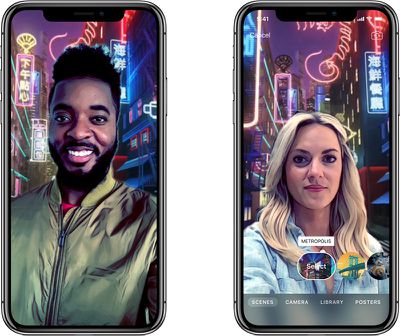
appleclipsapp

"Clips users love how quick and easy it is to create amazing videos on iPhone or iPad," said Susan Prescott, Apple's vice president of Apps Product Marketing. "And we're making it even more fun with Selfie Scenes. By harnessing the incredible new TrueDepth camera system on iPhone X, users can now record selfies against a variety of fun and whimsical backdrops with just a tap."

Clips now features a redesigned interface that Apple says puts frequently used controls "easily within reach." There's a new Effects browser for choosing filters, labels, stickers, and emoji, and labeled buttons make it easier to add Live Titles, change filters, and edit clips. All Clips are also now stored in iCloud and can be accessed across multiple devices.
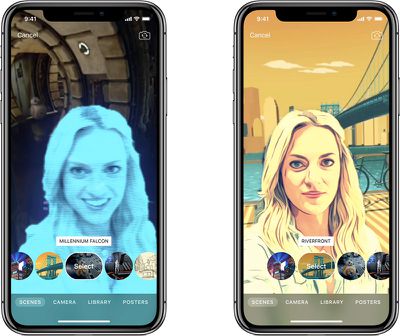
clipsscenes2
Along with new Selfie Scenes and a redesigned interface, the updated version of the app adds new effects for turning a photo or a video into an oil painting, a watercolor, or a pencil sketch, all effects that can be applied in real time while recording.

There's also more Disney content in the form of full-screen posters featuring Mickey and Minnie Mouse and an array of animated Star Wars stickers. There are additional Apple-designed stickers and 21 new soundtracks from indie artists that can be applied to videos created with the app.
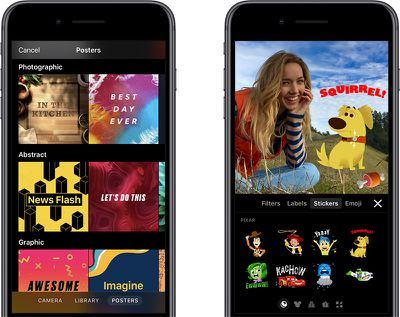
clipsstickers
For those unfamiliar with Clips, it's a video editing app that was released earlier this year. It's designed to let users combine several video clips, images, and photos with voice-based titles, music, filters, and graphics to create enhanced videos that can be shared on social media sites.

Clips can be downloaded from the App Store for free. Selfie Scenes are limited to the iPhone X, and style transfer effects are available on the iPhone 7 and later and the 2017 iPad Pro models. [Direct Link]


Tag: Clips

Top Rated Comments

Scottsoapbox Avatar
113 months ago
Apple seems too focused on gimmicks instead of doing something useful with all this computational power in your pocket.

Take a selfie in front of a background! Yippee. :rolleyes:

But maybe I am overestimating the average consumer again.
Score: 6 Votes (Like | Disagree)
113 months ago
When I try scenes it just shows a zoomed in background of each scene and nothing moves. Am I missing a function/toggle?
Score: 3 Votes (Like | Disagree)
citi Avatar
113 months ago
Apple seems too focused on gimmicks instead of doing something useful with all this computational power in your pocket.

Take a selfie in front of a background! Yippee. :rolleyes:

But maybe I am overestimating the average consumer again.
You can't say "computational power" and "average consumer" in the same sentence. The two are mutually exclusive.
Score: 2 Votes (Like | Disagree)
113 months ago
I am having the same issue on my X and can't find anything in permissions, etc., to address it. I am using the 11.1.1 update that just came out if that makes a difference.
Me too. I tried it with 11.1 and 11.1.1 and same problem. Tried deleting reinstalling, hard reset, still doesn’t work.

Will have to try restoring my phone later to see if that works
Score: 1 Votes (Like | Disagree)
UltraZ33 Avatar
113 months ago
I am having the same issue on my X and can't find anything in permissions, etc., to address it. I am using the 11.1.1 update that just came out if that makes a difference.
I’m on 11.2 beta and it doesn't work.
Score: 1 Votes (Like | Disagree)
chriscrk Avatar
113 months ago
Apple seems too focused on gimmicks instead of doing something useful with all this computational power in your pocket.

Take a selfie in front of a background! Yippee. :rolleyes:

But maybe I am overestimating the average consumer again.
Steve Jobs would never...


allow this?
Score: 1 Votes (Like | Disagree)

Popular Stories

Apple Acquires Award Winning App Play Feature

Apple Acquires Award-Winning App 'Play'

Monday June 29, 2026 7:39 am PDT by
In February, Apple notified the European Commission that it would be acquiring certain assets from and have the right to hire certain employees from Rabbit 3 Times, the company behind the award-winning app design tool Play. The notification was published on the European Commission's website this week, following a four-month waiting period. Play was a Mac and iPhone app that allowed designers ...
American Express Gold Apple Pay Feature

American Express Announces New Apple Pay Feature

Tuesday June 30, 2026 10:27 am PDT by
American Express today announced that you can now redeem Membership Rewards points when checking out with Apple Pay on the web and in apps on the iPhone and iPad. When checking out with Apple Pay on iOS 18 or iPadOS 18 or later, tap on your eligible American Express card (Platinum, Gold, Green, and others) and select the Membership Rewards points option. You can use points to cover all or...
series 10 apple watch titanium digital crown

Report: Apple Watch Redesign Coming Next Year With New Band System

Tuesday June 30, 2026 8:45 am PDT by
A "major overhaul" of the Apple Watch's design is due to arrive next year with a new system for connecting bands, according to a known Weibo leaker. In a set of recent posts, the leaker known as "Instant Digital" linked the new claim to older rumors about an "Apple Watch X" model, which was said to introduce a fresh design and break compatibility with the existing watch band system. Citing...







































