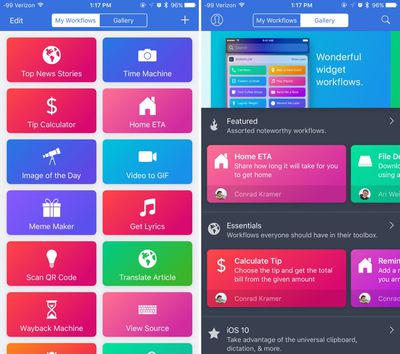
Workflow, the popular automation app Apple purchased earlier this year, was today updated to introduce support for iOS 11 and iPhone X.

The new version of the app allows users to drag and drop files onto a workflow to run the workflow using that file, and it adds HEIF and HEVC support to the Convert Image and Encode Media actions, respectively.

Support for new iOS 11 Health data types including Insulin Delivery, V02 Max, Waist Circumference, Resting Heart Rate, Walking Heart Rate Average, and Heart Rate Variability has also been added.
workflowforios
With the Get File and Save File actions, there's now support for retrieving and saving multiple files at one time, and there's also a new option to specify a default "From" address when using the Send Email action. Apple has also introduced a long list of bug fixes, listed below:

  • Fixed the Tweet and Post on Facebook actions on iOS 11
  • Fixed an issue where text items could unexpectedly be converted to image metadata dictionaries
  • Fixed an issue where granting access to Ulysses may not work
  • Fixed an issue where workflows launched from the Complication would not run on watchOS 4
  • Fixed an issue where the Text action may randomly scroll to the top while typing
  • Fixed an issue where the Send Message via WhatsApp action contact field did not work properly
  • Fixed an issue where the Convert Image action may crash in the Today Widget or Action Extension
  • Fixed an issue where the Show Directions action may not use the correct travel mode when opening Google Maps
  • Fixed an issue where messaging the attendees of an event may include yourself
  • Fixed an issue where VoiceOver may not focus on an action after it's added to a workflow
  • Fixed an issue where the Select Photos action did not work with VoiceOver when "Select Multiple" was turned on
  • Fixed an issue where a Workflow Input variable may not be editable after being added from the variable bar
  • Fixed a crash when inserting variables into the List and Dictionary actions
  • Fixed an issue where some files may not be selectable in the Dropbox and Box file pickers
  • Fixed an issue where a ghost workflow may appear while workflows are being reordered
  • Fixed an issue where passing a comma-separated list of email addresses into the Send Email action did not work
  • Fixed an issue where the Get Contents of URL action did not support passing a JSON body in DELETE requests
  • Fixed an issue where saving a file to Dropbox when a file already exists with the same name did not properly append a number to the filename
  • Other bug fixes and minor additions

For those unfamiliar with Workflow, it's an automation tool that can essentially do anything. It allows users to create workflows to accomplish tasks like creating GIFs from a series of photos, pulling images from a web page, translating an article, posting photos to multiple social networks at once, calculating a tip, and more.

Since Apple acquired the app, it has been free to download. Regular improvements have been introduced, including bug fixes and new actions.

Workflow can be downloaded from the App Store for free. [Direct Link]
Top Rated Comments

nitschi Avatar
107 months ago
I'm crying tears of happiness and wonder here.
Score: 2 Votes (Like | Disagree)
Jessica Lares Avatar
107 months ago
Oh wow. Drag and drop on the iPad with Workflow is going to be nice.
Score: 2 Votes (Like | Disagree)
Kabeyun Avatar
107 months ago
Still love it for snagging YouTube videos.
Score: 2 Votes (Like | Disagree)
laerning Avatar
107 months ago
Would be great if we could convert the existing iCloud Photo Library to the new HEVC/HEIF formats to save some cloud space.
Score: 1 Votes (Like | Disagree)

Popular Stories

imac video apple feature

Apple Unveils First New Products of 2026

Monday January 26, 2026 1:55 pm PST by
Apple today introduced its first two physical products of 2026: a second-generation AirTag and the Black Unity Connection Braided Solo Loop for the Apple Watch. Read our coverage of each announcement to learn more:Apple Unveils New AirTag With Longer Range, Louder Speaker, and More Apple Introduces New Black Unity Apple Watch BandBoth the new AirTag and the Black Unity Connection Braided...
Second Generation AirTag Feature

Apple Unveils New AirTag With Longer Range, Louder Speaker, and More

Monday January 26, 2026 6:07 am PST by
Apple today introduced the second-generation AirTag, with key features including longer range for tracking items and a louder speaker. For those who are not familiar, the AirTag is a small accessory that you can attach to your backpack, keys, or other items. Then, you can track the location of those items in the Find My app on the iPhone, iPad, Mac, Apple Watch, and iCloud.com. The new...
iPhone 5s

iPhone 5s Gets New Software Update 13 Years After Launch

Monday January 26, 2026 3:56 pm PST by
Alongside iOS 26.2.1, Apple today released an updated version of iOS 12 for devices that are still running that operating system update, eight years after the software was first released. iOS 12.5.8 is available for the iPhone 5s and the iPhone 6, meaning Apple is continuing to support these devices for 13 and 12 years after launch, respectively. The iPhone 5s came out in September 2013,...
Apple Logo Spotlight

Apple to Launch These 20+ Products This Year

Sunday January 25, 2026 6:02 pm PST by
2026 promises to be yet another busy year for Apple, with the company rumored to be planning more than 20 product announcements over the coming months. Beyond the usual updates to iPhones, iPads, Macs, and Apple Watches, Apple is expected to release its all-new smart home hub, which was reportedly delayed until the more personalized version of Siri is ready. Other unique products rumored for ...
M5 MacBook Pro

Apple Reportedly Aiming to Upgrade the MacBook Pro Twice This Year

Sunday January 25, 2026 11:46 am PST by
Apple plans to release new MacBook Pro, MacBook Air, Mac Studio, and Studio Display models in the first half of this year, according to Bloomberg's Mark Gurman. In his Power On newsletter today, Gurman added that redesigned MacBook Pro models with an OLED touch screen "should be hitting toward the end of 2026," meaning that the MacBook Pro line would be upgraded twice this year. First up...