Bluetooth and Wi-Fi Aren't Fully Disabled When Toggled Off in Control Center on iOS 11 - MacRumors
Skip to Content

Bluetooth and Wi-Fi Aren't Fully Disabled When Toggled Off in Control Center on iOS 11

Apple has confirmed that Bluetooth and Wi-Fi are not fully disabled when toggled off in Control Center on iOS 11.
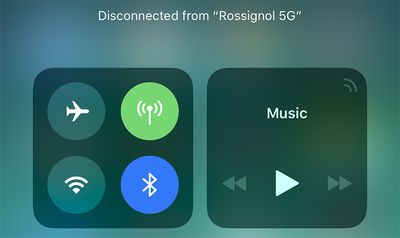
bluetooth wifi control center ios 11
Even when toggled off in Control Center on an iPhone, iPad, or iPod touch running iOS 11 and later, a new support document says Bluetooth and Wi-Fi will continue to be available for AirDrop, AirPlay, Apple Pencil, Apple Watch, Location Services, and Continuity features like Handoff and Instant Hotspot.

Toggling off Bluetooth or Wi-Fi in Control Center only disconnects accessories now, rather than disabling connectivity entirely.

If Bluetooth is turned off, the iOS device can't be connected to any Bluetooth accessories until one of these conditions is met:

  • You turn on Bluetooth in Control Center.
  • You connect to a Bluetooth accessory in Settings > Bluetooth.
  • It's 5 a.m. local time.
  • You restart your device.

While Wi-Fi is disabled, auto-join for any nearby Wi-Fi networks will also be disabled until one of these conditions is met:

  • You turn on Wi-Fi in Control Center.
  • You connect to a Wi-Fi network in Settings > Wi-Fi.
  • You walk or drive to a new location.
  • It's 5 a.m. local time.
  • You restart your device.

Apple made this change in the iOS 11 beta, and it gained more attention after the software was publicly released yesterday.

iOS 11 users can still completely disable Wi-Fi and Bluetooth for all networks and devices by toggling them off in the Settings app.

Apple says users should try to keep Wi-Fi and Bluetooth turned on for the best experience on an iOS device.

(Thanks, FlunkedFlank!)
Related Forum: iOS 11

Popular Stories

Four iPhone 18 Pro Colors Mock Feature

iPhone 18 Pro Launching Later This Year With These 10 New Features

Tuesday May 26, 2026 6:32 am PDT by
While the iPhone 18 Pro and iPhone 18 Pro Max are not launching until September, there are already plenty of rumors about the devices. It was initially reported that the iPhone 18 Pro models would have fully under-screen Face ID, with only a front camera visible in the top-left corner of the screen. However, the latest rumors indicate that only one Face ID component will be moved under the...
apple wallet drivers license feature iPhone 15 pro

Apple Just Expanded iPhone Driver's License Feature to Arkansas

Wednesday May 27, 2026 9:41 am PDT by
In select U.S. states, residents can add their driver's license or state ID to the Apple Wallet app on the iPhone and Apple Watch, and then use it to display proof of identity or age at select airports and businesses, and in select apps. Starting today, the feature is available in Arkansas, which is the 14th state to offer it. However, it may take some time to roll out to all users. To...
Apple Watch Blood Glucose Monitoring Feature 2

Apple Watch for Diabetes: The Latest on Apple's Plans for Non-Invasive Blood Sugar Monitoring

Tuesday May 26, 2026 9:30 am PDT by
For many years now, it has been rumored that the Apple Watch will eventually gain non-invasive blood sugar monitoring capabilities, which would enable millions of people with diabetes to track their blood glucose levels without needing to prick their skin with a needle or wear a dedicated continuous glucose monitor. According to Bloomberg's Mark Gurman, Apple recently shifted oversight of...

Top Rated Comments

djeeyore25 Avatar
113 months ago
This feature is annoying.
Score: 95 Votes (Like | Disagree)
Moonjumper Avatar
113 months ago
The original iPhone famously came without a manual as everything was so obvious. That time is over.
Score: 91 Votes (Like | Disagree)
Mlrollin91 Avatar
113 months ago
Where did this 5am thing come from? How did they decided on 5am?
Score: 68 Votes (Like | Disagree)
ghostface147 Avatar
113 months ago
This annoys me. Add a 3D touch option to turn it off. Thanks.
Score: 42 Votes (Like | Disagree)
113 months ago
it's all about simplicity, right? :rolleyes:
Score: 37 Votes (Like | Disagree)
113 months ago
Can you press and hold one of the shortcuts to open the full settings page in the Settings app yet?
Nope... that's the annoying part.
I'd really want the previous behavior. This "feature" is completely useless for a "pro" user and I though it was a bug for 8 betas.

Also: why not to put a flag into settings to restore the complete switch off instead of this. Apple, wtf are you doing?!
Score: 36 Votes (Like | Disagree)