Skip to Content

Apple Seeds Fourth Beta of watchOS 3.2 to Developers

Apple today seeded the fourth beta of an upcoming watchOS 3.2 update to developers for testing purposes, one week after seeding the third watchOS 3.2 beta and more than a month after the release of watchOS 3.1.3, the current public version of the operating system.

The watchOS 3.2 beta can be downloaded through the dedicated Apple Watch app on the iPhone by going to General --> Software Update after installing the proper configuration profile on the iPhone. To install the update, the Apple Watch must have 50 percent battery, it must be placed on the charger, and it must be in range of the iPhone.

watchOS 3.2 requires an iPhone running iOS 10 to install and will only be available to developers. Apple does not make watchOS betas available to the public as there is no way to downgrade the software on an Apple Watch.

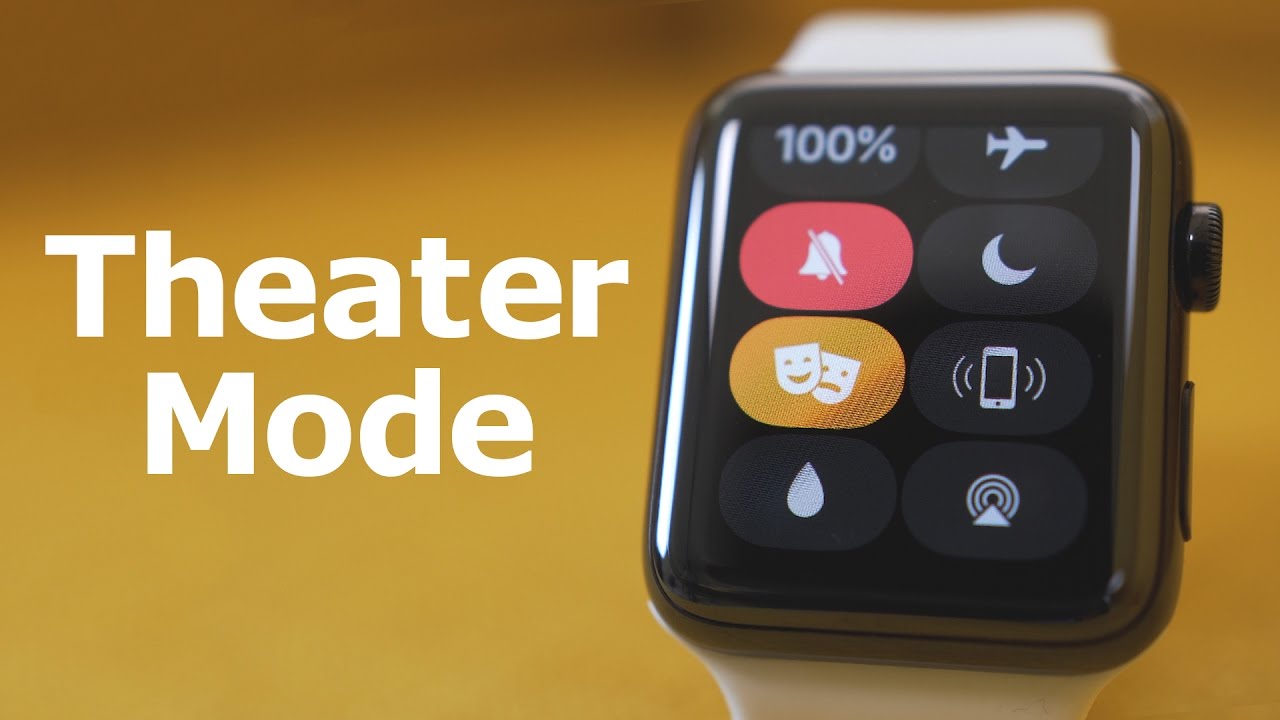
watchOS 3.2 includes a "Theater Mode" designed to let customers quickly mute the sound on the Apple Watch and disable Raise to Wake, preventing the screen from lighting up with arm movement.

Customers are still able to receive haptic feedback-based notifications, and information can be viewed by either tapping the screen or pressing down on the Digital Crown.

watchOS 3.2 also brings SiriKit to the Apple Watch, allowing customers to ask Siri to do things like send messages, send payments, book a ride, log a workout, make a call, or search through photos. SiriKit has been available on iOS devices since the release of iOS 10, but is new to the Apple Watch.
Related Roundup: Apple Watch 11
Buyer's Guide: Apple Watch (Neutral)

Popular Stories

Apple Event Logo

Apple Released Seven New Products Today

Wednesday March 11, 2026 7:05 am PDT by
Starting today, the seven new Apple products that were announced last week are available at Apple Stores and beginning to arrive to customers. The colorful MacBook Neo and all of the other new products are on display at most Apple Store locations around the world starting today. Apple Stores have inventory of the new products for both walk-in customers and Apple Store pickup, but...

ios 26 4 yellow

Everything New in iOS 26.4 Beta 4

Monday March 9, 2026 3:50 pm PDT by
Apple is continuing to test the iOS 26.4 beta, and the latest update is now available for developers and public beta testers. As testing goes on, there are fewer new features in each beta, but today’s release adds new emoji characters and a few other changes. New Emoji Apple added new emoji characters, including trombone, treasure chest, distorted face, hairy creature, fight cloud, orca,...
Apple 50 Years of Thinking Different

Apple Announces 50th Anniversary Plans

Thursday March 12, 2026 6:10 am PDT by
Apple today announced that it will celebrate the company's 50th anniversary over the coming weeks, but it has yet to reveal any specific plans. Apple was founded on April 1, 1976, so the company will turn 50 on April 1, 2026. "While Apple is known for looking forward, this milestone offers a special moment to reflect on the journey that has brought the company here, to celebrate the...

Top Rated Comments

Mad Mac Maniac Avatar
118 months ago
Not sure if this has been said previously or not, but Theater Mode makes a lot of sense when imagining series 3 having an always on display....
Score: 4 Votes (Like | Disagree)
andreigherghe Avatar
118 months ago
There is a new sound when unlocking a Mac with the WATCH - sounds like an actual mechanical lock now.
Score: 2 Votes (Like | Disagree)
118 months ago
Not sure if this has been said previously or not, but Theater Mode makes a lot of sense when imagining series 3 having an always on display....
It makes more than enough sense for the series 2. It is handy to turn off Raise to Wake and Sounds in 1 toggle from the Control Center.

Besides, Apple watch is not getting an Always-On display. Anyone who told you otherwise is wrong.
Score: 1 Votes (Like | Disagree)
118 months ago
There is a new sound when unlocking a Mac with the WATCH - sounds like an actual mechanical lock now.
The new taptic feedback is pretty a nice touch to the new sound as well!
Score: 1 Votes (Like | Disagree)
Mad Mac Maniac Avatar
118 months ago
It makes more than enough sense for the series 2. It is handy to turn off Raise to Wake and Sounds in 1 toggle from the Control Center.

Besides, Apple watch is not getting an Always-On display. Anyone who told you otherwise is wrong.
Sure, it can absolutely be handy for series 0-2, but it would be supremely useful on an always on display.

I must have missed that story. I highly doubt that would be ready for version 3. ... Maybe if they make the display bigger, as the increase in display size usually doesn't outweigh the increase in volume to hold more battery capacity.
I haven't necessarily heard a specific rumor of an always on display, but I've heard rumors for series 3 that screen technology is changing and that a focus is on battery life. Take these rumors, combine them with the fact that there are several other smart watches that have this feature and there appears to be significant desire for this feature (at least in these forums, granted not the most fully represented demographic), and I would argue that it's certainly plausible. And I would argue that the feature would lend even more credence to that as a possibility.

Additionally I think I would welcome a small increase in size. Maybe either move from 38mm/42mm to 40/44? Or perhaps keeping 38/42 and adding a 46mm? For me (and I have small-to-medium male wrists), 42mm is fine, but I honestly think I would prefer something more in the 45mm range, both for added screen size and battery life.
Score: 1 Votes (Like | Disagree)
xDKP Avatar
118 months ago
It makes more than enough sense for the series 2. It is handy to turn off Raise to Wake and Sounds in 1 toggle from the Control Center.

Besides, Apple watch is not getting an Always-On display. Anyone who told you otherwise is wrong.
Wow would love a crystal ball like the one you have - must be amazing!

Looking forward to this - think it might be better than do not disturb mode for meetings - I use that at the moment but it should still have all notifications in the menu so a quick glance after the meeting would update me - but it doesn't
Score: 1 Votes (Like | Disagree)