Skip to Content

iOS 27 Brings These Five New Features to Your iPhone Lock Screen

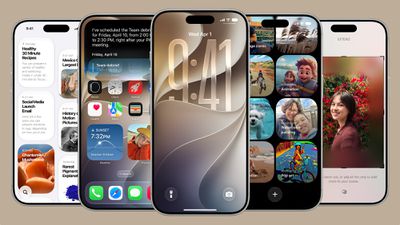
Apple released iOS 27 on Monday, September 14, and while the headline-grabbing Siri overhaul has received the most attention, the Lock Screen has picked up several refinements that you may not have heard about.
ios 27
Some are brand-new additions, while others are tweaks to features Apple introduced in iOS 26, but together they give you more control over how your Lock Screen looks and behaves.

Here are five to try right after you update your iPhone (supported models) to iOS 27. You can download the update now in the Settings app, via General ➝ Software Update.

Extend Your Wallpaper
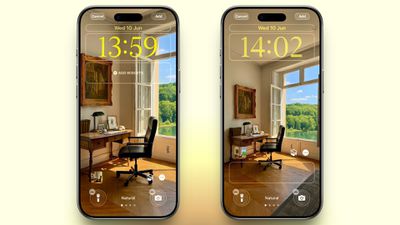
extend wallpaper ios 27
A new wallpaper extension feature in iOS 27 uses Apple Intelligence to automatically expand a photo beyond its original boundaries so it fills the entire Lock Screen more naturally. If a photo is cropped too tightly, doesn't match your iPhone's aspect ratio, or it leaves empty space when positioned on the Lock Screen, iOS 27 can generate additional image content around the edges with the "Extend" option. It will analyze the existing image and create matching background details that blend with the original photo, so there's no need for aggressive cropping. The Extend option can also be found in the Photos app.

Make the Clock Tiny
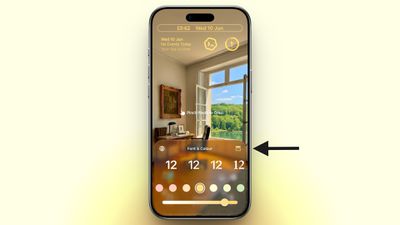
lock screen
A new compact clock mode is available as a new Lock Screen layout option in iOS 27. Found in the top-right corner of the Font & Color panel, the option moves the time from its traditional large, centered position to a much smaller format alongside the date and widgets at the top of the screen. It's a nice option to have if you like a cleaner Lock Screen look that shows off your wallpaper more fully, and it's the complete opposite effect introduced in iOS 26 that stretches the clock down the screen.

Generate Wallpapers With AI
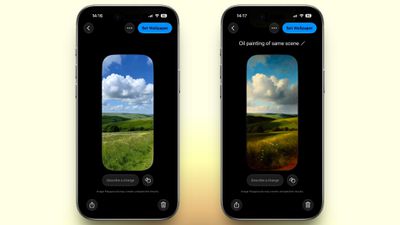
playground
iOS 27 also expands Image Playground with support for AI-generated Lock Screen wallpapers. You can create custom backgrounds using text descriptions, and the app will generate entirely new images tailored to your preferred style, subject matter, or aesthetic, allowing you to set it directly as your Lock Screen wallpaper.

Change Liquid Glass Opacity
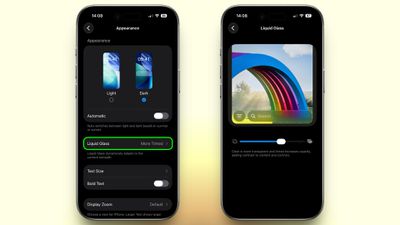
settings
In iOS 27, Apple added a full Liquid Glass slider under Settings ➝ Appearance ➝ Liquid Glass. It changes the translucency of Liquid Glass elements, and you can choose a clear version of Liquid Glass that allows some of the background to show through, select a more opaque, tinted version that improves the legibility of text, or choose something in between. Granted, it's more of a system-wide customization feature than a Lock Screen-exclusive feature, but it directly impacts the look of your clock setup, buttons, widgets, and notifications.

New Siri Interface
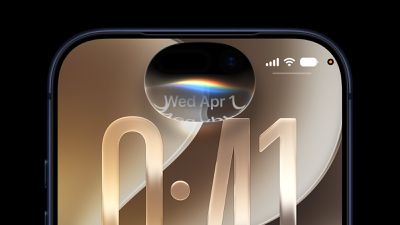
ios 27 siri animation
To go with Apple's tentpole "Siri AI" chatbot-style overhaul, iOS 27 introduces a redesigned Siri experience. Instead of the glowing light effect that previously traced the edges of the display, a swirling Siri orb now expands and animates within the Dynamic Island. Siri requests and responses are also now presented in a more compact interface surrounding the Dynamic Island, so interactions should feel more focused rather than completely taking over your Lock Screen.
Related Roundups: iOS 27, iPadOS 27
Related Forum: iOS 27

Popular Stories

iphone duo yellow hand

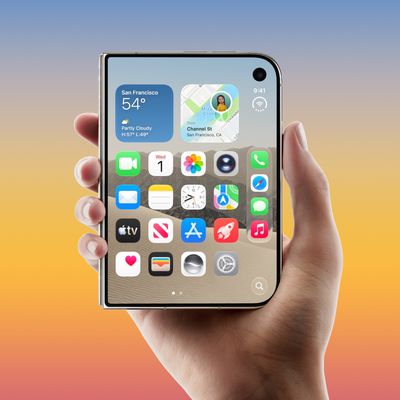
Apple Adds Facial Unlock Option on iPhone Duo in iOS 27.3

Monday November 16, 2026 10:17 am PST by
Apple today added a new option for unlocking the iPhone Duo using the front-facing camera, giving device users multiple ways to access their content. The feature is available in the second iOS 27.3 beta. The option to unlock with facial recognition is only available on the Lock Screen, and authentication via Touch ID is still needed for Apple Pay purchases, adding passwords and logins, and...
iOS 27

iOS 27.2 Features: Everything New in iOS 27.2

Monday October 26, 2026 3:56 pm PDT by
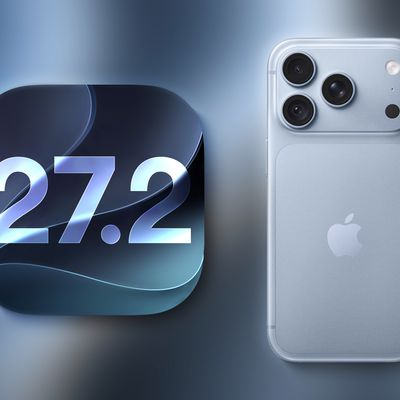
Apple released iOS 27.2, uniting the iPhone Duo and other iPhone models on the same version of iOS. iOS 27.2 is the first major iOS 27 update, and it adds several useful new features. Siri AI Improvements Siri AI can recall past conversations you had with it, so you can ask Siri about something it told you before, like a restaurant it previously recommended. It's also able to draw on more...
bug security vulnerability issue fix larry

Here's What Apple Fixed in iOS 27.2.1 and macOS 27.2.1

Monday November 9, 2026 3:07 pm PST by
The iOS 27.2.1, iPadOS 27.2.1, and macOS 27.2.1 updates Apple released today fix a handful of security vulnerabilities. With the security fixes implemented, it's a good idea to update as soon as you can. A bug with iMessage could let a remote attacker join a group chat to receive its messages, and another could let users see messages sent before they joined a group chat. Most of the...


Top Rated Comments

24 weeks ago
Only 2 out of 5 features are genuine lock screen enhancements. The other 3 are either wallpaper tools (which already exist in the Photos app) or system-wide customisation features.
Score: 7 Votes (Like | Disagree)
24 weeks ago
How about displaying the time with seconds. Much more useful than the rubbish on offer.
Score: 6 Votes (Like | Disagree)
sw1tcher Avatar
24 weeks ago

Anyone manage to extract this image, would make a nice watchOS background!
No need to extract it when you can just go to Tim Cook's tweet about it from September 9, 2024 and get it there.


View post on X

https://pbs.twimg.com/media/GW-RG4QbQAAfihG.jpg


A wider (desktop?) version can be found here:

https://www.macrumors.com/2026/03/29/apples-50th-anniversary-finale-revealed/
Score: 3 Votes (Like | Disagree)
Dr McKay Avatar
24 weeks ago
I wish I could make it more closely match the font for the date. Also I can’t measure because I’m not at my computer but I feel like the clock is a few pixels higher than the date 😅

Hoping that’s not the case and it’s just the difference in font type playing tricks on me.


Attachment Image
Score: 2 Votes (Like | Disagree)
24 weeks ago
A feature to change just the current wallpaper would be great. I've setup my lock screen widgets the way I want them, but having to redo them just to pick a new wallpaper is annoying.

I hope I'm not missing a setting somewhere, but even the settings pane have that little animation switching between lock screens. I don't want an entire lock screen just to change the wallpaper.
Score: 2 Votes (Like | Disagree)
Small White Car Avatar
24 weeks ago
What I really want is the ability to pick a photo album as a source of backgrounds and have my lock screen reference it as I make changes in the future.

I can do this on my Apple TV screensaver. I have an album on my phone and I can add or remove photos at any point and the screensaver will reflect that in the future.

But for some reason on my iPhone lock screen it’s a big hassle to add and remove photos from my rotating photo gallery. It’s a completely separate process and it never checks photo albums again after you import the photos.

This would be far more useful than anything listed in this article.
Score: 2 Votes (Like | Disagree)
Latest Stories
AirPods Pro 3 Drop to $169.99 in Amazon Black Friday Sale
10 hours ago
iPhone Duo Could Get More Lock Screen Widgets, Leak Suggests
10 hours ago
Gurman: Siri Layoffs Spared Newer AI Systems, But Problems Persist
10 hours ago
M6 MacBook Pro Drops to $1,799 in New Black Friday Sale ($200 Off)
15 hours ago
Apple Reportedly Plans to Release These Products in February or March
15 hours ago
Apple Watch SE 3 Lineup Sees Record Low Prices Starting at Just $179
15 hours ago
Apple Black Friday Deals Available Now: AirPods, Apple Watches, MacBooks, and More
16 hours ago
Apple Store in UK Permanently Closing Today
2 days ago
Siri AI Settlement: Here's How Much Apple Will Pay You
2 days ago
RIP, Apple Support Community
2 days ago
Top Stories: iPhone Duo Face Unlock, HomeView Tidbits, and More
2 days ago
Amazon Takes $120 Off 46mm GPS Apple Watch Series 12 With New Record Low Price [Update: Gone]
2 days ago
Siri Recap Hands-On: Private, But Not Very Useful
2 days ago
Save on Headphones This Black Friday With Major Deals on Beats, Sony, Soundcore, and More
2 days ago
MacRumors Giveaway: Win a 512GB OLED iPad Mini and a Year of Astropad Workbench
3 days ago
The MacRumors Show: What's Next for iPhone Duo?
3 days ago
Anker's Black Friday Steals: The Lowest Prices Yet on MagSafe Favorites
3 days ago
Microsoft to Retire 'To Do' Apps Next Year
3 days ago
First Look at iPhone Air 2 and iPhone 18 Revealed By Dummy Models
3 days ago
WhatsApp Raises Group Chat Limit to 1,500 Members
3 days ago
MacBook Pro Black Friday Deals Are Here: Get Up to $250 Off M6 and PROLED XDR
3 days ago
Apple is Building an AI Agent That Can Use Apps and Code
3 days ago
Black Friday Deal: Apple TV Streaming Service for $6.99/Month
3 days ago
AirPods Black Friday Deals Hit Pro 3 at $179 and Max 2 at $429
3 days ago
Second iOS 27.3 and macOS Golden Gate 27.3 Public Betas Now Available
3 days ago
Google's Gemini Can Now Control Apps on Your Mac
3 days ago
iPhone Duo vs. Samsung Galaxy Z Fold8: Which is Better?
4 days ago
Apple Executive in Charge of iPhone's Camera App Reportedly Retires
4 days ago
Apple Announces 2026 Black Friday Event, Here's What You Can Get
4 days ago
Sonos Black Friday Sale Takes Up to 25% Off Speakers, Soundbars, and More
4 days ago