Facebook recently announced that users are now able to select the "initial view" for 360-degree photos when uploading pictures to the iOS, Android, and Chrome for Desktop Facebook apps. Prior to the update, Facebook would randomly choose a section of the 360-degree photo to showcase on the service, so now users can personally select the best section to show their friends and family (via The Next Web).
To do this, before posting users simply have to drag around the photo on mobile, or select "Edit" on desktop, to find the area of the picture they want to be the initial viewpoint for anyone scrolling through their Facebook feed. Whenever the initial view is clicked on, the full 360-degree photo will be showcased with more detail.
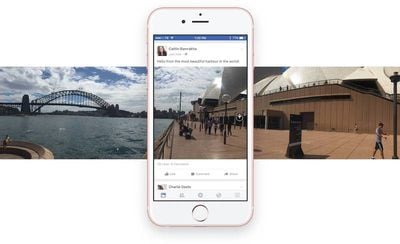 "In the coming weeks," the company will also rollout album support for 360-degree photos, as well as the ability to post them into multimedia status updates, "i.e. when you want to post a combination of 360 photos, regular photos, 360 videos and regular videos at once."
We've heard you loud and clear and we're excited to roll out the ability to set the initial field of view on your 360 photo on iOS, Android and Chrome for desktop. To change the view, simply upload a 360 photo, then, before posting, move your photo around by dragging with your finger or select Edit on desktop and move the mouse until you've reached the desired view. Your friends will now see this angle of your photo when you post to Facebook. Please note, we have not enabled zoom with this feature.
Additionally, it was recently reported that the social network is running a beta test for a "data saver" feature on its separate Facebook Messenger app. When a user is on cellular data, and data saver is turned on, the mode acts as a barrier between the user and unwanted media downloads within messages by letting them tap and select every photo and video they want to download, and ignore the ones they don't.
Ordinary text messages are unaffected by the mode, which also includes a setting that tells the user how much data is being saved. Normally, Facebook Messenger downloads all content within a message without user consent, so Facebook hopes data saver could be a way for users on low-data plans to avoid going over their rates. Right now, data saver is being tested on Android, but the feature is expected to eventually make it to iOS as well.