

Razer today launched a new top-tier mechanical keyboard peripheral for Apple's 12.9-inch iPad Pro, which packs in PC-like mechanical switches for typing on the tablet (via The Verge). The $169.99 accessory -- which uses Bluetooth to connect to the iPad Pro -- also doubles as a protective case for the tablet when closed, and has a kickstand to perch the device open when the keyboard is in use.
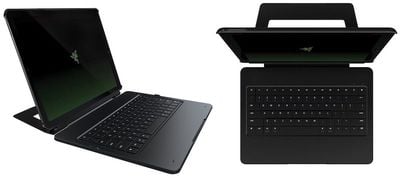
razer ipad pro case 2
The "ultra-low-profile mechanical switches" used in the keyboard case replicate the feel and responsiveness of a full-fledged mechanical keyboard, according to Razer, but with the slimmer profile needed for a mobile tablet accessory. The keys are even individually backlit for typing in the dark, and come with 20 levels of illumination power to cycle through depending on the light needed.

This revolutionary technology with slim chiclet keycaps raises the bar for ultra-mobile keyboards. Featuring optimized actuation and reset points and an actuation force of 70g, the world’s first low-profile mechanical switch delivers the exact same performance and feel as a full-fledged mechanical keyboard.

Optimized for multiple viewing angles, Razer noted that the Mechanical Keyboard Case's metal kickstand is "detachable and not limited to a fixed angle," letting users find the perfect position for every typing environment. Concerning battery life, the company claimed that the case gets 10 hours on one charge at the highest-intensity level of keyboard brightness, with the possibility to extend that all the way up to 600 hours by turning the backlight off completely.
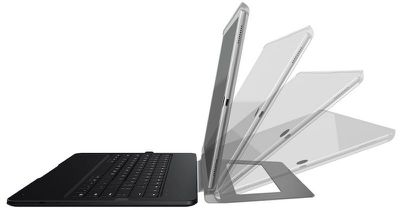
razer ipad pro case
Razer has posted more information about the Mechanical Keyboard Case on its website, and anyone interested can purchase it from the company for $169.99.
Related Roundup: iPad Pro
Tag: Razer
Buyer's Guide: iPad Pro (Buy Now)

Top Rated Comments

Daws001 Avatar
123 months ago
uses Bluetooth to connect to the iPad Pro
And that's where they lost me.
Score: 18 Votes (Like | Disagree)
pgiguere1 Avatar
123 months ago
I still don't understand the need for backlit keys. Are people still that unaccustomed with their keyboard that they have to look to type? A backlit keyboard just warms my hands (more than I would like) and wastes battery.
Usually not while they type, but since people's hand are usually not on the keyboard 100% of the time, it's useful to look right before you place you hands on it to know which keys are under your fingers initially. I know that's what the nibs on the F and J keys are for, but it's often quicker to quickly glance at the keyboard than the look for the nibs by feel alone. There are also those times where you use less frequent keys and don't know where they are just by memory. Do you think most people would hit the right key on their first attempt if they were asked to press, say, F7 without looking?
Score: 5 Votes (Like | Disagree)
sracer Avatar
123 months ago
Okay guys, the BT factor sucks, but this isn't about that. A mechanical keyboard CASE?! I adore my mechanical keyboard for my desktop. The price is what it is because of the key switches. If you have never used a mechanical keyboard, I strongly encourage you to try one out.
I've been a software developer for over 40 years and have (and still) use mechanical keyboards all that time. I get it that hipsters love them (I'm not saying all who love mechanical keyboards are hipsters), but I don't like them. They're ponderous to type on.

When I get to use my iMac, Macbook Air, and iPad Pro keyboards, it's a pleasure by comparison. It's the difference between slogging through knee-deep snow without snow-shoes and flittering across a running track. :confused::D
Score: 3 Votes (Like | Disagree)
enkadrummer88 Avatar
123 months ago
I still don't understand the need for backlit keys. Are people still that unaccustomed with their keyboard that they have to look to type? A backlit keyboard just warms my hands (more than I would like) and wastes battery.
It's not like you have to have the backlight on... it's technically an option. And do those tiny little white LEDs really generate enough heat to make a difference? I'd say it's just your laptop that's hot, not he keyboard. I use a backlit mechanical keyboard at work for 8 hours a day (using it right now) and I've never noticed any heat difference. In fact, my hands are freezing right now...
Score: 3 Votes (Like | Disagree)
Bbqthis Avatar
123 months ago
Are the hoops apple has set forth really that hard to jump through to get smart connector keyboards made? Or are they simply not wanting to limit the buyer base.
Score: 2 Votes (Like | Disagree)
PBG4 Dude Avatar
123 months ago
Nobody knows if the smart connector will change over time, so why build to something that may disappear if Apple decides it doesn't want that extra port anymore? Don't blame Razer for only taking so much of a risk with this new product.

As someone who would connect an IBM Selectric to my desktop if I could use it for my keyboard, I look forward to trying out a demo model of this keyboard. :) Not to buy, just to see how much of a mechanical feel they incorporated into this tiny a case. Weight isn't mentioned in Razer's specs though so I'd imagine this won't be a light keyboard case.
Score: 2 Votes (Like | Disagree)

Popular Stories

iOS 26

iOS 26.2 Coming Soon With These 8 New Features on Your iPhone

Thursday December 11, 2025 8:49 am PST by
Apple seeded the second iOS 26.2 Release Candidate to developers earlier this week, meaning the update will be released to the general public very soon. Apple confirmed iOS 26.2 would be released in December, but it did not provide a specific date. We expect the update to be released by early next week. iOS 26.2 includes a handful of new features and changes on the iPhone, such as a new...
iOS 26

iOS 26.4 and iOS 27 Features Revealed in New Leak

Friday December 12, 2025 10:56 am PST by
Macworld's Filipe Espósito today revealed a handful of features that Apple is allegedly planning for iOS 26.4, iOS 27, and even iOS 28. The report said the features are referenced within the code for a leaked internal build of iOS 26 that is not meant to be seen by the public. However, it appears that Espósito and/or his sources managed to gain access to it, providing us with a sneak peek...
iOS 26

Apple Releases iOS 26.2 With Alarms for Reminders, Lock Screen Changes, Enhanced Safety Alerts and More

Friday December 12, 2025 10:10 am PST by
Apple today released iOS 26.2, the second major update to the iOS 26 operating system that came out in September, iOS 26.2 comes a little over a month after iOS 26.1 launched. ‌iOS 26‌.2 is compatible with the ‌iPhone‌ 11 series and later, as well as the second-generation ‌iPhone‌ SE. The new software can be downloaded on eligible iPhones over-the-air by going to Settings >...
AirPods Pro Firmware Feature

Apple Releases New Firmware for AirPods Pro 2 and AirPods Pro 3

Thursday December 11, 2025 11:28 am PST by
Apple today released new firmware designed for the AirPods Pro 3 and the prior-generation AirPods Pro 2. The AirPods Pro 3 firmware is 8B30, up from 8B25, while the AirPods Pro 2 firmware is 8B28, up from 8B21. There's no word on what's include in the updated firmware, but the AirPods Pro 2 and AirPods Pro 3 are getting expanded support for Live Translation in the European Union in iOS...
macOS Tahoe 26 Thumb

Apple Releases macOS Tahoe 26.2 With Edge Light

Friday December 12, 2025 10:08 am PST by
Apple today released macOS Tahoe 26.2, the second major update to the macOS Tahoe operating system that came out in September. macOS Tahoe 26.2 comes five weeks after Apple released macOS Tahoe 26.1. Mac users can download the macOS Tahoe update by using the Software Update section of System Settings. macOS Tahoe 26.2 includes Edge Light, a feature that illuminates your face with soft...
AirTag 2 Mock Feature

Apple AirTag 2: Four New Features Found in iOS 26 Code

Thursday December 11, 2025 10:31 am PST by
The AirTag 2 will include a handful of new features that will improve tracking capabilities, according to a new report from Macworld. The site says that it was able to access an internal build of iOS 26, which includes references to multiple unreleased products. Here's what's supposedly coming: An improved pairing process, though no details were provided. AirTag pairing is already...
ipados 26 1 slide over

Apple Releases iPadOS 26.2 With Multitasking Improvements

Friday December 12, 2025 10:09 am PST by
Apple today released iPadOS 26.2, the second major update to the iPadOS 26 operating system released in September. iPadOS 26.2 comes a month after iPadOS 26.1. The new software can be downloaded on eligible iPads over-the-air by going to Settings > General > Software Update. iPadOS 26.2 continues with the multitasking improvements that were added with iPadOS 26.1. You can now drag and...
bug security vulnerability issue fix larry

Update Now: iOS 26.2 Fixes 20+ Security Vulnerabilities

Friday December 12, 2025 11:11 am PST by
Apple today released iOS 26.2, iPadOS 26.2, and macOS 26.2, all of which introduce new features, bug fixes, and security improvements. Apple says that the updates address over 20 vulnerabilities, including two bugs that are known to have been actively exploited. There are a pair of WebKit vulnerabilities that could allow maliciously crafted web content to execute code or cause memory...









































