iOS 9.2 Tidbits: Top Stories for News, AT&T NumberSync, Mail Drop, USB Camera Adapter Support, and More - MacRumors
Skip to Content

iOS 9.2 Tidbits: Top Stories for News, AT&T NumberSync, Mail Drop, USB Camera Adapter Support, and More

The second major update to iOS 9, iOS 9.2, was released this morning, with a long list of bug fixes and improvements to features and apps like Apple Music, News, Mail, Podcasts, Safari, iBooks, and more. There are quite a few outward-facing changes tweaks and changes to the operating system, and we've gathered up a list of the major new features below.

News - Apple's News app has been updated with features that are designed to make it more attractive to users and publishers. As outlined by Re/code, News will now include lists of top stories curated by Apple editors and published a "couple of times a day." For publishers, Apple is also implementing integration with Comscore.
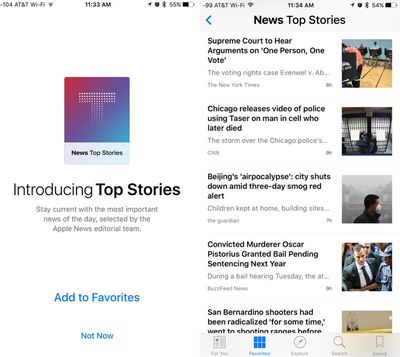
newstopstories
AT&T NumberSync - iOS 9.2 adds support for AT&T's NumberSync service, which is an expansion of Wi-Fi calling. As outlined in Apple's updated Wi-Fi calling support document, it is now possible for AT&T users to place Wi-Fi calls from their iPads, Apple Watches, and Macs (with OS X El Capitan) even when an iPhone is not nearby.

Continuity previously allowed a similar feature, but required an iPhone to be nearby as it used the phone's cellular connection. Similar advanced Wi-Fi calling features are also available to T-Mobile and Sprint users.

Apple Music - There are a lot of small tweaks to Apple Music to remove various pain points. When adding a song to a playlist, for example, it's now possible to create a new playlist instead of having to use an existing one, and playlists are ordered by most recent changes. There are also clearer indicators for which songs have been downloaded, and albums or playlists from iCloud Music Library can be downloaded by tapping the iCloud download button. The classical music catalog in Apple Music has been improved with works, composers, and performers.
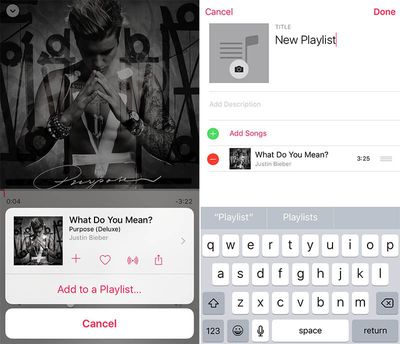
apple_music_ios9_2_playlists
Mail Drop - For the first time, Mail Drop can be used on iOS to send attachments up to 5GB in size. Mail Drop is a feature that was previously limited to the Mac version of the Mail app.

iBooks - iBooks includes support for 3D Touch, allowing users to peek and pop into pages from the table of contents, notes and bookmarks, or search results with force press gestures. iBooks also includes support for listening to an audiobook while browsing a library, reading other books, or viewing the iBooks Store.

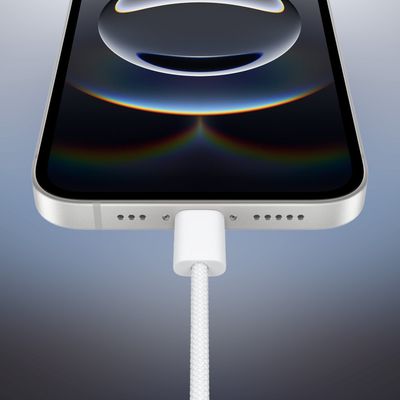
USB Camera Adapter - With iOS 9.2, iPhones are now able to support Apple's USB Camera Adapter and for importing pictures from a digital camera or DSLR. Previously, only iPads supported the USB Camera Adapter. The iPhone 5 and later appear to work with the USB Camera Adapter. The iPhone 4s with the iPad Camera Connection Kit and the iPod touch do not support it.

lightningusbadapter
Safari View Controller - The Safari View Controller, which is what allows a pop-up Safari window to be used within third-party apps, has been improved. In iOS 9.2, the Safari View Controller supports third-party Action Extensions, letting apps like 1Password be accessed in the Safari view of other apps like Tweetbot. There's also a new ability to long tap on the Reload button to load content without content blockers, support for the request desktop site function, and an edge swipe feature for dismissing the Safari window within apps.
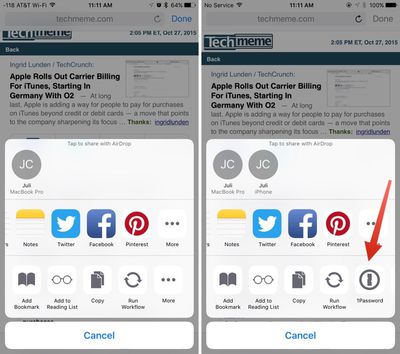
safariviewcontroller

In the Hipchat app for iOS, clicking a link brings up an in-app browser. In iOS 9.1, seen on the left, there's no option for third-party extensions. In iOS 9.2, seen on the right, there's support for third-party extensions like 1Password.​

Unresponsive iPad Pro Fix - Apple has updated its support document for unresponsive iPad Pros to indicate that iOS 9.2 or later may prevent the issue from continuing in the future.

We'll be updating this tidbits post should any new features in iOS 9.2 be discovered. Our dedicated iOS 9 forum is also a great place to get more details on the new update, as users are discussing all of the changes that have been discovered in iOS 9.2.

The new update is currently available to all users with an iPhone 4s or later and can be downloaded over-the-air by going to Settings --> General --> Software Update.
Tag: iOS 9.2
Related Forum: iOS 9

Popular Stories

iOS 26

iOS 26.4 Adds Two New Features to CarPlay

Tuesday March 24, 2026 1:55 pm PDT by
iOS 26.4 was released today, and it includes a couple of new features for CarPlay: an Ambient Music widget and support for voice-based chatbot apps. To update your iPhone 11 or newer to iOS 26.4, open the Settings app and tap on General → Software Update. CarPlay will automatically offer the new features so long as the iPhone connected to your vehicle is running iOS 26.4 or later....

Apple Business hero

Apple Unveils 'Apple Business' All-in-One Platform

Tuesday March 24, 2026 8:53 am PDT by
Apple today announced Apple Business, a new all-in-one platform that unifies device management, productivity tools, and customer outreach features. The service is designed to be a consolidated replacement for several of Apple's existing business-focused offerings, including Apple Business Essentials, Apple Business Manager, and Apple Business Connect. It provides organizations with a single...
AirPods Pro Firmware Feature

Apple Releases New Firmware for AirPods Pro 3, AirPods Pro 2 and AirPods 4

Tuesday March 24, 2026 12:31 pm PDT by
Apple today released new firmware for the AirPods Pro 2, AirPods Pro 3, and the AirPods 4. The firmware has a version number of 8B39, up from 8B34 on the AirPods Pro 3, 8B28 on the AirPods Pro 2, and 8B21 on the AirPods 4. There is no word on what's included in the firmware, but Apple has a support document with limited notes. Most updates are limited to bug fixes and performance...

Top Rated Comments

APlotdevice Avatar
134 months ago
USB Camera Adapter - With iOS 9.2, iPhones are now able to support Apple's USB Camera Adapter ('http://www.apple.com/shop/product/MD821AM/A/lightning-to-usb-camera-adapter') and related accessories ('http://www.apple.com/shop/product/MC531AM/A/apple-ipad-camera-connection-kit') for importing pictures from a digital camera or DSLR. Previously, only iPads supported the USB Camera Adapter. The iPhone 5 and later appear to work with the USB Camera Adapter/iPad Camera Connection Kit. The iPhone 4s ('https://twitter.com/stroughtonsmith/status/674306690049777664') and the iPod touch ('https://twitter.com/stroughtonsmith/status/674296044524601344') do not support it.
******* finally!
Score: 10 Votes (Like | Disagree)
ericg301 Avatar
134 months ago
I don't really like the idea of "Top Stories" as I feel it gives Apple a chance to editorialise a certain agenda, and given the politics that Tim Cook has been pushing...
yeah equality for all and privacy rights are so divisive.
Score: 6 Votes (Like | Disagree)
134 months ago
Some info on how to enable NumberSync (if necessary) would be nice.
Go to settings>general>about you will get a prompt to update carrier settings. Once you have completed this go to setting>phone>calls on other devices... You will see the option to enable in there.
Score: 6 Votes (Like | Disagree)
canny Avatar
134 months ago
I think the USB camera kit allowed the iPad to connect to MIDI devices - does this mean we can connect MIDI keyboards to our phones? And play them in GarageBand etc.
Score: 5 Votes (Like | Disagree)
gsmornot Avatar
134 months ago
I don't get this ATT extended wi-fi call. Could anyone explain this to me?
If you have an iPad and/or Apple Watch prior to this you could use continuity to make/receive calls through your iPhone using your devices. This worked similar to a bluetooth device like your car or a headset. Your phone, when close to you, would facilitate the call.

Numbersync on the other hand, uses the WiFi calling feature and your device ID's to complete calls over the AT&T network as if you were calling from your phone itself. With this feature on, you can leave your phone at home and with your iPad, connect to a WiFi network and make/receive phone calls as you could prior with continuity. An Apple Watch will do the same. The watch requires that you have connected to the network prior with your phone but it works. When I run, I only take my watch and headphones. I have places setup in my area that are known WiFi spots and now have the ability to make/receive calls with my watch while my phone is still at the house. Not often do you leave your phone but now if you do, you have a backup plan.
Score: 4 Votes (Like | Disagree)
Jimmy James Avatar
134 months ago
I've wanted camera support since the advent of the iPhone. Glad to see this is finally supported.
Score: 3 Votes (Like | Disagree)