Apple Introduces Revamped Two-Factor Authentication for iOS 9 and OS X El Capitan - MacRumors
Skip to Content

Apple Introduces Revamped Two-Factor Authentication for iOS 9 and OS X El Capitan

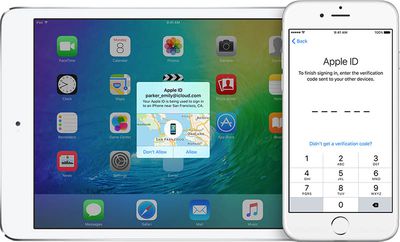
With the third betas of iOS 9 and OS X 10.11 El Capitan, Apple is introducing a revamped two-factor authentication system, according to both the beta release notes and a detailed support FAQ that outlines the changes.

The new two-factor authentication system is different from Apple's existing two-step verification system, using "different methods" to trust devices and deliver verification codes. Apple also says it includes a "more streamlined user experience."

Based on the support document, the new two-factor authentication system works similarly to the existing two-step verification system. Any device that you sign into using two-factor authentication in iOS 9 or El Capitan becomes a trusted device that can be used to verify identify when signing into other devices or services linked to an Apple ID.
appletwostepauth
Apple recommends that iOS 9 and OS X El Capitan beta testers using the new two-factor authentication system update all of their devices to iOS 9 or El Capitan for "the best experience." As outlined in the release notes, customers who use two-factor authentication with older devices may be required to put a six-digit verification code at the end of a password instead of using a dedicated verification field.

If you enable two-factor authentication, iTunes purchases on Mac and Windows will require you to append a 6-digit code to the end of your password on every purchase. The 6-digit code will automatically be sent to your iOS 9 or OS X El Capitan devices.

Older devices are also not able to receive two-factor authentication codes when used with devices running iOS 9 and El Capitan, but customers who stick with the older two-step verification system should not run into any issues as Apple tests the newer two-factor authentication system. Apple does not recommend that customers using two-step verification swap over to two-factor authentication until the feature is available to all.

First introduced in March of 2013, two-factor verification is an opt-in system that increases the security of Apple ID accounts. Since its debut, Apple has been working to expand two-factor authentication to cover several different services like iCloud, iMessage, and FaceTime.

It is not entirely clear what other changes the new two-factor authentication system brings to iOS and Mac devices, but the switch to a new system may allow Apple to further extend the functionality of two-factor authentication in the future.

Update: An Apple spokesperson told Macworld that the troublesome recovery key feature that has caused people to lose their Apple ID accounts in the past has been removed in the new two-factor authentication system.

With the existing two-step verification system, either a recovery key or a trusted device/trusted phone number is required to access an Apple ID account. If both should be lost, such as when a trusted device is stolen, an Apple ID is irretrievable.

With the new authentication system, Apple's customer support team will help users recover their Apple IDs through a recovery process should both trusted devices and phone numbers become inaccessible.

If you can't sign in, reset your password, or receive verification codes, you can regain access to your account by requesting account recovery. Simply provide a verified phone number where you can receive a text message or phone call regarding your account. Apple will review your case and contact you at the number provided when your Apple ID is ready for recovery. The automated message will direct you to iforgot.apple.com to complete the required steps and regain access to your account.

Account recovery will take a few days—or longer—depending on how much information you can provide to verify that you are the account owner. The process is designed to get you back into your account as quickly as possible while denying access to anyone who might be pretending to be you.

As noted by Apple, not all beta testers and developers will have access to the new two-factor authentication system right away, but Apple plans to add additional testers gradually as we get closer to the release of iOS 9 and OS X El Capitan.


Related Forums: iOS 9, OS X El Capitan

Popular Stories

Apple TV Sans Remote Feature

New Apple TV 4K Leaked

Friday September 25, 2026 8:16 am PDT by
MacRumors contributor Aaron Perris has uncovered an image file from Apple for an unreleased Apple TV 4K, suggesting that a new model will finally be released soon. The image is specifically for an "Apple TV 4K (4th generation)" model. Apple TV 4K (4th generation) image (on a gradient) The image reveals that the Apple TV will have the same external design as the current model, with all of its...


HomePod minis Apple TV and iPad mini Leak Feature

iPad Mini With A20 Pro, New HomePod Mini Colors, and New Apple TV 4K All Just Leaked

Friday September 25, 2026 8:18 am PDT by
The next iPad mini, HomePod mini, and Apple TV 4K models have all leaked, just a few weeks before the devices are expected to be announced. Specifically, MacRumors contributor Aaron Perris discovered a few of Apple's official images of the devices, confirming their existence and some new features that are planned. The most notable iPad mini details revealed in today's leak include an A20 Pro ...
HomePod minis on gradient feature 1 1

Exclusive: First Look at HomePod Mini 2 in Three New Colors

Friday September 25, 2026 8:17 am PDT by
Apple's new HomePod mini will share the same design as the original model and come in five colors, MacRumors has found. The information originates from Apple's own code (spotted by MacRumors contributor Aaron Perris) and shows clear product images of the new models in all of their colors. The above image contains Apple's own icons, which specifically refer to a "HomePod mini 2." The new...

Top Rated Comments

146 months ago
The fact that people are involved isn't what concerns me. What concerns me is that for this to work Aplle must retain the ability to access your account, meaning they can be obliged to access your account by the American government, and people hacking Apple can access your account too. This I bad news. Remember when Apple were promoting the fact that if the NSA asked for access to your account Apple were unable to comply even if they wanted to? Clearly this is no longer the case.
This, a thousand time this. Apple being able to provide access to your account means apple holds the master key to unlock your account. This is a blow to us who rely on Apple for privacy as it's allows open season access for the US Govt or clever social engineers.
Score: 8 Votes (Like | Disagree)
christarp Avatar
147 months ago
Good, app specific passwords, two factor authentication, etc as it is right now is just confusing as all hell. It took me like 30 minutes to sign into imessage on my mac because of the app specific password crap. It was a PITA to set up.
Score: 8 Votes (Like | Disagree)
mazz0 Avatar
147 months ago
Idiots!

Why are they involving humans in recovery process yet again???

Did they not learn from the infamous 2012 case???

Leave it 100% to machines!!

Humans can be easily manipulated.
The fact that people are involved isn't what concerns me. What concerns me is that for this to work Aplle must retain the ability to access your account, meaning they can be obliged to access your account by the American government, and people hacking Apple can access your account too. This I bad news. Remember when Apple were promoting the fact that if the NSA asked for access to your account Apple were unable to comply even if they wanted to? Clearly this is no longer the case.
Score: 7 Votes (Like | Disagree)
jclo Avatar
147 months ago
Hey Juli Clover,

Did you just post two different articles on macrumors.com that started with the same introduction?!

Recycling at its heights, journalism at its lows.
Those two posts were written simultaneously because they were interrelated and it was at a time when we were doing a million things at once. I didn't mean to word them exactly the same way though, so I apologize for that, and I've changed the beta post.

Sometimes when you write, you skip over whole words and phrases when you read it back to yourself and repetitive bits like that can go entirely under the radar. Sorry for the brain fart there.

By the way, if you see a typo or a title/phrase/word in a post that you have an issue with, you can email us and it'll get our attention faster. It sometimes it takes me awhile to get back to the comments on a post when it's busy. tips at macrumors.com or juli at macrumors.com.
Score: 3 Votes (Like | Disagree)
jkbuster Avatar
147 months ago
Apple still refuses to use my Google Voice # for authentication purposes. Not real enough for Apple, but I use it daily. Ah well.
I'm guessing they take advantage of email -> text addresses provided by phone carriers. Unfortunately, Google has not made this available for Voice. I'd use it in a ton of places as well.

As for having the ability to have them to let you back into your account in case you're locked out, I hope that isn't a requirement for everyone. As someone who operates rather securely, if I screw something up and lock myself out, I want that data to be completely inaccessible. I do not want Apple retaining a secondary backup key to access my information; only I should have the key. Though, not everyone is comfortable with the potential loss of data, which is why it should be an opt-in feature.
Score: 3 Votes (Like | Disagree)
Robert.Walter Avatar
147 months ago
Good, app specific passwords, two factor authentication, etc as it is right now is just confusing as all hell. It took me like 30 minutes to sign into imessage on my mac because of the app specific password crap. It was a PITA to set up.
Agree. I have to complete the App Specifice passwords things so often I wonder how I would recognize if they were bogus pfishing attempts.
Score: 3 Votes (Like | Disagree)
Latest Stories
Top Stories: Apple Leaks, Siri AI Settlement, and More
1 day ago
watchOS 27: 12 New Things To Check Out on Your Apple Watch
1 day ago
Banks and Credit Unions to Team Up Against Apple Pay Fees
2 days ago
Apple Finally Shares tvOS 27 Release Notes With List of New Features
2 days ago
Amazon's $199 Discount on Apple Watch Ultra 3 Returns to Help Clear Stock
2 days ago
MacRumors Giveaway: Win an Apple Watch Ultra 4 From Lululook
2 days ago
Apple Code Confirms iPad 12 Specs: A19, 8GB RAM, N1, C1X Modem
2 days ago
Some iPhone 18 Pro Max Users Experiencing AT&T Cellular Issues
2 days ago
Launch Week Deals Hit Latest Macs, Apple Watch Ultra 4, and Apple Accessories
2 days ago
The MacRumors Show: Tyler Stalman Talks iPhone 18 Pro's Camera
2 days ago
iPad Mini With A20 Pro, New HomePod Mini Colors, and New Apple TV 4K All Just Leaked
2 days ago
iPad Mini 8 Leaked: A20 Pro Chip, Landscape Camera, and More
2 days ago
Exclusive: First Look at HomePod Mini 2 in Three New Colors
2 days ago
New Apple TV 4K Leaked
2 days ago
Create a Custom Pass in the Wallet App on iPhone
2 days ago
How to Check Your Mac's Manufacture Date in macOS 27
2 days ago
What's Gone in macOS Golden Gate and What's Next in macOS 28
3 days ago
TestFlight App Gets New iOS 27 Features
3 days ago
Google Photos Wardrobe Feature Comes to iOS
3 days ago
Apple Music to Host Free Head Trip Festival Livestream
3 days ago
watchOS 27.2 Code Hints at iPhone-Style Screenshot Previews
3 days ago
Beats 360 Headphones Now Available in Apple Stores
3 days ago
Apple Shares New Video Promoting iOS 27 Parental Controls
3 days ago
Apple Has Announced 12 New Products in the Past Month
3 days ago
Apple Watch Ultra 2 vs. Ultra 4 Buyer's Guide: Should You Upgrade?
3 days ago
Here's When Apple TV is Airing Free 'Peanuts' Holiday Specials This Year
3 days ago
Square Announces Apple Business Integration
3 days ago
AirPods Pro 3 on Sale for $199 This Week on Amazon
3 days ago
Qualcomm Announces Renewed Agreement With Apple
3 days ago
Apple Confirms iPhone 18 Pro Bug Fix Update is Coming Next Week
3 days ago