IFTTT's 'Do Button' and 'Do Note' Coming to Apple Watch

After a bit of re-branding and the launch of a trio of new apps in Do Button, Do Note, and Do Camera, IFTTT today confirmed that two of those experiences - Do Button and Do Note - will be coming to the Apple Watch when the device arrives to customers beginning next week.

Coming as a client update that will bring Apple Watch support, like many other apps before it, the two task-management apps will allow users to run their favorite "Recipes" from the simplicity of their wrist. Envisioned as a simple "If this, then that" equation, Recipes require a "Channel" (an app) and a "Title" (a command) to be executed properly. So users can, in essence, create a Button to post a picture quickly to a Facebook album, or share it to Twitter followers.
iftt-apple-watch-1
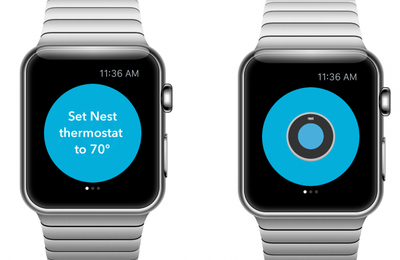
The advantage of having Recipes on the Apple Watch is interesting, as the Do Button specifically aims to introduce Apple Watch functionality to apps that haven't even confirmed first-party support for the wearable yet. Users will be able to control their Nest to a desired setting, or interact with a set of Hue Bulbs. Philips has confirmed a Hue Watch app is incoming, but has remained quiet on the actual launch window for the app.

While each interaction will be boiled down to basic on/off functionality thanks to Do Button - one can't go into Hue's deep color customization screen, for example - even the limited availability of such apps at the Watch's launch date is notable.

Available tomorrow, the IFTTT apps will give people the power to use the apps, services and devices they love, even if they don’t have Apple Watch functionality (everything from Gmail to Jawbone, Evernote, Nest and Facebook).

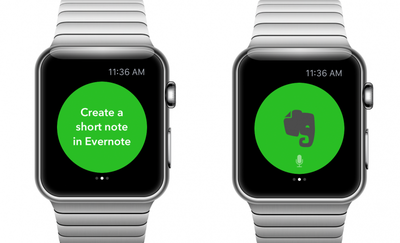
For example, use Do Button to turn your Nest thermostat to 70 degrees with a single tap, or to switch your lights on or off. With Do Note, simply dictate your request and tap to run your command – e.g. create a note in Evernote or quickly create an event in Google Calendar.

While Do Button lived mostly as an extraneous accessory to first-party apps on iPhone, the Apple Watch version has an advantage of being first out of the gate with a few of the most popular apps on the App Store. Do Note could be in the same boat, but with a focus on Evernote functionality right now - which has its own dictation-inspired note app launching for the Watch - it's yet to be seen if IFTTT's Do Note app will be as functional as Do Button on the Watch.
iftt-apple-watch-3
With the incoming update later today, all three IFTTT apps, including Do Camera, will be made available for iPad, as well. It will no doubt be interesting to see as time goes on the kinds of recipes users create, and IFTTT itself recommends, specifically due to the ease-of-use of the Apple Watch.

Do Button [Direct Link], Do Note [Direct Link], and Do Camera [Direct Link] can be downloaded from the App Store for free.
Related Roundup: Apple Watch 11
Buyer's Guide: Apple Watch (Neutral)

Popular Stories

maxresdefault

Apple Shows Off a Key Reason to Upgrade to the iPhone 17

Saturday February 7, 2026 9:26 am PST by
Apple today shared an ad that shows how the upgraded Center Stage front camera on the latest iPhones improves the process of taking a group selfie. "Watch how the new front facing camera on iPhone 17 Pro takes group selfies that automatically expand and rotate as more people come into frame," says Apple. While the ad is focused on the iPhone 17 Pro and iPhone 17 Pro Max, the regular iPhone...


apple wallet drivers license feature iPhone 15 pro

Apple Says These 7 U.S. States Plan to Offer iPhone Driver's Licenses

Monday February 9, 2026 6:24 am PST by
In select U.S. states, residents can add their driver's license or state ID to the Apple Wallet app on the iPhone and Apple Watch, and then use it to display proof of identity or age at select airports and businesses, and in select apps. The feature is currently available in 13 U.S. states and Puerto Rico, and it is expected to launch in at least seven more in the future. To set up the...
m5 macbook pro deal

Why You Shouldn't Buy the Next MacBook Pro

Tuesday February 10, 2026 4:27 pm PST by
Apple is planning to launch new MacBook Pro models as soon as early March, but if you can, this is one generation you should skip because there's something much better in the works. We're waiting on 14-inch and 16-inch MacBook Pro models with M5 Pro and M5 Max chips, with few changes other than the processor upgrade. There won't be any tweaks to the design or the display, but later this...
Apple Logo Zoomed

Apple Expected to Launch These 10+ Products Over the Coming Months

Tuesday February 10, 2026 6:33 am PST by
It has been a slow start to 2026 for Apple product launches, with only a new AirTag and a special Apple Watch band released so far. We are still waiting for MacBook Pro models with M5 Pro and M5 Max chips, the iPhone 17e, a lower-cost MacBook with an iPhone chip, long-rumored updates to the Apple TV and HomePod mini, and much more. Apple is expected to release/update the following products...
iOS 26

Apple Releases iOS 26.3 and iPadOS 26.3

Wednesday February 11, 2026 10:07 am PST by
Apple today released iOS 26.3 and iPadOS 26.3, the latest updates to the iOS 26 and iPadOS 26 operating systems that came out in September. The new software comes almost two months after Apple released iOS 26.2 and iPadOS 26.2. The new software can be downloaded on eligible iPhones and iPads over-the-air by going to Settings > General > Software Update. According to Apple's release notes, ...

Top Rated Comments

Locoboof Avatar
141 months ago
This is actually good to know. I'll use this for my nest thermostats and my garage door opener until they officially make one. Thank you!
Score: 1 Votes (Like | Disagree)