Wunderlist has provided a closer look at its Apple Watch companion app, which appeared on the App Store on Thursday ahead of the device's launch next month. The app is designed with a unique Home View that provides access to your most important items first, with four buttons that display a bird's eye view of your to-do lists, agenda and reminders on your wrist.
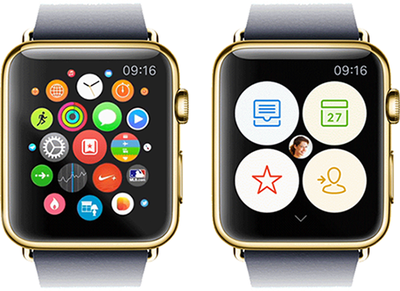
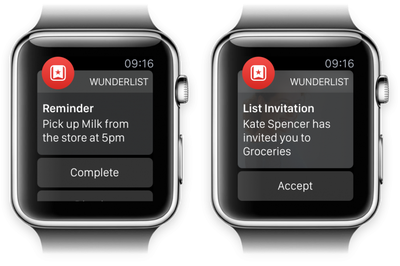
Wunderlist for Apple Watch delivers a hand-free experience in situations where you might normally use your iPhone, such as while shopping at a supermarket and checking items off your grocery list, or when using smart voice input to add to-dos for an upcoming meeting. The combination of Glances and real-time notifications ensure that you will stay up to date with important things during your day, be it during your morning commute, at the office or at home.
"As you move through the day, you won’t even have to open Wunderlist on your Watch to get stuff done. Just take a look at our Glance during breakfast to review your most important to-dos for the day. Thanks to Wunderlist’s real-time notifications, a subtle tap on your wrist will let you know what your colleagues are working on during your morning commute, and remind you to pick up the milk on your way home from work."
Wunderlist for Apple Watch features custom animations for interacting with the app, and its developers have carefully considered which font sizes, layouts and interactions would work best with limited screen real estate. The result is a design that was inspired by Wunderlist's brand-new colorful sidebar icons, with the majority of the user interface consisting of white text on a black background.
Ultimately, the developers behind Wunderlist for Apple Watch wanted to create software that gets out of your way, all the while providing multipurpose functionality for managing your day-to-day life. Apple Watch, and by extension the wrist, provides a more natural setting for to-do apps such as Wunderlist and Todoist, so it will be interesting to see how developers build upon these apps in the future.

Thursday December 11, 2025 8:49 am PST by Joe Rossignol
Apple seeded the second iOS 26.2 Release Candidate to developers earlier this week, meaning the update will be released to the general public very soon.
Apple confirmed iOS 26.2 would be released in December, but it did not provide a specific date. We expect the update to be released by early next week.
iOS 26.2 includes a handful of new features and changes on the iPhone, such as a new...
Friday December 12, 2025 10:56 am PST by Joe Rossignol
Macworld's Filipe Espósito today revealed a handful of features that Apple is allegedly planning for iOS 26.4, iOS 27, and even iOS 28.
The report said the features are referenced within the code for a leaked internal build of iOS 26 that is not meant to be seen by the public. However, it appears that Espósito and/or his sources managed to gain access to it, providing us with a sneak peek...
Friday December 12, 2025 10:10 am PST by Juli Clover
Apple today released iOS 26.2, the second major update to the iOS 26 operating system that came out in September, iOS 26.2 comes a little over a month after iOS 26.1 launched. iOS 26.2 is compatible with the iPhone 11 series and later, as well as the second-generation iPhone SE.
The new software can be downloaded on eligible iPhones over-the-air by going to Settings >...
Thursday December 11, 2025 11:28 am PST by Juli Clover
Apple today released new firmware designed for the AirPods Pro 3 and the prior-generation AirPods Pro 2. The AirPods Pro 3 firmware is 8B30, up from 8B25, while the AirPods Pro 2 firmware is 8B28, up from 8B21.
There's no word on what's include in the updated firmware, but the AirPods Pro 2 and AirPods Pro 3 are getting expanded support for Live Translation in the European Union in iOS...
Friday December 12, 2025 10:08 am PST by Juli Clover
Apple today released macOS Tahoe 26.2, the second major update to the macOS Tahoe operating system that came out in September. macOS Tahoe 26.2 comes five weeks after Apple released macOS Tahoe 26.1.
Mac users can download the macOS Tahoe update by using the Software Update section of System Settings.
macOS Tahoe 26.2 includes Edge Light, a feature that illuminates your face with soft...
Thursday December 11, 2025 10:31 am PST by Juli Clover
The AirTag 2 will include a handful of new features that will improve tracking capabilities, according to a new report from Macworld. The site says that it was able to access an internal build of iOS 26, which includes references to multiple unreleased products.
Here's what's supposedly coming:
An improved pairing process, though no details were provided. AirTag pairing is already...
Friday December 12, 2025 10:09 am PST by Juli Clover
Apple today released iPadOS 26.2, the second major update to the iPadOS 26 operating system released in September. iPadOS 26.2 comes a month after iPadOS 26.1.
The new software can be downloaded on eligible iPads over-the-air by going to Settings > General > Software Update.
iPadOS 26.2 continues with the multitasking improvements that were added with iPadOS 26.1. You can now drag and...
Friday December 12, 2025 3:55 am PST by Tim Hardwick
Foldable smartphone panel shipments are projected to jump 46% year-over-year in 2026, with Apple's entry into the market serving as the main catalyst, according to Counterpoint Research's latest Foldable-Rollable Display Shipment Tracker.
"Apple is the key driver as it starts to procure panels for its first foldable iPhone," said Counterpoint's Guillaume Chansin. The research firm expects...
Paper. Give your son the list and ask him to hold it. Ask him to name the stuff he sees. Let him smell the radishes, green onion and cilantro. Staring at your phone while your son is in the cart is why he's destroying stuff.
P
I agree! Even in the last few weeks its become apparent to me what a pain it is to try and hold my phone in one hand with the list, push a heavy cart with the other, and keep my son from destroying the aisles as we go. (Still working on the best approach for the last one.)
It would be nice to have a list go through on the watch, so I can just clear them as I go.
Are we going to get a separate front page post for every watch app that debuts? :confused: Wouldn't a sidebar "collection pot" be a better place to just FYI watch apps?