GBA4iOS Debuts 2.0 Update for Game Boy Emulator With iPad Support, Easy Installation - MacRumors
Skip to Content

GBA4iOS Debuts 2.0 Update for Game Boy Emulator With iPad Support, Easy Installation

GBA4iOS today introduced a 2.0 update for its popular Game Boy emulator for iOS, introducing a full iOS 7 redesign, iPad optimization, support for original and Game Boy Color games, and a built-in web browser for downloading ROMs.

More importantly, the software is now much easier to install, requiring neither a jailbroken device nor a work around to set the device clock to 2012. Prior to the 2.0 update, installing GBA4iOS without jailbreaking required an iPhone's date to be set to 2012. Though it doesn't require an initial date change, GBA4iOS 2.0 does carry a warning that the device clock may need to be set back to 2/19/14 if the app fails to open.
gba4ios
With GBA4iOS 2.0, gamers can play Game Boy Advanced, Game Boy Color, and original Gameboy ROMs directly on their iPads and iPhones, but the software is only compatible with devices running iOS 7. GBA4iOS 2.0 is distributed using an Apple Enterprise certificate, which are designed to allow companies to distribute iOS apps internally.

Downloading games for GBA4iOS previously required navigating outside of the app to find ROMs, but the newest version includes an in-app web browser that can be used to download games from any ROM website. GBA4iOS 2.0 also includes full support for cheats, accepting five different code formats covering everything from Game Genie to Action Replay.

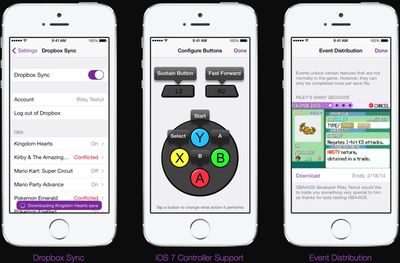
The GBA4iOS update includes an array of controller skins for Game Boy Advance and Game Boy Color games and it supports third party controller skins. It also offers full iOS 7 controller support, Dropbox integration, and "Event Distribution" to allow GBA4iOS unlock and distribute features that are not normally included within games.

While several emulators have snuck into the App Store via shell apps, they are always short-lived as Apple pulls the apps within hours or days of release. GBA4iOS is able to overcome Apple's restrictions as it is not installed via the App Store. Instead, GBA4iOS can be installed directly on an iOS device from the website, by tapping the download link on an iPad or iPhone.

Update: Apple has revoked the enterprise certificate that GBA4iOS used to install itself on iOS devices, which means installs now require setting a device date back to February 18, 2014 before downloading the software. After installation, the date on the device can be changed back to the present time.


Popular Stories

Four iPhone 18 Pro Colors Mock Feature

iPhone 18 Pro Launching in September With These 10 New Features

Monday April 20, 2026 7:13 am PDT by
While the iPhone 18 Pro and iPhone 18 Pro Max are not launching until September, there are already plenty of rumors about the devices. It was initially reported that the iPhone 18 Pro models would have fully under-screen Face ID, with only a front camera visible in the top-left corner of the screen. However, the latest rumors indicate that only one Face ID component will be moved under the...
Tim Cook Rainbow

Apple CEO Tim Cook Stepping Down, John Ternus Taking Over

Monday April 20, 2026 1:33 pm PDT by
Apple CEO Tim Cook is stepping down as Apple's chief executive officer, and hardware engineering chief John Ternus is set to take over, Apple announced today. Cook will continue on as Apple CEO through the summer, with Ternus set to join Apple's Board of Directors and take over as CEO on September 1, 2026. Cook is going to transition to executive chairman, and he will "assist with certain...
iphone 17 ceramic shield

Leaker: Apple Downgrading iPhone 18 to Cut Costs

Monday April 20, 2026 9:12 am PDT by
Apple is downgrading the planned specifications of the standard iPhone 18 to cut costs, a leaker claims. In a new post on Weibo, the user known as "Fixed Focus Digital" said that the iPhone 18 features "certain manufacturing downgrades" that bring it more into line with the low-cost iPhone 18e model. The decision is said to be "a cost-cutting measure." Apple has apparently chosen to...

Top Rated Comments

BaldiMac Avatar
159 months ago
Warez/Serials/Keys. Do not post software serial numbers or keys or refer people to specific websites, software, or techniques whose purpose is to break or bypass software licensing methods, distribute cracks, or obtain or use commercial software or media in violation of its license and/or for copyright violation. Do not ask for or give such help.

Why would this be posted in direct violation of forum rules?
Score: 16 Votes (Like | Disagree)
daijholt Avatar
159 months ago
I'm curious, how exactly does this get installed from the browser? Wouldn't that be a serious security issue?
Score: 9 Votes (Like | Disagree)
159 months ago
I downloaded it via the link in this article and successfully installed it. But everytime I try to open the app, it crashes immediately. I have an iPhone 5S running 7.0.4 (11B554a).

Doesn't work for me either. Won't even launch, it's stuck in a "installing" cycle over and over.
Score: 7 Votes (Like | Disagree)
keysofanxiety Avatar
159 months ago
MacRumours, thank you SO MUCH! Downloaded this as soon as I got the notification (cheers Mavericks!) and I'm playing FireRed as I speak.

EDIT: This is seriously ****ing sweet. Seriously, this works a charm and it's so easy to set up. Literally four taps and I'm playing this stuff. Just remember to be patient with the web browser, it does take a little time to load. :)
Score: 7 Votes (Like | Disagree)
BaldiMac Avatar
159 months ago
I have to agree, but since Nintendo doesn't offer their games on the App store where I can purchase them. I am left with other methods to play legacy games.

:D I think that falls under first world problems. Doesn't quite compare to the old "I need to feed my family" excuse.
Score: 5 Votes (Like | Disagree)
Parasprite Avatar
159 months ago
This seems safe.

Downloads anyway.
Score: 5 Votes (Like | Disagree)