

Developer Flying Meat has released an update to its popular Photoshop alternative Acorn, bringing it to version 4.0 and adding an improved user interface, speed upgrades, non-destructive filters, multiple layer selection and more.
acorn4
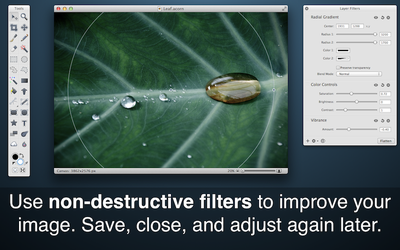
The developer claims that the new version of Acorn is "a lot faster than its predecessors" in a variety of ways, including applying filters and selections and working with large images. New features like non-destructive filters also improve workflow speed, allowing users to try filter combinations without overwriting the original image data.

Non-Destructive Filters

Layer styles and filters are now merged together into a happy new UI. Chain filters together to create endless combinations of unique effects knowing you can always change your mind later on.

Non-destructive filters aren't the only new part of Acorn, as the entire program has received a "new coat of paint" while the tools palette has been split off into its own window and a new filter HUD, called Merlin HUD, has been added, which will allow users to manipulate the radii and center points of their filters on the canvas.

Acorn 4, which debuted in 2007 with the goal of "simplicity", is available on Flying Meat's website for $29.99 until the end of May.


Top Rated Comments

I WAS the one Avatar
165 months ago
I'd be interested as well, as I too find Pixelmator is often frustratingly counter-intuitive-not to mention highly unstable.

Unstable? I've been using Pixelmator for a while and to this date Pixelmator works great. I gotbit running on an 2007 iMac 24 core 2 extreme with maxed ram.
Score: 2 Votes (Like | Disagree)
AdeFowler Avatar
165 months ago
A great looking app for the price and I wish the developers well, but until it has CMYK support it cannot be considered as a true Photoshop alternative. That’s not me being snobbish, it’s just a fact of life for a huge percentage of Photoshop users.
Score: 2 Votes (Like | Disagree)
CrickettGrrrl Avatar
165 months ago
Been there, tried that. I still have two filters, one of them displays completely garbled preview (so I cannot see the way the shadow is going to look like), the other does not display any preview at all. Without the preview, it is still better for me to make shadows the "duplicate-fill-blur" way. Maybe you know a working filter?

And I'm not bashing Pixelmator. Let's put it that way: using Pixelmator, I can still make that drop shadow effect by hand, although not as fast as in Photoshop. Using Acorn, I just cannot transform several layers simultaneously, and there seem to be no way around this, other than transforming each layer one by one.

You have to download Quartz Composer, use it to open the Quartz filters that are garbled or where preview doesn't work (I had something like 28 to change so I know the drill now :p) --then open the Parameters tab --then select the default Preview image icon and delete it. I spent Saturday afternoon doing this based on the instructions on the following link and all the filters that were buggy after the Cherry update are working again.
http://support.pixelmator.com/viewtopic.php?f=6&t=3429&start=50 (http://support.pixelmator.com/viewtopic.php?f=6&t=3429&start=50)
Score: 1 Votes (Like | Disagree)
I WAS the one Avatar
165 months ago
One click drop shadow. I'm purchasing right now.

Yes, I know how to make a shadow by hand, but honestly all this layer copying, blurring and copying again just to get a shadow in Pixelmator is quite annoying.

Shadows are easy with Pixelmator... It seems you just want to get results the Adobe way. Go search for Quark Filters and install them and you will see how easy to do shadows is with Pixelmator. Yes. The old filters works great. Please master an app before bashing it. I own Phostoshop, Pixelmator and Acorn. Al of them are great, Photoshop is expensive that's why Pixelmator is my next photo editing app, Acorn is cool but I return to Pixelmator everytime.

And about the crying on CMYK pixelmator also works with thar too. Is a basic feature now but it will be better on every update.
Score: 1 Votes (Like | Disagree)
Albright Avatar
165 months ago
I agree with Ade. Without CMYK (and control over total ink coverage), no program is an adequate substitute for Photoshop.
Okay, it won't work for you. I'm a web developer, so for me, CMYK images are a bug, not a feature - and Acorn works quite well for me as a Photoshop replacement. (On the other hand, I would love to see more support for indexed color images, but it's not a dealbreaker.)

Anyone know if there is a further discounted price for users of version 3-3.5?
The web site says the $30 price is "for everybody." I bought my copy through the App Store, which doesn't support upgrade discounts, so that might be a part of that. At any rate, I don't think $30 is unreasonable for a program like this if you do a fair bit of image editing and want something more Mac-friendly than GIMP.

What's the difference between this and Pixelmator? I've used the latter and found it even less intuitive than Photoshop for some tasks.
In my opinion, Acorn's interface is more sane. Pixelmator seemed to be unnecessarily flashy and hip. Acorn also has a "Web Export" feature which isn't quite as useful as Photoshop's "Save for Web" but is still better than just "Save As…". A lot of people swear by Pixlemator, though, and it is cheaper. Acorn has a demo available on their site, so you can give it a try

At any rate, I'm glad to see more support for layer styles and other non-destructive stuff. I think those things are very useful, and an area where Photoshop held a big lead for a long time. I haven't upgraded yet, but I will.
Score: 1 Votes (Like | Disagree)
saturnotaku Avatar
165 months ago
Anyone know if there is a further discounted price for users of version 3-3.5?
Score: 1 Votes (Like | Disagree)

Popular Stories

iOS 26

iOS 26.4 and iOS 27 Features Revealed in New Leak

Friday December 12, 2025 10:56 am PST by
Macworld's Filipe Espósito today revealed a handful of features that Apple is allegedly planning for iOS 26.4, iOS 27, and even iOS 28. The report said the features are referenced within the code for a leaked internal build of iOS 26 that is not meant to be seen by the public. However, it appears that Espósito and/or his sources managed to gain access to it, providing us with a sneak peek...
iOS 26

iOS 26.2 Coming Soon With These 8 New Features on Your iPhone

Thursday December 11, 2025 8:49 am PST by
Apple seeded the second iOS 26.2 Release Candidate to developers earlier this week, meaning the update will be released to the general public very soon. Apple confirmed iOS 26.2 would be released in December, but it did not provide a specific date. We expect the update to be released by early next week. iOS 26.2 includes a handful of new features and changes on the iPhone, such as a new...
iOS 26

Apple Releases iOS 26.2 With Alarms for Reminders, Lock Screen Changes, Enhanced Safety Alerts and More

Friday December 12, 2025 10:10 am PST by
Apple today released iOS 26.2, the second major update to the iOS 26 operating system that came out in September, iOS 26.2 comes a little over a month after iOS 26.1 launched. ‌iOS 26‌.2 is compatible with the ‌iPhone‌ 11 series and later, as well as the second-generation ‌iPhone‌ SE. The new software can be downloaded on eligible iPhones over-the-air by going to Settings >...
AirPods Pro Firmware Feature

Apple Releases New Firmware for AirPods Pro 2 and AirPods Pro 3

Thursday December 11, 2025 11:28 am PST by
Apple today released new firmware designed for the AirPods Pro 3 and the prior-generation AirPods Pro 2. The AirPods Pro 3 firmware is 8B30, up from 8B25, while the AirPods Pro 2 firmware is 8B28, up from 8B21. There's no word on what's include in the updated firmware, but the AirPods Pro 2 and AirPods Pro 3 are getting expanded support for Live Translation in the European Union in iOS...
macOS Tahoe 26 Thumb

Apple Releases macOS Tahoe 26.2 With Edge Light

Friday December 12, 2025 10:08 am PST by
Apple today released macOS Tahoe 26.2, the second major update to the macOS Tahoe operating system that came out in September. macOS Tahoe 26.2 comes five weeks after Apple released macOS Tahoe 26.1. Mac users can download the macOS Tahoe update by using the Software Update section of System Settings. macOS Tahoe 26.2 includes Edge Light, a feature that illuminates your face with soft...
AirTag 2 Mock Feature

Apple AirTag 2: Four New Features Found in iOS 26 Code

Thursday December 11, 2025 10:31 am PST by
The AirTag 2 will include a handful of new features that will improve tracking capabilities, according to a new report from Macworld. The site says that it was able to access an internal build of iOS 26, which includes references to multiple unreleased products. Here's what's supposedly coming: An improved pairing process, though no details were provided. AirTag pairing is already...
Apple Foldable Thumb

Leak Reveals Foldable iPhone Details

Monday December 15, 2025 9:09 am PST by
The first foldable iPhone will feature a series of design and hardware firsts for Apple, according to details shared by the Weibo leaker known as Digital Chat Station. According to a new post, via machine translation, Apple is developing what the leaker describes as a "wide foldable" device, a term used to refer to a horizontally oriented, book-style foldable with a large internal display....
ipados 26 1 slide over

Apple Releases iPadOS 26.2 With Multitasking Improvements

Friday December 12, 2025 10:09 am PST by
Apple today released iPadOS 26.2, the second major update to the iPadOS 26 operating system released in September. iPadOS 26.2 comes a month after iPadOS 26.1. The new software can be downloaded on eligible iPads over-the-air by going to Settings > General > Software Update. iPadOS 26.2 continues with the multitasking improvements that were added with iPadOS 26.1. You can now drag and...
















