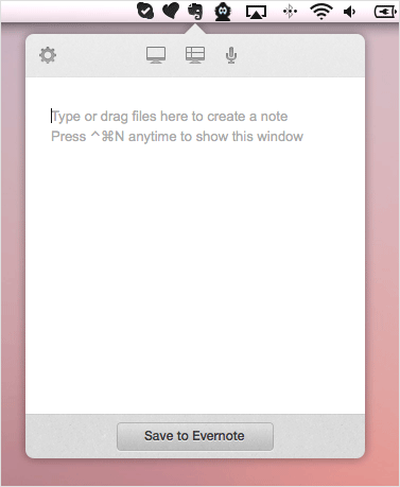
Evernote has upgraded its menulet item to enhance the workflow of its users who take notes frequently. Users can click the Evernote icon in their menubar from within any application and immediately begin typing a note, or can even drag files directly to the icon to upload them to the service.
Image

Use Quick Note to:

- Create a text note instantly. Pop it open with CTRL-CMD-N, type your note. CMD-Return to go back to what you were doing
- Add images and attachments by dragging the image up to the Evernote elephant icon
- Create an instant audio note and grab screenshots with the Helper options
- Have several things to clip to one note? Just keep opening the note with Helper and drop things in as you go

The update has not yet gone live on the App Store, but users can download the new version directly from Evernote's website.

Evernote is a free download from the Mac App Store. [Direct Link]

Top Rated Comments

zhenya Avatar
166 months ago
Surprise surprise...

My app, Rapid Note, does exactly that, but better as it allows you to use a global hotkey and very soon will have iCloud support and free, accompanying iOS app.

Maybe sometime someone will make a post about me :rolleyes:

If any one was interested, you can check it out here: Rapid Note (https://itunes.apple.com/us/app/rapid-note/id468548067)

---

Just noticed that it has also support for a hotkey. My bad.

So does your app also have full featured clients with a consistent UI on Windows, OSX, iOS, Android, Blackberry, Windows Phone, extensions for most every browser, not to mention full-featured editing from any web browser?

Thought so. :rolleyes:
Score: 2 Votes (Like | Disagree)
rhett7660 Avatar
166 months ago
Surprise surprise...

My app, Rapid Note, does exactly that, but better as it allows you to use a global hotkey and very soon will have iCloud support and free, accompanying iOS app.

Maybe sometime someone will make a post about me :rolleyes:

If any one was interested, you can check it out here: Rapid Note (https://itunes.apple.com/us/app/rapid-note/id468548067)

---

Just noticed that it has also support for a hotkey. My bad.

Yeah but your app costs money and you don't have an iOS app yet. :)

Evernote is free across the board.........

Hopefully your app gains some traction and is recognized here. But I doubt they are going to pay much credence to a snarky post.
Score: 1 Votes (Like | Disagree)
ArtOfWarfare Avatar
166 months ago
Surprise surprise...

My app, Rapid Note, does exactly that, but better as it allows you to use a global hotkey and very soon will have iCloud support and free, accompanying iOS app.

Maybe sometime someone will make a post about me :rolleyes:

If any one was interested, you can check it out here: Rapid Note (https://itunes.apple.com/us/app/rapid-note/id468548067)

---

Just noticed that it has also support for a hotkey. My bad.

I know that feel. MR prefers to only report on apps that most people already know about. I think at this point everyone who checks the MR forums ever knows about my app, but only because of how frequently I've plugged it for the last year.
Score: 1 Votes (Like | Disagree)

Popular Stories

iOS 26

15 New Things Your iPhone Can Do in iOS 26.2

Friday December 5, 2025 9:40 am PST by
Apple is about to release iOS 26.2, the second major point update for iPhones since iOS 26 was rolled out in September, and there are at least 15 notable changes and improvements worth checking out. We've rounded them up below. Apple is expected to roll out iOS 26.2 to compatible devices sometime between December 8 and December 16. When the update drops, you can check Apple's servers for the ...
Intel Inside iPhone Feature

Apple's Return to Intel Rumored to Extend to iPhone

Friday December 5, 2025 10:08 am PST by
Intel is expected to begin supplying some Mac and iPad chips in a few years, and the latest rumor claims the partnership might extend to the iPhone. In a research note with investment firm GF Securities this week, obtained by MacRumors, analyst Jeff Pu said he and his colleagues "now expect" Intel to reach a supply deal with Apple for at least some non-pro iPhone chips starting in 2028....
ios 18 to ios 26 upgrade

Apple Pushes iPhone Users Still on iOS 18 to Upgrade to iOS 26

Tuesday December 2, 2025 11:09 am PST by
Apple is encouraging iPhone users who are still running iOS 18 to upgrade to iOS 26 by making the iOS 26 software upgrade option more prominent. Since iOS 26 launched in September, it has been displayed as an optional upgrade at the bottom of the Software Update interface in the Settings app. iOS 18 has been the default operating system option, and users running iOS 18 have seen iOS 18...
iOS 26

Apple Seeds iOS 26.2 and iPadOS 26.2 Release Candidates to Developers and Public Beta Testers

Wednesday December 3, 2025 10:33 am PST by
Apple today seeded the release candidate versions of upcoming iOS 26.2 and iPadOS 26.2 updates to developers and public beta testers, with the software coming two weeks after Apple seeded the third betas. The release candidates represent the final versions of iOS 26.2 and iPadOS 26.2 that will be provided to the public if no further bugs are found during this final week of testing....
Photos App Icon Liquid Glass

John Gruber Shares Scathing Commentary About Apple's Departing Software Design Chief

Thursday December 4, 2025 9:30 am PST by
In a statement shared with Bloomberg on Wednesday, Apple confirmed that its software design chief Alan Dye will be leaving. Apple said Dye will be succeeded by Stephen Lemay, who has been a software designer at the company since 1999. Meta CEO Mark Zuckerberg announced that Dye will lead a new creative studio within the company's AR/VR division Reality Labs. On his blog Daring Fireball,...
iOS 26

When Will Apple Release iOS 26.2?

Monday December 1, 2025 4:37 pm PST by
We're getting closer to the launch of the final major iOS update of the year, with Apple set to release iOS 26.2 in December. We've had three betas so far and are expecting a fourth beta or a release candidate this week, so a launch could follow as soon as next week. Past Launch Dates Apple's past iOS x.2 updates from the last few years have all happened right around the middle of the...
maxresdefault

iPhone Fold: Launch, Pricing, and What to Expect From Apple's Foldable

Monday December 1, 2025 3:00 am PST by
Apple is expected to launch a new foldable iPhone next year, based on multiple rumors and credible sources. The long-awaited device has been rumored for years now, but signs increasingly suggest that 2026 could indeed be the year that Apple releases its first foldable device. Subscribe to the MacRumors YouTube channel for more videos. Below, we've collated an updated set of key details that ...
ive and altman

Jony Ive's OpenAI Device Barred From Using 'io' Name

Friday December 5, 2025 6:22 am PST by
A U.S. appeals court has upheld a temporary restraining order that prevents OpenAI and Jony Ive's new hardware venture from using the name "io" for products similar to those planned by AI audio startup iyO, Bloomberg Law reports. iyO sued OpenAI earlier this year after the latter announced its partnership with Ive's new firm, arguing that OpenAI's planned "io" branding was too close to its...
iphone air camera

iPhone Air's Resale Value Has Dropped Dramatically, Data Shows

Thursday December 4, 2025 5:27 am PST by
The iPhone Air has recorded the steepest early resale value drop of any iPhone model in years, with new data showing that several configurations have lost almost 50% of their value within ten weeks of launch. According to a ten-week analysis published by SellCell, Apple's latest lineup is showing a pronounced split in resale performance between the iPhone 17 models and the iPhone Air....
iPhone 17 Pro Cosmic Orange

iPhone 17 Pro Lost a Camera Feature Pro Models Have Had Since 2020

Thursday December 4, 2025 5:18 am PST by
iPhone 17 Pro models, it turns out, can't take photos in Night mode when Portrait mode is selected in the Camera app – a capability that's been available on Apple's Pro devices since the iPhone 12 Pro in 2020. If you're an iPhone 17 Pro or iPhone 17 Pro Max owner, try it for yourself: Open the Camera app with Photo selected in the carousel, then cover the rear lenses with your hand to...