

Fantastical, the excellent calendar app for the Mac, has finally been ported to the iPhone. The app has been totally redesigned for the smaller screen, rolling out a new feature called the 'DayTicker'
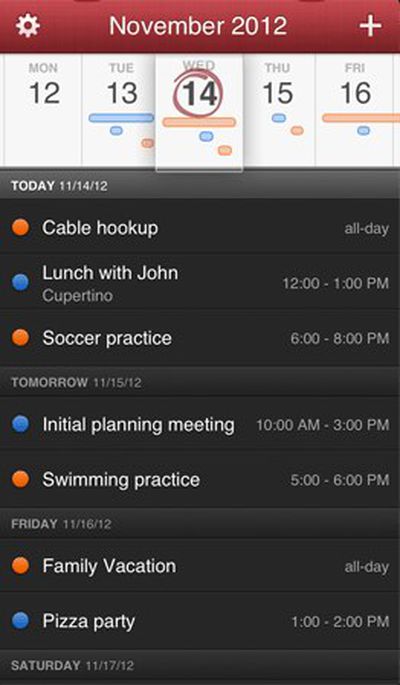
dayticker
The Verge and The Next Web both have extensive reviews of the new app. TNW's Matt Panzarino had this to say:

I’m not what you’d call a productivity guru. I don’t use any interesting methods or cool combinations of software to do what I do. My philosophy is more along the lines of ‘start doing and stop when you’re dead’.

That’s one of the reasons that I love Fantastical for the Mac so much. It’s a small icon that sits in my menu bar and allows me to quickly dash off appointments and reminders in plain english. It’s blazing fast and it helps me avoid all of the nit picky fields and tick boxes that infest calendar apps, including Apple’s poor built-in option. No fussing, no scripts, no precariously balanced suite of productivity apps that eat up half my day just maintaining.

Today, Fantastical comes to the iPhone bearing that same spirit of no-nonsense calendar management, but with an additional intuitive layer of greatness.

The app features the same natural language parsing engine as it does on the Mac, with the addition of a feature called the DayTicker. The DayTicker is at the heart of the reason Fantastical for iPhone has replaced Calendar for me. It’s a ribbon-shaped display of your current day and the surrounding days that makes it incredibly fast to see what you’ve got coming up at a glance.


Fantastical for Mac is available as a free trial download from the developer's site, or directly from the Mac App Store for the temporary sale price of $9.99. [Direct Link]

Fantastical for iPhone is available through the App Store for $1.99. [Direct Link]

Flexibits is also the company that we've hired to develop the MacRumors iOS app, currently in the works.


Top Rated Comments

JaySoul Avatar
169 months ago
I'd like it more if it accomplished my Things To Do without needing to involve me at all.
Score: 6 Votes (Like | Disagree)
dahauss Avatar
169 months ago
Well I purchased it today..I just dont see what is so special about it over the built in iPhone 5.1.1 Calendar App. it does evderything the built in app I already have does and nothing more. it doesnt show me the current date on the icon like the built in app does. I also cant turn the phone in landscape to scroll through the week view like I can on the built in app. Also it doesnt tie into SIRI ... Also other apps open the regular calendar anyway so this is useless as a replacement app...

Can someone tell me what makes this a better app then the built in one? I see lots of people raving about it but I just dont see the need.
Score: 3 Votes (Like | Disagree)
MsQueen Avatar
169 months ago
The Mac version is outrageously overpriced.
Score: 2 Votes (Like | Disagree)
shorn Avatar
169 months ago
The Mac app i superb, and from my initial play with it on iOS, it's just as good.
Native calendar app is now redundant!
Score: 2 Votes (Like | Disagree)
GIZBUG Avatar
169 months ago
Looks interesting. Already paid for and use Pocket Informant though....
Score: 1 Votes (Like | Disagree)
Pared Avatar
169 months ago
Why can't I copy/paste an event? Seems like its extremely difficult to do since no one has done it yet. Frustrating. It also can't avoid adding the default 30 mins before reminder that Google calendar does. The default calendar app does not do this.
Score: 1 Votes (Like | Disagree)

Popular Stories

2024 iPhone Boxes Feature

Apple Adjusts Trade-In Values for iPhones, iPads, Macs, and More

Thursday November 6, 2025 11:12 am PST by
Apple today updated its trade-in values for select iPhone, iPad, Mac, and Apple Watch models. Trade-ins can be completed on Apple's website, or at an Apple Store. The charts below provide an overview of Apple's current and previous trade-in values in the U.S., according to its website. Maximum values for most devices either decreased or saw no change, but the iPad Air received a slight bump. ...
Liquid Glass General Feature

Apple Shares Liquid Glass Design Gallery

Thursday November 6, 2025 2:45 pm PST by
Apple is promoting the new Liquid Glass design in iOS 26, showing off the ways that third-party developers are embracing the aesthetic in their apps. On its developer website, Apple is featuring a visual gallery that demonstrates how "teams of all sizes" are creating Liquid Glass experiences. The gallery features examples of Liquid Glass in apps for iPhone, iPad, Apple Watch, and Mac. Apple...
iOS 26

iOS 26.1 Available Now With These 8 New Features

Monday November 3, 2025 5:54 am PST by
Following more than a month of beta testing, Apple released iOS 26.1 on Monday, November 3. The update includes a handful of new features and changes, including the ability to adjust the look of Liquid Glass and more. Below, we outline iOS 26.1's key new features. Liquid Glass Toggle iOS 26.1 lets you choose your preferred look for Liquid Glass. In the Settings app, under Display...
airtag purple

Apple's Website Lists AirTag 4-Pack at Shockingly Low Price [Updated]

Friday November 7, 2025 6:40 am PST by
Apple's online store in the U.S. is suddenly offering a pack of four AirTags for just $29, which is the same price as a single AirTag. This is likely a pricing error, and it is unclear if orders will be fulfilled. Apple has not discounted the AirTag four-pack in any other countries that we checked. Delivery estimates are already pushing into late November to early December, suggesting...
Finder Siri Feature

Apple's New Siri Will Be Powered By Google Gemini

Wednesday November 5, 2025 11:57 am PST by
The smarter, more capable version of Siri that Apple is developing will be powered by Google Gemini, reports Bloomberg. Apple will pay Google approximately $1 billion per year for a 1.2 trillion parameter artificial intelligence model that was developed by Google. For context, parameters are a measure of how a model understands and responds to queries. More parameters generally means more...
apple watch se 3 always on

Apple to Remove iPhone-Apple Watch Wi-Fi Sync in EU With iOS 26.2

Thursday November 6, 2025 4:37 am PST by
Apple in iOS 26.2 will disable automatic Wi-Fi network syncing between iPhone and Apple Watch in the European Union to comply with the bloc's regulations, suggests a new report. Normally, when an iPhone connects to a new Wi-Fi network, it automatically shares the network credentials with the paired Apple Watch. This allows the watch to connect to the same network independently – for...
ikea smart home devices

IKEA Debuts 21 HomeKit-Compatible Smart Bulbs, Sensors, and Controls

Thursday November 6, 2025 4:08 pm PST by
IKEA today announced the upcoming launch of 21 new Matter-compatible smart home products that will be able to interface with HomeKit and the Apple Home app. There are sensors, lights, and control options, all of which will be reasonably priced. Some of the products are new, while some are updates to existing lines that IKEA previously offered. There are a series of new smart bulbs that are...
Home Hub Command Center with Dome Base Feature

Apple's 2026 Smart Home Revamp: All the Rumors

Wednesday November 5, 2025 3:54 pm PST by
It's been over a decade since Apple's HomeKit smart home platform launched, and it is overdue for an update. HomeKit and the Home app can no longer keep up with AI-powered solutions from other companies like Google and Amazon, but that's set to change with a smart home revamp that Apple has planned for 2026. Home Hub Apple is working on a home hub or "command center" that will serve as a...
apple tv logo physical

New Apple TV Intro Was Made With Practical Effects

Thursday November 6, 2025 7:02 am PST by
The all-new intro sequence for Apple TV was made with practical effects and shot in-camera, Ad Age reports. Rather than using digital techniques, the new sequence was made by shooting large glass versions of the Apple TV logo, with physical motion and changing lighting used to create effects. Apple partnered with TBWA\Media Arts Lab to create the intro. Ad Age released an exclusive look...














