

 Apple has updated its and Find My Friends with iOS 6 support and a few new features, including push notifications for locations.
Arstechnica digs deeper into the new features of the app, which includes a revamped interface and the ability to send texts to friends from within the app. They also note one particularly notable new feature: push notifications for friend locations:
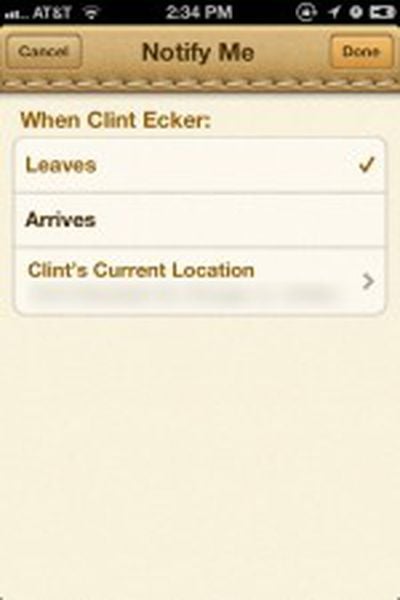
But the most significant new feature—and the one that will undoubtedly cause at least a bit of controversy—is the ability to set notifications for when your iOS-using friends arrive or leave a certain location. You can set this notification by viewing a specific friend's location and then tapping the "Notify Me" button on the top right. This brings you to a screen that allows you to decide whether you want to be notified when that person is coming or going, and with which address to associate the notification.
Arstechnica notes that you can disable permissions from friends but it disables the Find My Friends functionality completely for that individual, not just automated notifications.
Find My Friends is a free download on the App Store [Direct Link].




















Top Rated Comments
what i'm hoping is that i'll soon be able to say things like "Siri, please remind me to talk to Joe about the car show next weekend when i see him." resulting in my phone giving me a notification with context next time our phones are detected as in the same location... THAT would be the best development ever for this app.
That will be key; same as you I want to let my wife know I left the company and second when close to home. But only Mon to Fri between 6pm an 8pm.
On weekends not needed.
I personally love this feature for letting friends and family know when I've left home for a trip or arrived at my final destination without needing to notify them all, especially when it's very late. It also lets my partner know when I've left work and am on my way home for dinner. While I can see it's not a feature for everyone, the per-person basis means you only share this info with the people you want to. If it can be coupled with an expiration date, like location sharing already can be (I believe this was demoed in the iPhone 4S keynote), it could be a great way to allow for such notifications only for specific times.
What do you think?
I was going on what I had read about it being single use notifications, but hadn't explored it personally. I was waiting a day or two on upgrading her phone in case I had problems with the upgrade.
This is pretty much exactly what we have wanted it for, except I also travel for work, so notifying my wife when I arrive or leave some of my client locations would help my wife know when I might get home without me having to constantly send text messages.
That's the case.
However, if you click on the "Me" tab, you can setup leave/arrive notifications to send to anyone's email. It will warn you if they don't have iOS simply to say that they may not be able to share locations with you.