Apple Releases Apple TV Software Version 5.0 with Updated Interface - MacRumors
Skip to Content

Apple Releases Apple TV Software Version 5.0 with Updated Interface

Following today's introduction of the new 1080p Apple TV with an updated user interface, Apple has now pushed the 5.0 software update to existing Apple TV set-top boxes.
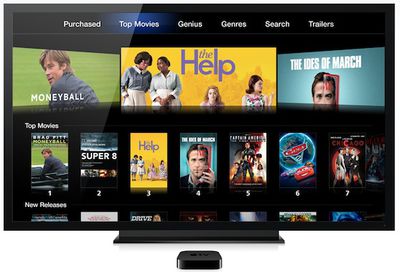
apple tv 2012 movies
While the update obviously doesn't add 1080p support to the older boxes, it does bring the new icon-based user interface and other enhancements such as support for direct Netflix billing to their iTunes Store accounts.

Related Roundup: Apple TV
Buyer's Guide: Apple TV (Don't Buy)

Popular Stories

tvOS 27 Feature

Apple Seeds tvOS 27 Beta 4 to Developers

Monday July 20, 2026 10:01 am PDT by
Apple today seeded the fourth beta of tvOS 27 to developers for testing purposes, with the update coming two weeks after Apple released the third beta. The beta can be downloaded and installed through the Settings app on the Apple TV. A free developer account is required. tvOS 27 has few new features compared to the other 27 software updates, but it does add a redesigned Podcasts app,...

General visionOS watchOS and tvOS Betas Feature Redux

Apple Seeds watchOS 26.6, tvOS 26.6 and visionOS 26.6 Release Candidates

Monday July 20, 2026 10:00 am PDT by
Apple today provided developers with the release candidate versions of upcoming watchOS 26.6, tvOS 26.6, and visionOS 26.6 betas for testing purposes. The software comes a week after Apple seeded the fifth betas. The RCs are the final version of the software that will be released to the public as long as no bugs are found during this final testing period. The software updates are available...

watchos 27

tvOS 27 and watchOS 27 Second Public Betas Now Available

Wednesday July 22, 2026 10:38 am PDT by
Apple today released the second public betas of tvOS 27 and watchOS 27, giving Apple TV and Apple Watch users a chance to try the new software ahead of its fall launch. There's also a new HomePod Software 27 beta for the HomePod and HomePod mini. You can sign up for Apple's public beta testing program on the beta website, and then download the updates through the Settings app on each device. ...

Top Rated Comments

189 months ago
Looks to me like Apple are finally preparing for an ATV app store... The new look essentially separates all the distinct sections into app icons and there is an awful lot of space when you shift the screen down... I recon (well, mostly hope lol!) that an ATV app store will be part of developer seeds by the WWDC in a few months... Fingers crossed!
Score: 12 Votes (Like | Disagree)
nagromme Avatar
189 months ago
Yet another example of Apple bringing new features to old devices—an example which, as always, will be forgotten in time for the next nonsensical round of “Apple always wants to force you to upgrade by withholding XYZ feature for no reason!” :p (As though that’s been the trend... and as though Apple would truly want to damage their core reason for success—user experience—in trade for “forcing” some small fraction of people to upgrade a product.)
Score: 9 Votes (Like | Disagree)
189 months ago
Niccccccccccccccce!

I have no need for 1080p on my 720p TV, and I'm not upgrading until Apple makes a TV. ;)
Score: 8 Votes (Like | Disagree)
M-O Avatar
189 months ago
personally, I liked the old look.

I wish I could rearrange the icons and hide the ones I never use... I'd like Netflix to be on the top row, and the sports icons to disappear.
I have found that long pressing the home button puts it to sleep. I don't know if this is a new feature, or one I just never came across before.
Score: 7 Votes (Like | Disagree)
189 months ago
From the screen shots it looks like the music menu has returned :D

That was the only reason I didnt replace my atv1


So can you now select music from an iTunes library without having to push it to the atv using AirPlay?

Well you held out for the wrong reason then. You never had to use Airplay. The second generation Apple TV puts music, movies, tv shows, photos, iTunes U, podcasts, and any other content that's in your iTunes library under "Computers" and it is shared to the Apple TV using the Home Sharing feature.

Airplay is an option but it has never been required to get your music in your iTunes Library on the Apple TV. Also, the Music icon is for iTunes Match which is another way to get your music. The main benefit with iTunes Match on the Apple TV, you don't need an iOS device or a computer running iTunes.
Score: 5 Votes (Like | Disagree)
189 months ago
Looks to me like Apple are finally preparing for an ATV app store... The new look essentially separates all the distinct sections into app icons and there is an awful lot of space when you shift the screen down... I recon (well, mostly hope lol!) that an ATV app store will be part of developer seeds by the WWDC in a few months... Fingers crossed!

Agreed. Definitely a step closer to custom ATV apps.
Score: 5 Votes (Like | Disagree)













































