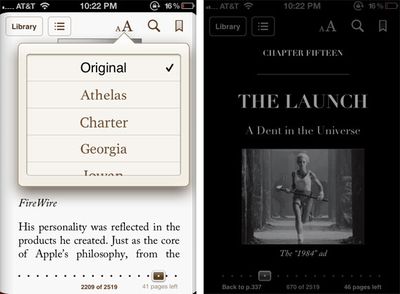
Apple released a version 1.5 update to their iBooks iOS app that provides a number of new features to the ebook application:
iBooks 1.5 adds the following new features as well as some stability and performance improvements:
- Nighttime reading theme makes reading books in the dark easier on the eyes. - Full-screen layout lets you focus on the words without distraction. - iBooks now features an improved selection of fonts, including Athelas, Charter, Iowan, and Seravek. - Beautiful new classic covers for public domain books. - Support for pop-up footnotes, included in select iBookstore titles. - A redesigned annotation palette makes it easier to choose a color for your highlighted text.
iBooks is a universal app that supports iPhone, iPod Touch and iPad. [App Store]
Sunday September 13, 2026 3:00 am PDT by Eric Slivka
Update 10:04 a.m.: iOS 27 is rolling out now, though it may take a bit for all users to see it, so keep checking!
Apple is about to release iOS 27, which will finally deliver more advanced Siri AI capabilities as well as a variety of other refinements, improvements, and new features to iPhones. It's Apple's biggest software update of the year, and Apple announced at Wednesday's iPhone event...
Monday September 14, 2026 9:00 am PDT by Joe Rossignol
Update: Apple has released iOS 27.
During its iPhone 18 Pro and iPhone Duo event last week, Apple announced that iOS 27 will be released widely on Monday, September 14.
iOS 27 should be available around 10 a.m. Pacific Time / 1 p.m. Eastern Time today via the Settings app, under General → Software Update.
Below, we have highlighted eight new features and changes coming with iOS...
Saturday September 12, 2026 3:27 pm PDT by Joe Rossignol
As noted by Nicolas Lellouche, who writes for the French tech website Numerama, Apple has updated its tech specs pages for the iPhone 18 Pro and iPhone 18 Pro Max to clarify which models are equipped with its new C2 cellular modem and where.
Apple now says the iPhone 18 Pro has a C2 modem worldwide, while the iPhone 18 Pro Max uses the chip in every country except for the U.S.
According...
A good update, the night mode was one reason iBooks sucked in comparison to the others, though I'll be sticking with the Kindle app.
The Kindle version looks much the same, only it does away with the header and footer at top and bottom and the text goes to the edge of the screen. For an iPad it wouldn't be much of an issue and I'm sure iBooks would be fine, but for an iPod/Phone you want all the screen real-estate for text you can.