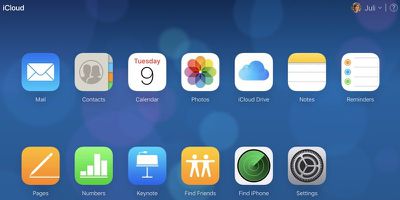
Apple has little known iCloud tools that are designed to let you recover files that have been deleted from ‌iCloud‌, as well as recover Contacts, Calendars, and Reminders that have been lost.

Lost ‌iCloud‌ data isn't a situation that comes up often, but these tools were introduced following an iCloud Drive bug in 2015 that caused some users to lose documents stored in ‌iCloud Drive‌, prompting the creation of the tool.

icloudsettings

Accessing Your Files on iCloud.com

  1. Visit the iCloud.com website on your web browser of choice.
  2. Enter your Apple ID, password, and two-factor authentication code if the feature is enabled.
  3. Once logged in, click on the "Settings" app in the main ‌iCloud‌ menu.
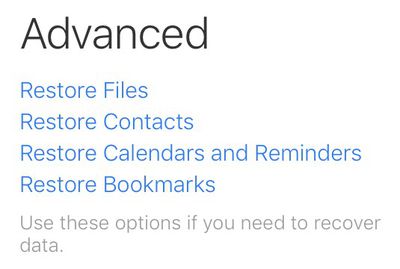
  4. Scroll down to the bottom of the page until you reach the "Advanced" section. icloudrestoreoptions
  5. Click on the content that you need to restore. Options include files stored in ‌iCloud Drive‌, a list of contacts, your Calendars and Reminders, or your Bookmarks.
Restoring Files

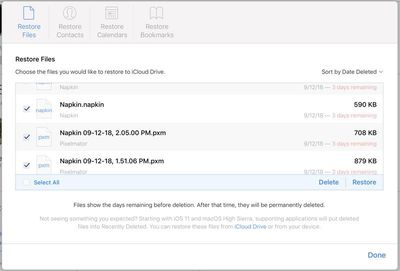
Using the "Restore Files" option on iCloud.com brings up a list of all files that have been deleted over the past 30 days. It includes files from apps that support ‌iCloud Drive‌, such as Pixelmator, Napkin, and Byword.

You can select a single file to restore or multiple files, should there have been a catastrophic event that caused ‌iCloud Drive‌ to be wiped entirely. Check the box to make a selection and click "Restore File." Using the file restoration tool returns the file in question to ‌iCloud Drive‌ in its original parent folder, much like undeleting a photo on iOS.
icloudfilerestore
Deleted ‌iCloud Drive‌ files remain available in ‌iCloud‌ for 30 days before being permanently deleted, at which point they become unrecoverable. As a side note, you cannot do a manual permanent deletion with ‌iCloud Drive‌ files as you can do with Photos on iOS - they're sticking around for the full 30 days.

Restoring Contacts, Calendars, and Reminders

Apple regularly archives a list of Contacts, which can be restored to an iOS device at any time. Restoring a list of contacts from the archive will replace the contacts on all iOS devices connected to your ‌iCloud‌ account, while archiving the current list of contacts to ensure nothing is lost. Contacts can't be restored one by one -- this is an all or nothing batch operation.
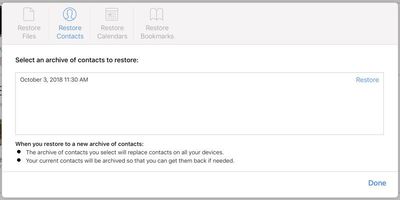
icloudcontactsrestore
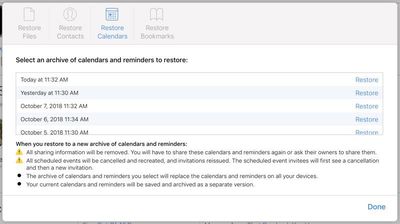
Restoring Calendars and Reminders works like restoring Contacts. Apple frequently creates a backup for the two apps, capturing snapshots for more than a month. Any of these archives can be used to replace a current Calendar or Reminder list, replacing the existing information on all connected iOS devices.
icloudrestorecalendars
Restoring a Calendar will remove all sharing information, so Calendars and Reminders shared with friends and family will need to be shared again. All scheduled events will also be cancelled and recreated, reissuing all invitations for events.

Restoring Bookmarks

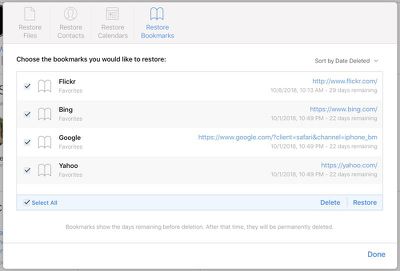
Along with Contacts and Calendars, Apple backs up the bookmarks that you have removed from your Bookmarks list in Safari on a regular basis.
icloudrestorebookmarks
To restore them, simply choose the deleted bookmarks you would like to put back in place and then choose the "Restore" option.

Conclusion

Most users probably won't need to delve into the Advanced settings that will restore content like this, but it's nice to have a backup should something disastrous occur. It's also useful because it enables people to restore key information to a new iPhone or iPad without having to work from a full backup.

‌iCloud‌ settings are also handy for immediately signing out of all browsers that are signed into ‌iCloud‌ should you suspect someone has gained unauthorized access to your account and for managing apps that let people look you up using your ‌Apple ID‌. It also displays all devices you're signed into, offers up a look at available storage, and displays the members of your Family Sharing group.


Tag: iCloud

Top Rated Comments

LisaBonet Avatar
137 months ago
Call me a cynic but, ‘Apple quietly introduced tools to recover deleted files ('http://goo.gl/6Ttibf') from iCloud’, suggests to me that they are never really deleted.
Now if this were google, the Fanboys would be up in arms about how Evil Google are storing your data to monetize it.
They just like a same way.
Score: 4 Votes (Like | Disagree)
137 months ago
How about they allow us to restore messages
iMessages aren't stored on a server once they've been delivered, so that would be impossible.
Score: 4 Votes (Like | Disagree)
DeathBecomesMe Avatar
137 months ago
How about they allow us to restore messages
Score: 3 Votes (Like | Disagree)
boston04and07 Avatar
132 months ago
It would be very convenient, but I don't think Apple will ever do it due to privacy concerns.


100% sure, the only way I could think that happened is you were previously signed into iMessage on that device and never signed out, so it thought the messages hadn't been delivered yet.
How are messages any more private than, say, emails, calendar data, stuff people keep in iCloud Drive - heck, even photos? My photos are (to me) way more private than simple old text messages. So is my calendar. But Apple already gives us the option to store that stuff in the cloud if we want. I'd like the same option for my messages. Always having access to them would be very much worth it to me.
Score: 1 Votes (Like | Disagree)
137 months ago
Are you sure? I've had past conversations appear on brand new devices after I've set them up and restored with iCloud.
You restored a backup which includes Messages.
Score: 1 Votes (Like | Disagree)

Popular Stories

iphone 16 apple intelligence

Apple Aiming to Release 'Breakthrough' New iPhone Accessory

Wednesday February 18, 2026 12:43 pm PST by
Apple is looking for a "breakthrough" with its push into wearable AI devices, including an "AirTag-sized pendant," according to Bloomberg's Mark Gurman. In a report this week, he said the pendant is reminiscent of the failed Humane AI Pin, but it would be an iPhone accessory rather than a standalone product. The pendant would feature an "always-on" camera and a microphone for Siri voice...
Apple Watch 15 Tips Every Owner Needs to Know Feature

Apple Watch: 15 Tips Every Owner Needs to Know

Thursday February 19, 2026 7:38 am PST by
Apple Watch is now eleven generations in, and packed with useful features that are easy to miss at first glance. To help you get more out of your new device, we've rounded up 15 practical tips you might not have discovered yet, including a few that long-time users often overlook. Bounce Between Two Apps On your Apple Watch, double-press the Digital Crown to see a deck of all currently...
Dynamic Island iPhone 18 Pro Feature

10 Reasons to Wait for Apple's iPhone 18 Pro

Wednesday February 18, 2026 5:12 am PST by
Apple's iPhone development roadmap runs several years into the future and the company is continually working with suppliers on several successive iPhone models at the same time, which is why we often get rumored features months ahead of launch. The iPhone 18 series is no different, and we already have a good idea of what to expect for the iPhone 18 Pro and iPhone 18 Pro Max. One thing worth...
iphone 17 pro green

iPhone 17 Pro Max Curiously Becomes Most Traded-In Smartphone

Wednesday February 18, 2026 9:13 am PST by
New trade-in data indicates that Apple's iPhone 17 Pro Max has rapidly become the single most traded-in smartphone. According to a new report from SellCell, Apple's latest flagship iPhone has quickly risen to the top of the independent trade-in market, accounting for 11.5% of all devices appearing in the top-20 trade-in rankings just months after release. The analysis is based on SellCell...
Multicolored Low Cost A18 Pro MacBook Feature

Low-Cost MacBook Expected on March 4 in These Colors

Wednesday February 18, 2026 5:42 am PST by
Apple will announce its rumored low-cost MacBook at its event on March 4, with the device coming in a selection of bold color options, according to a known leaker. Earlier this week, Apple announced a "special Apple Experience" for the media in New York, London, and Shanghai, taking place on March 4, 2026 at 9:00am ET. Posting on Weibo, the leaker known as "Instant Digital" said that the...