
Researchers Discover Flaw in Signal's Disappearing Messages Related to Mac Notification Center - MacRumors
Skip to Content

Researchers Discover Flaw in Signal's Disappearing Messages Related to Mac Notification Center

by

signal app icon 3Signal's Mac app displays recently received messages in the Notification Center on macOS, and this feature could compromise a user's disappearing private messages, as discovered by security researcher Alec Muffett and reported by Motherboard.

One of Signal's main advantages is its ability to send disappearing messages, so that after a predetermined amount of time the message is deleted from the app.

Muffett pointed out on Twitter this week that Signal's default Mac app settings somewhat defy this security measure due to the way Macs handle notifications. So, even if you send a self-destructing message within the Signal app, the messages remain on the recipient's Mac Notification Center, displaying your name and message details. Muffett was running macOS 10.13.4 and Signal version 1.9.0.
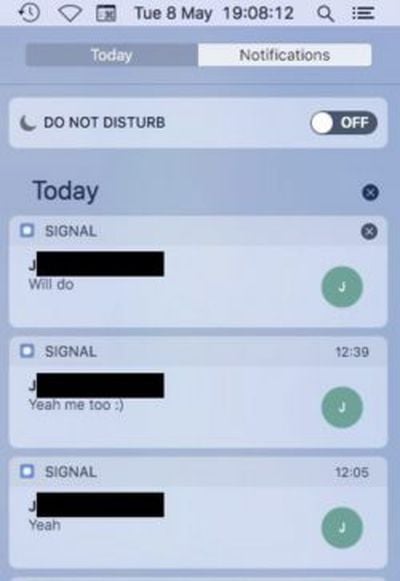
signal app notifications

Mac security researcher Patrick Wardle then investigated the issue further, discovering that the "deleted" Signal messages that remain in the Notification Center are saved on the Mac's disk inside the operating system. While this is true of any app that displays notifications, it's particularly troublesome for Signal users in need of high-level security, like government workers or journalists.

Any malicious third parties would still need to get their hands on your Mac to get into your message history, so as Motherboard pointed out, "this is not a major threat for most people." Still, this could be a major security risk for high-level Signal users, since this means that any disappearing messages that popped up in Notification Center can be recovered later, "even after they are gone within the Signal app."

Wardle summed up his findings:

In short, anything that gets displayed as a notification (yes, including 'disappearing' Signal messages) in the macOS Notification Center, is recorded by the OS.

If the application wants the item to be removed from the Notification Center, it must ensure that the alert is dismissed by the user or programmatically! However, it is not clear that this also 'expunges' the notifications (and the their contents) from the notification database...i'm guessing not! If this is the case, Signal may have to avoid generating notifications (containing the message body) for disappearing messages...

Wardle said that Signal's iOS app does not appear to have a similar issue at this time, although the app "should be investigated." Of course, any Signal Mac user who is worried about potential privacy risks can navigate to Signal's Preferences menu on the top-left corner of the screen when the app is open, click Notifications, and "Disable notifications."


Tag: Signal

Top Rated Comments

109 months ago
Lol, right. I wouldn’t trust any of these supposedly secure messaging systems. Just because they haven’t discovered an exploit yet, doesn’t mean its not there and being exploited. Turning off features to patch of security holes after they’ve been made public isn’t going to do you much good at all.
Feel free to check the source code yourself then if you doubt it.
Score: 4 Votes (Like | Disagree)
109 months ago
In short: Disable this feature, problem solved.
Score: 3 Votes (Like | Disagree)
109 months ago
99.999% of the time, no point whatsoever.

Either the content is not worth encoding or it is being monitored by people more sophisticated in breaking the cypher than you are at encoding it. The "one time pad" is still the only unbreakable encryption method but, since it relies upon distributing multiple copies of the pad (to the sender and recipient(s)), it isn't secure either.
Well, sounds like there isn't a point to locks either since someone somewhere can certainly pick whatever one you might use.
Score: 1 Votes (Like | Disagree)
109 months ago
I find it hilarious that someone can have the capacity and understanding of macOS to create a macOS app but somehow still doesn't understand that notifications are stored infinitely in Notification Center until the user manually clears them out. Hilarious but also annoying. Please Apple can we please please stop with the paper trails? I will never stop clearing (force quitting) my recent iOS apps and obsessively clearing Notification Center. They should auto-clear out after about an hour in my opinion. I don't care about the wallpaper I downloaded, decided I didn't like, and deleted a month ago. What is the point in showing me a notification from a month ago?

Edit: If you disable the notifications for an app they're just hidden but if you re-enable them in Sys Prefs all the old notifications come back. They don't go anywhere. How great is that :) :) :) :) :) :) :)
Score: 1 Votes (Like | Disagree)
Kaibelf Avatar
109 months ago
Honestly if you are getting a message that is compromising you likely don’t want t popping up as a banner on a larger screen than necessary anyway.
Score: 1 Votes (Like | Disagree)
twistedpixel8 Avatar
109 months ago
This is ridiculous. You need to assume that anything you send to someone has been read and potentially recorded. These "disappearing messages" are misleading and anyone who takes them for temporary is simply naive.
Score: 1 Votes (Like | Disagree)

Popular Stories

Apple iCloud Plus expansion hero

iCloud+ Now Includes Apple TV, Apple Arcade, and Curated Apple Music Stations in Over 100 Countries

Tuesday September 15, 2026 1:43 am PDT by
Apple today announced a new subscription initiative that turns paid iCloud+ subscriptions into a broader services bundle in more than 100 countries. In select countries, Apple says every paid iCloud+ plan, including the cheapest 50GB tier, now includes Apple TV and Apple Arcade "at no additional cost," while family sharing extends the storage, TV and Arcade access to up to five people....
Everything New Your iPhone Can Do on iOS 27 Feature 1

50 New Things Your iPhone Can Do in iOS 27 - Out Now!

Monday September 14, 2026 10:48 pm PDT by
Apple released iOS 27 this week, and despite the company's focus this year on refining its flagship operating system and nixing bugs, there are still many additional features to explore, not least of which is Apple's new context-aware Siri, re-tooled for the generative AI era. Which iPhones Support Every iOS 27 Feature? This year's major iPhone software update isn't all about AI, though,...
iOS 27 Icon iPhone

iOS 27 Available Now With These 8 New Features

Monday September 14, 2026 9:00 am PDT by
Update — 10 a.m. Pacific Time: Apple has released iOS 27. During its iPhone 18 Pro and iPhone Duo event last week, Apple announced that iOS 27 will be released widely on Monday, September 14. iOS 27 should be available around 10 a.m. Pacific Time / 1 p.m. Eastern Time today via the Settings app, under General → Software Update. Below, we have highlighted eight new features and...