

Dropbox has said it needs to do a "better job" of communicating its OS X integration, after claims emerged online that its Mac app was phishing for user passwords and even "hacks" the operating system on installation.
Developers of the cloud storage service were forced to reply to accusations which appeared on Hacker News that the client app was a security risk and "couldn't be trusted", because of the way it takes control of system features without asking for permission to do so.
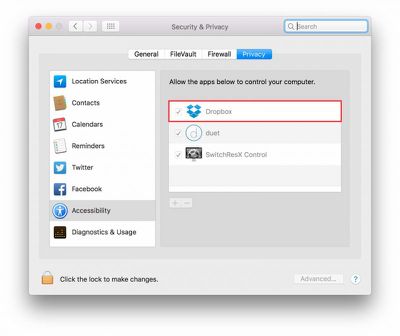
Concerns were raised after it was demonstrated that Dropbox appears in the Security & Privacy tab for Accessibility, despite the fact that users are never prompted to grant access to the features.
Let’s assume for the sake of argument that Dropbox never does any evil on your computer. It remains the fact that the Dropbox process has that ability. And that means, if Dropbox itself has a bug in it, it’s possible an attacker could take control of your computer by hijacking flaws in Dropbox’s code. Of course, that’s entirely theoretical, but all security risks are until someone exploits them. The essence of good computer security and indeed the very reason why OSX has these kinds of safeguards in place to begin with is that apps should not have permissions greater than those that they need to do their job.
Responding to the accusations, Dropbox said it only asks for the permissions it needs and uses the Accessibility features for certain app integrations like Office, although the permissions aren't as "granular" as the company would like.
Dropbox, like other apps, requires additional permissions to enable certain features and integrations. The operating system on a user's device may ask them to input their password to confirm. Dropbox never sees or receives these passwords. Reports of Dropbox spoofing interfaces, or capturing system passwords are absolutely false. We realize that we can do a better job communicating how these permissions are used, and we're working on improving this.
Dropbox said it was working with Apple to reduce its dependence on elevated access in macOS Sierra, and will respect when people disable Dropbox's Accessibility permissions. In the meantime, Hacker News wants the firm to more explicitly outline why it needs the permissions it does.
The latest news comes at a sensitive time for the cloud storage outfit. Two weeks ago, it was revealed that over 68 million Dropbox accounts were implicated in a hack that took place in 2012.
Due to a password hack connected to other websites, hackers were able to sign in to "a small number" of Dropbox accounts, said the company, including an employee's who had access to a document listing an array of user email addresses. But when Dropbox announced a preventative password reset measure, it made no mention of the extent of the users touched by the four-year-old hack.
Earlier this year, Dropbox was also forced to defend a feature called Project Infinite, which allows users to access all of the content in their account as if it is stored on their own machine, regardless of how small their hard disk is. The feature requires kernel-level access to computers in order to function, which critics suggested could leave it open to serious vulnerabilities.
Update: Dropbox has contacted MacRumors to reiterate that it "categorically denies" its Mac client phishes for user passwords or "hacks" the operating system on installation, but agreed that "we need to do more to be more transparent and make it clearer why we need access permission to a Mac OS". The company also added that the account information stolen in 2012 was hashed and salted, meaning it is unlikely hackers were able to obtain many of the users' actual passwords.





















Top Rated Comments
That dialogue is 100% genuine (called from Apple API's). You can customize the text that appears ("blabla for Dropbox to work correctly") using older C-API's that are still fully allowed. It is not a "custom Dropbox popup that can see your password".
This has been called out numerous times but unfortunately news articles can't keep up and that blog doesn't seem to want to edit the post (I'm guessing they're getting peak traffic from this story).
--------------------------------
EDIT: Here is the actual API's to achieve this: https://developer.apple.com/library/mac/documentation/Security/Reference/authorization_ref/#//apple_ref/c/func/AuthorizationCopyRights
Parameter: environment
"Data used when authorizing or preauthorizing rights. Not used in OS X v10.2 and earlier. In OS X v10.3 and later, you can pass icon or prompt data to be used in the authentication dialog box"
Take a look at the attached images.
[doublepost=1473677349][/doublepost]No dude, there's no confusion here.
The problems are as follows:
1. Dropbox spoofs OSX's permissions dialog.
2. Dropbox enables special permissions on behalf of the user instead of letting OSX enabling permissions on behalf of its user (lol, see first point to understand why).
3. In order to be able to do point 2, Dropbox uses hacking tactics like modifying a system's database to force the OS to enable permissions (sudo, anyone? Point 1 again)
4. If an user tries to disable the unknowingly self-given permissions, magic happens! the agent re-enables itself!
That's PURE EVIL coming from Dropbox!
LE:
About UI Spoofing on OSX: http://www.symantec.com/connect/blogs/mac-os-x-dialog-box-spoofing-believe-me-i-m-system-preferences
LE2:
For people trying to prove that Dropbox isn't spoofing the permissions dialog, there's one more thing that might not be so obvious: how come Dropbox is able to insert its identifier in the Privacy Database?
As far as I know, this is only possible if it has the same access privileges as an Administrator or Super User.
So what I'm saying is that in my opinion, Dropbox really does cache the password and uses it to gain access to root and this thing goes all the way back to number one: in order to cache the password, they must have access to it right? So in order to get the password they spoof the permissions dialog.
The only confusion here stems from people without knowledge of these API's drawing conclusions like "they are using fake popups because the message is not like the standard popup!11!" in their efforts to find more "incriminating stuff" about Dropbox's practices.
As for their practices in general I personally think they are designed from a UX perspective - enter password once and be done with setup and not the "conspiracy-steal-password-control-your-computer-malware" FUD that is being spread right now.
This is straight from the documentation:
Parameter: environment
Data used when authorizing or preauthorizing rights. Not used in OS X v10.2 and earlier. In OS X v10.3 and later, you can pass icon or prompt data to be used in the authentication dialog box.
This is what Dropbox is using.