Wikipedia yesterday released a major update to its iOS app, offering an all-new interface and several new features designed to enhance content discovery.

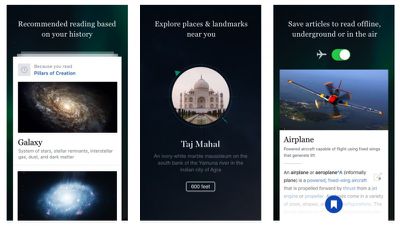
Wikipedia Mobile 5.0 brings several optimizations to devices running iOS 9, featuring Spotlight Search integration, Handoff support, and 3D Touch enhancements for iPhone 6s and iPhone 6 Plus users.
Wikipedia Mobile
Previous updates to the app added features like offline access and mobile editing, but with the latest version Wikipedia has changed tack by aiming to make navigation simpler and developing an interface that's more focused on personalization and tailored content.

The Explore feed now populates based on previous interests, local surroundings, and featured articles and images, with support for navigating using a wider range of multi-touch gestures.

3D Touch support has also been extended to the Wikipedia icon, with Quick Actions like "Random article" and "Nearby articles" accessible from the home screen.

Wikipedia Mobile for iPhone and iPad is a free download from the App Store. [Direct Link]

Top Rated Comments

130 months ago
wonder how annoying it's going to be when they ask for money again.
Score: 3 Votes (Like | Disagree)
SBlue1 Avatar
130 months ago
There is an app for Wikipedia? Why should I use it instead of the website?
Score: 3 Votes (Like | Disagree)
130 months ago
There is an app for Wikipedia? Why should I use it instead of the website?
See it as a way to deal with too many open tabs in Safari (particularly on the iPhone) and a quicker way to get to Wikipedia. With Safari, one would start with:
[LIST=1]
* Tap the Safari icon, then
* Tap the tabs icon (possibly first activate the bottom bar), then
* Tap the + icon, then
* Tap the Wikipedia favourite icon (if one has Wikipedia as one of the first 20 favourite icons)

With a separate Wikipedia app this reduces to one step:
[LIST=1]
* Tap the Wikipedia icon
Score: 2 Votes (Like | Disagree)
l00pback Avatar
130 months ago
There is an app for Wikipedia? Why should I use it instead of the website?
Nobody is saying you should. It's personal preference. Try it out, see for yourself if you like it better than using the website. One advantage the app offers that the website doesn't is the ability to locally save articles to read later. Whether or not that's important to you, well, that's up to you.
Score: 1 Votes (Like | Disagree)
Evan Davis Avatar
130 months ago
Clicking a Wikipedia link in Safari now opens the app
Score: 1 Votes (Like | Disagree)
Jessica Lares Avatar
130 months ago
There's nothing wrong with the website. The benefit of using a client for me is having the list of things I've looked at in the past that is more visual (and lets me save stuff for later so I don't have to pile it with other stuff in my Reading List). That might not be valuable for someone that doesn't use Wikipedia constantly though.

Saying that, I've played with it for 30 minutes now and don't like it in comparison to Curiosity/Inquire (Heard about Viki, but too late now). They waste a lot of space with the cropped images, and most of the pages they're recommending to me aren't relevant at all. IMO, the Saved tab would be better if it was more like the History one too. But that's why we have choice.
Score: 1 Votes (Like | Disagree)

Popular Stories

maxresdefault

Apple Shows Off a Key Reason to Upgrade to the iPhone 17

Saturday February 7, 2026 9:26 am PST by
Apple today shared an ad that shows how the upgraded Center Stage front camera on the latest iPhones improves the process of taking a group selfie. "Watch how the new front facing camera on iPhone 17 Pro takes group selfies that automatically expand and rotate as more people come into frame," says Apple. While the ad is focused on the iPhone 17 Pro and iPhone 17 Pro Max, the regular iPhone...
m5 macbook pro deal

Why You Shouldn't Buy the Next MacBook Pro

Tuesday February 10, 2026 4:27 pm PST by
Apple is planning to launch new MacBook Pro models as soon as early March, but if you can, this is one generation you should skip because there's something much better in the works. We're waiting on 14-inch and 16-inch MacBook Pro models with M5 Pro and M5 Max chips, with few changes other than the processor upgrade. There won't be any tweaks to the design or the display, but later this...
apple wallet drivers license feature iPhone 15 pro

Apple Says These 7 U.S. States Plan to Offer iPhone Driver's Licenses

Monday February 9, 2026 6:24 am PST by
In select U.S. states, residents can add their driver's license or state ID to the Apple Wallet app on the iPhone and Apple Watch, and then use it to display proof of identity or age at select airports and businesses, and in select apps. The feature is currently available in 13 U.S. states and Puerto Rico, and it is expected to launch in at least seven more in the future. To set up the...
iOS 26

Apple Releases iOS 26.3 and iPadOS 26.3

Wednesday February 11, 2026 10:07 am PST by
Apple today released iOS 26.3 and iPadOS 26.3, the latest updates to the iOS 26 and iPadOS 26 operating systems that came out in September. The new software comes almost two months after Apple released iOS 26.2 and iPadOS 26.2. The new software can be downloaded on eligible iPhones and iPads over-the-air by going to Settings > General > Software Update. According to Apple's release notes, ...
Apple Logo Zoomed

Apple Expected to Launch These 10+ Products Over the Coming Months

Tuesday February 10, 2026 6:33 am PST by
It has been a slow start to 2026 for Apple product launches, with only a new AirTag and a special Apple Watch band released so far. We are still waiting for MacBook Pro models with M5 Pro and M5 Max chips, the iPhone 17e, a lower-cost MacBook with an iPhone chip, long-rumored updates to the Apple TV and HomePod mini, and much more. Apple is expected to release/update the following products...