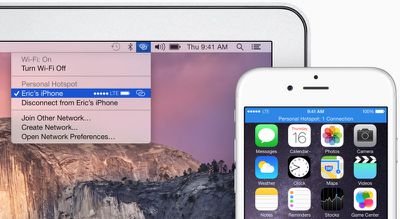
With OS X Yosemite, Apple has included a number of Continuity features that improve the integration between iOS and Mac devices. OS X Yosemite includes a feature called Instant Hotspot which allows users to more easily use their iPhone's wireless cellular data connection from their Mac or iPad.
instanthotspot
With Instant Hotspot, there is no longer a need to enter a password to connect as security is handled through a common iCloud account. An iPhone can even be in sleep mode and allow your Mac to initiate Instant Hotspot, with no additional settings needing to be enabled aside from Wi-Fi and Bluetooth.

Before you Start

You need iOS 8.1 and OS X Yosemite in order to use Instant Hotspot. You also need to ensure that your data plan with your wireless carrier allows for internet hotspot capabilities. In the United States, AT&T, Verizon, and T-Mobile, allow phones to be used as hotspots with select data plans. Sprint offers mobile hotspot capabilities with a monthly add-on plan.

Also, make sure both your Mac and iPhone are logged into the same iCloud account, and check that your Mac supports Instant Hotspot. This can be done by clicking the  symbol in the top left-hand side of the Menu bar, navigating to About This Mac, clicking on System Report and clicking on the Bluetooth listing. You should see information about whether your system is compatible with Instant Hotspot and Handoff.

instanthotspot1
After you ensure that you have a compatible Mac and data plan, follow the instructions below to turn on Instant Hotspot:

Steps

1. Turn on Wi-Fi on your iPhone (Settings -> Wi-Fi) and Mac (Menu Bar -> wifi -> Turn Wi-Fi On.

2. Turn on Bluetooth on your iPhone (Settings -> Bluetooth) and Mac (Menu Bar -> Apple -> System Preferences -> Bluetooth -> Turn Bluetooth On).
wifi
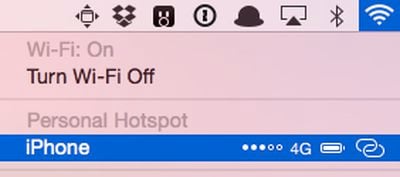
3. On your Mac, click the Wi-Fi symbol wifi in the menu bar. A new "Personal Hotspot" heading now appears near the top, and will be followed by the name of your iPhone. On the right side of your iPhone's name, signal strength, network type, and available battery life are displayed. Click on your device's name to begin using it as an Instant Hotspot for your Mac.

personalhotspot5
4. You may now begin using the Internet on your Mac with your iPhone acting as an Instant Hotspot. On the Mac, the Instant Hotspot connection between both devices is represented by a special icon that shows a link over the traditional Wi-Fi symbol. On the iPhone, the connection is represented by a blinking blue bar that shows that a Personal Hotspot is active.

When a tethered Mac or iPad switches to a Wi-Fi connection or is no longer connected to an iPhone, Instant Hotspot automatically turns off. This feature is designed to save battery on the iPhone, because tethering can use a significant amount of battery life.

Troubleshooting

While we had few issues with Instant Hotspot, several members of our forum have had more inconsistent results. Several people have had to try logging out and back into iCloud on their devices, turning Wi-Fi off and then back on, or even rebooting their devices. These steps may help if you are having trouble turning using Instant Hotspot.

Related Forums: iOS 8, OS X Yosemite

Top Rated Comments

148 months ago
how to run out of cellular bandwidth on a mac with OS X Yosemite
Score: 8 Votes (Like | Disagree)
148 months ago
I think a necessary step is missing from this guide.

On iPhone: Settings > Personal Hotspot > On

No.
Score: 6 Votes (Like | Disagree)
148 months ago
I dont understand why cover the name of the phone and network?
Because it's my real name (ok part of) and my real nickname. :o Kind of personal.
Score: 5 Votes (Like | Disagree)
148 months ago
Well this is just stupid and pointless if I have to pay extra just to use this feature with my carrier. If it eats up my bandwidth, so be it because that is my decision, but it should not cost extra to use it.
Score: 5 Votes (Like | Disagree)
148 months ago
It works as reliably as al the Handoff features, which is, not at all - probably 30% of the time.

I've seen it appear. It doesn't appear right now though.

I'll usually get Handoff working between iPhone and Macbook and not the other way around. Then i'll reboot the Macbook and it'll work from Macbook to iPhone and not the other round.

It's one of the buggiest features Apple has have made...a theme of the times lately unfortunately.

When's the Yosemite update coming?
I agree, I was pulling my hair out trying to get this to work consistently last night. At first my mac found the iPhone hotspot and tethered with no problems. Then I tried with my iPad and it would find the hotspot but not connect. Then it wouldn't find it at all. Then the mac couldn't connect to it anymore either, but still find it. Then the iPad could connect but the mac still couldn't. Tried resetting all 3 devices and resetting network settings. It just doesn't work consistently.

The big irony is of course that it was supposed to replace the old hotspot method and make it less clunckly and more streamlined, yet it's done the exact opposite, for me anyway.
Score: 2 Votes (Like | Disagree)
PowerBook-G5 Avatar
148 months ago
not live in sovjet USA where you get shafted by the cell carriers...

seriously, needing to pay the carrier to allow hot spots is something totally unheard of in europe...

Welcome to 'Merica, the land of liberals, infinite taxes, and idiocracy. If I have a 4GB data plan, then I should not have to pay extra to use it for a hotspot.


EDIT: After trying what was stated in the above article, I got it to work when trying the "Troubleshooting" tips. I first connected to the same WiFi network, turned on Bluetooth, then I signed out of iCloud on both my iPhone and my MBP. Then I restarted each device, and then signed back into iCloud and it "just work[ed]." If you click on the WiFi icon in the menu bar and don't see it at first, wait a few seconds and it will appear (If everything else is done correctly).

Score: 2 Votes (Like | Disagree)

Popular Stories

iphone 16 apple intelligence

Apple Aiming to Release 'Breakthrough' New iPhone Accessory

Wednesday February 18, 2026 12:43 pm PST by
Apple is looking for a "breakthrough" with its push into wearable AI devices, including an "AirTag-sized pendant," according to Bloomberg's Mark Gurman. In a report this week, he said the pendant is reminiscent of the failed Humane AI Pin, but it would be an iPhone accessory rather than a standalone product. The pendant would feature an "always-on" camera and a microphone for Siri voice...
Apple Watch 15 Tips Every Owner Needs to Know Feature

Apple Watch: 15 Tips Every Owner Needs to Know

Thursday February 19, 2026 7:38 am PST by
Apple Watch is now eleven generations in, and packed with useful features that are easy to miss at first glance. To help you get more out of your new device, we've rounded up 15 practical tips you might not have discovered yet, including a few that long-time users often overlook. Bounce Between Two Apps On your Apple Watch, double-press the Digital Crown to see a deck of all currently...
Dynamic Island iPhone 18 Pro Feature

10 Reasons to Wait for Apple's iPhone 18 Pro

Wednesday February 18, 2026 5:12 am PST by
Apple's iPhone development roadmap runs several years into the future and the company is continually working with suppliers on several successive iPhone models at the same time, which is why we often get rumored features months ahead of launch. The iPhone 18 series is no different, and we already have a good idea of what to expect for the iPhone 18 Pro and iPhone 18 Pro Max. One thing worth...
iphone 17 pro green

iPhone 17 Pro Max Curiously Becomes Most Traded-In Smartphone

Wednesday February 18, 2026 9:13 am PST by
New trade-in data indicates that Apple's iPhone 17 Pro Max has rapidly become the single most traded-in smartphone. According to a new report from SellCell, Apple's latest flagship iPhone has quickly risen to the top of the independent trade-in market, accounting for 11.5% of all devices appearing in the top-20 trade-in rankings just months after release. The analysis is based on SellCell...
Multicolored Low Cost A18 Pro MacBook Feature

Low-Cost MacBook Expected on March 4 in These Colors

Wednesday February 18, 2026 5:42 am PST by
Apple will announce its rumored low-cost MacBook at its event on March 4, with the device coming in a selection of bold color options, according to a known leaker. Earlier this week, Apple announced a "special Apple Experience" for the media in New York, London, and Shanghai, taking place on March 4, 2026 at 9:00am ET. Posting on Weibo, the leaker known as "Instant Digital" said that the...