

iOS 8, released to the public today, includes an API that allows developers to create system-wide third-party keyboards for the first time, which will let users select from a range of different keyboards with unique functions.
We've rounded up a list of the best third-party keyboards currently available to you find the keyboard best suited to you. Some of these keyboards are in the App Store now, while others will begin rolling out today following the launch of iOS 8.
SwiftKey (Free) [Direct Link] - SwiftKey is a gesture-based keyboard that allows users to type by dragging their fingers from key to key. Along with offering predictive suggestions, SwiftKey integrates with SwiftKey Cloud to let a user's preferences be backed up and synced across all devices.
Swype ($0.99) [Direct Link]- Like SwiftKey, Swype is a gesture-based keyboard that allows users to drag their fingers from key to key in order to create words. Swype's built-in predictive text engine determines what was being typed, and it offers predictive punctuation to speed up typing. Swype also includes several different themes for custom looks. SwiftKey and Swype are fairly similar, and Re/code has done a review comparing and contrasting them.
Minuum ($1.99) [Direct Link] - Minuum is a resizable keyboard that can be shrunken down (via swipe gestures) to allow more of the screen to be seen. Minuum also takes advantage of a robust autocorrect feature that automatically corrects spelling as words are typed and offers word suggestions.
Fleksy ($1.99) [Direct Link] - Fleksy is known as the fastest keyboard in the world. It incorporates advanced autocorrection features to interpret what's typed (which improves over time) and it uses swipe gestures to make it easy for users to delete, add punctuation, spaces, and select alternate autocorrect suggestions. It also includes support for emoji and offers a resizable keyboard.
TouchPal (Free) [Direct Link] - TouchPal is another keyboard that lets users drag a finger over letters in quick succession to spell words, suggesting different choices based on input. TouchPal also offers a design that's similar to the standard keyboard, but it incorporates quick access buttons to allow for easy insertion of punctuation and special characters.
TextExpander ($4.99) [Direct Link] - Built into an update of the existing TextExpander app, the TextExpander keyboard allows users to type in short abbreviations, which are then spelled out fully. For example, tyvm might become thank you very much.
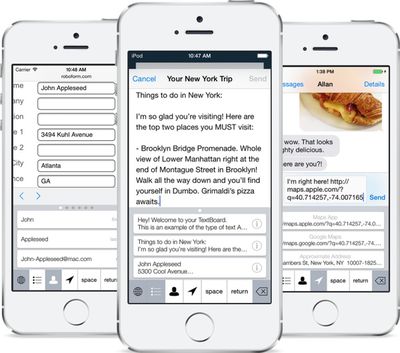
KuaiBoard ($1.99) [Direct Link] - Formerly known as QuickBoard, KuaiBoard is not a traditional keyboard. It's designed to let users insert chunks of frequently typed text like signatures, address information, billing information, and more. As outlined in our full hands-on post, KuaiBoard lets users create blocks of text that can then be inserted anywhere. It also has a feature that automatically detects a user's location, allowing it to be typed into a text message or email.
Keymoji (Free) [Direct Link] - Keymoji is an emoji keyboard that converts text into emojis as it is typed. Users can use Keymoji to insert an emoji into a sentence quickly or replace text entirely with emoji symbols. For example, if a phrase like "cookie monster" is typed, Keymoji will give users the option to replace the text with a cookie emoji next to a monster emoji. "Toilet paper" becomes a toilet emoji next to a paper emoji, while "goatee" becomes a goat emoji next to a tea emoji.
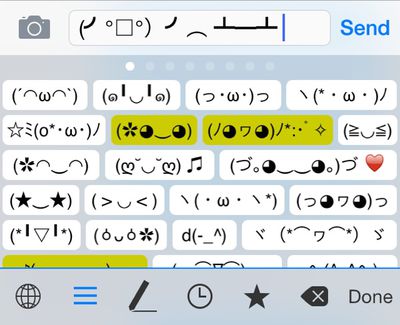
Kaomoji (Free) - Kaomoji keyboard is a fun third-party keyboard that allows users to insert kaomoji, or ASCII text emoticons, into messages, email, and more. Many users may not be familiar with kaomoji, but the popular table flip emoticon seen in the image below is one example. The Kaomoji keyboard isn't available yet, but it should be launching soon.
Third-party keyboards require users to install a separate app for each keyboard. Once downloaded, a keyboard can be turned on in the Settings app. In Settings, go to General --> Keyboards --> Add New Keyboard and tap whichever keyboard needs to be installed. From there, it is easy to switch between available keyboards by holding down on the Globe or Emoji icon in any app that supports keyboards.

















