

iOS 8 to Expand Manual Controls for iPhone Photographers - MacRumors
Skip to Content

iOS 8 to Expand Manual Controls for iPhone Photographers

Apple is working to open up camera controls in iOS 8, giving photographers granular control over settings such as ISO, shutter speed, and more, reports AnandTech. While only a few manual controls will make it into the stock camera app, almost full manual control will be made available for third-party app developers to implement as of iOS 8.
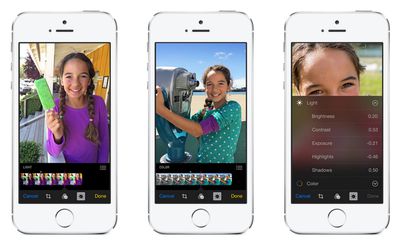
ios-8-camera-photos
According to AnandTech, iOS 8's AVCaptureDevice APIs will let developers tap into advanced controls such as ISO, shutter speed, focus, white balance, exposure bias, EV bracketing, and shutter speed/ISO bracketing. The ability to manipulate these controls will provide photographers with new ways to creatively compose a shot or a video clip. Developers also can use these controls to offer a variety of camera presets and other behind-the-scenes algorithms that manipulate images during the capture process.

While only the exposure bias controls will make it into the stock camera application, all of these new controls exposed through the AVCaptureDevice APIs will enable camera applications similar to Nokia's Pro Camera or HTC's Sense 6 camera application. It's been said that Apple is one of the few OEMs that take camera seriously, and these new controls can only cement that position.

Apple has steadily boosted camera performance in its iPhone models by improving both the hardware and software that powers this feature. As a result, the iPhone is known for its exceptional camera performance and has been among the most popular cameras on Yahoo's image hosting service Flickr.

The next-generation iPhone 6 is expected to continue this trend with iOS 8 camera improvements such as time-lapse mode as well as new iPhone camera hardware that may include optical or electronic image stabilization, a wider aperture, as well as an ARTON filter to minimize CMOS color shifts.


Related Forums: iOS 8, iPhone

Popular Stories

MacBook Pro Low Angle Wide Lens

Apple to Launch 'MacBook Ultra' With These Six New Features

Friday April 24, 2026 10:32 am PDT by
While the 14-inch and 16-inch MacBook Pro were just updated with M5 Pro and M5 Max chips last month, bigger changes are reportedly around the corner. According to Bloomberg's Mark Gurman, the higher-end MacBook Pro models will be receiving a major redesign by early 2027, and he said that Apple might use "MacBook Ultra" branding for them. If so, the MacBook Ultra would likely be a...
Apple TV Thumb 3

Here's What's Coming in the 2026 Apple TV

Thursday April 23, 2026 12:08 pm PDT by
There are a lot of folks waiting for a new version of the Apple TV because the set-top box hasn't been updated since 2022. There is an update coming this year, but people will need to wait a bit longer because Apple is holding the next Apple TV until the new version of Siri comes out this fall. Design Apple TV design updates don't happen often, and that's not changing in 2026. The next...
Four iPhone 18 Pro Colors Mock Feature

iPhone 18 Pro Launching in September With These 10 New Features

Monday April 20, 2026 7:13 am PDT by
While the iPhone 18 Pro and iPhone 18 Pro Max are not launching until September, there are already plenty of rumors about the devices. It was initially reported that the iPhone 18 Pro models would have fully under-screen Face ID, with only a front camera visible in the top-left corner of the screen. However, the latest rumors indicate that only one Face ID component will be moved under the...

Top Rated Comments

Orlandoech Avatar
155 months ago
Please give us a raw files mode. Nokia promised it, and then never delivered. It'd be such a nice option.

Imagine if you had an 8GB iPhone lol... #FAIL
Score: 7 Votes (Like | Disagree)
155 months ago
Please give us a raw files mode. Nokia promised it, and then never delivered. It'd be such a nice option.
Score: 6 Votes (Like | Disagree)
ThatGuyInLa Avatar
155 months ago
I would simply like for iOS to stop scaling the image down by half when you add a filter effect, then save, using the native photo editor!!!!!!
Score: 3 Votes (Like | Disagree)
155 months ago
Why not create a full manual setting within the Camera App? Why just leave this ability for third party Apps?
Score: 3 Votes (Like | Disagree)
155 months ago
Yeah, but when you're done editing it, you compress it. The RAW file is only temporary for while you edit it...
From a camera that can generate RAWs, IMHO RAW files aren't temporary. They should be treated as your originals. The analogy to the film days is a negative. Just like in film (you want to keep your negatives), in digital you definitely want to keep your RAWs. You never know.

JPGs/Other compressions are used to share with. Those can *always* be generated on the fly.

w00master
Score: 2 Votes (Like | Disagree)
155 months ago
Please give us a raw files mode. Nokia promised it, and then never delivered. It'd be such a nice option.

They did (http://conversations.nokia.com/2013/11/20/nokia-camera-raw-dng-support-available-now/). What they didn't do, was make it especially easy to get the damn things off the phone ( only jpegs auto sync )....

Would love for iOS to have this option....
Score: 2 Votes (Like | Disagree)













