

Wacom today debuted its Intuos Creative Stylus (via Engadget), which uses Bluetooth 4.0, integrated shortcut buttons, and 2,048 levels of pressure sensitivity to create "a realistic pen-on-paper feel" when drawing on an iPad. It's designed for sketching, drawing, and painting and aims to deliver "professional-grade performance" to iPad users.
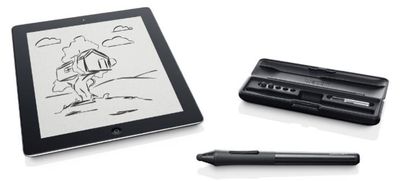
The pen comes in blue or black brushed aluminum with a case, extra nibs, and a replacement AAA battery. It is compatible with the third generation iPad, the fourth generation iPad, and the iPad mini. While it is meant to work with the company's Bamboo Paper app, it will apparently be compatible with other apps as well, including SketchBook Pro, ArtRage, and ProCreate.
Providing the power to produce professional results on an iPad, the Intuos Creative Stylus's advanced technology comes in form of a best-in-class pen experience and pressure sensitivity of 2048 pressure levels. This means that it can reproduce the feel and artistic control of traditional brushes and markers, so it's ideal for sketching, illustrating and image editing. It is also highly responsive, even reacting to light strokes, while rejecting unintentional touches when used with compatible creative apps that integrate Wacom's industry-leading technology.
In addition to announcing the stylus, Wacom has released a new version of its Bamboo Paper app. Version 2.0 of the app includes Tumblr and Dropbox sharing, along with premium notebooks, improved palm rejection software, new color palettes, and new tools.
Wacom's Intuos Creative Stylus will be available in Best Buy Stores for $99 beginning in October.
Bamboo Paper is an iPad app that can be downloaded for free from the App Store. [Direct Link]


















Top Rated Comments
That's because they have a Wacom digitizer built into the screen alongside the capacative.
I'm still holding out hope Apple eventually goes this route with the iPad line.
But Good. Great! You've established that. Everybody gets it. Now, can we please have our dang digitizer so we can write words and draw sketches quickly and legibly? I mean it's ridiculous.
But it feels like Apple is just going to milk cycle upgrades with little performance bumps as long as they can, instead of expanding the hardware functionality or intended use. Like they've reached the innovative cul-de-sac that paralyzes so many inventive companies.
...but hey, we get a fingerprint scanner on the home button. How incredibly useful.
I already broke down and bought the Galaxy Note 8 for my artistic and note-taking needs a few months ago. I still use my iDevices for everything else, but I'm tired of kidding myself when it comes to precision. Android still feels like beta and the apps just aren't there--I miss Procreate and Art Studio, but it meets my needs where Apple doesn't.
Unfortunately, Fat nibs don't offer the precision I need, and the disk on the jots aren't quite the same as a 'real' stylus. They're annoying in a different way. Plus, two of them scratched my moshi protectors. I don't like that, and I don't like having to turn off global settings to get palm rejection. It's just silly to have to keep jumping through hoops. I also don't have to worry about the charge running out on my Galaxy's stylus and I'm tired of waiting for Apple to pull the heads out of their arses.
Wacom has always made excellent products, and kudos to them for creating this stylus. I'm sure it will be up to their standards, but this is nothing more than a bandaid for a bigger problem that Apple continuously ignores.
I'll be passing this one by and wait for a newer version of the Galaxy 10, or pigs to fly, whichever comes first.
I've seen the iPad touted as a platform for media content creation. To be taken seriously, it needs to provide the some version of the tools used for the Desktop. Maybe then Adobe would euthanize Ideas and give us a full-throated tablet version of Illustrator. If Apple were to do this, in the rumored 12", and release a retina mini, all of my tablet needs would be met. As it stands, I'm giving serious thought to the Galaxy Note 12.2 due in October.