Got a tip for us? Share it...

Apple Notifies iMac Owners of Expanded Seagate Hard Drive Recall

Last week, we noted that Apple had expanded its iMac 1TB Seagate Hard Drive Replacement Program to include iMac models sold between October 2009 and July 2011. The program provides for free replacement of the defective Seagate drives or reimbursement for repairs already paid for out of pocket by machine owners.

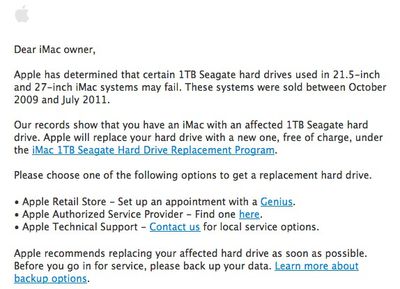
Apple has now begun emailing customers for whom it has contact information associated with a purchase of one of the affected machines. The email provides essentially the same information as is posted on the replacement program's support page, but helps ensure that iMac owners are aware of the issue.
Dear iMac owner,

Apple has determined that certain 1TB Seagate hard drives used in 21.5-inch and 27-inch iMac systems may fail. These systems were sold between October 2009 and July 2011.

Our records show that you have an iMac with an affected 1TB Seagate hard drive. Apple will replace your hard drive with a new one, free of charge, under the iMac 1TB Seagate Hard Drive Replacement Program.
Owners of affected iMac machines are covered for three years or until April 12, 2013, whichever provides longer coverage.

Top Rated Comments

(View all)

8 months ago
Seagate...gate....
Rating: 14 Positives
8 months ago
I put the serial number for my iMac purchased June 2011 in on the webpage for the replacement program, and it came back saying that I didn't have a Seagate HD (as previously noted by the8thark). I went into the System Information (Click the Apple at top left > About This Mac > More Information > System Report > Hardware > Serial-ATA) and found that I have a model number ST31000528AS in my iMac, which is in fact a Seagate 1TB HD (again, noted by the8thark, http://www.newegg.com/Product/Product.aspx?Item=N82E16822148433). Given the discrepancy, I call Apple to discuss the matter.

I talk to an Advisor and Sr. Advisor that both said the records show I have a Western Digital drive in my iMac. I insisted that it was a Seagate, and sent them a screenshot of my System Information window. Long story short, they are replacing my HD.

If you are in the same situation, call Apple and reference case number 361827989 as to why they should replace yours too!
Rating: 6 Positives
7 months ago
After mine crashed regularly and overheated, I arranged two calls with their paid telephone department £30 service calls to resolve the issue. After that didn't work I took it into the store which is in a different city. They said after a clean install of the operating system it should work. It didn't so I went back to the store.

I noticed that they tried to recreate the same conditions which was usually file transfers from external hardrives however they used usb with only small amounts of data transfer. When I said they should use a bigger drive the iMac became too hot to touch and crashed. They said I would need a new drive putting in at cost. I said I was in UK Warranty.

The Head Genius said that Apple only offer a year warranty. I showed in the sales of goods act which permits up to five and the EU law which clearly states two. He adamantly refused. That day I saw lots of customers in store paying for clear manufacturing faults despite their products still being in warranty.

http://www.pcworld.com/article/255851/italian_court_upholds_apple_warranty_fine.html

I initiated a small claims. The store manager called me and said I was wrong that they had a right to charge. I continued the legal action at a cost of £94 for court application.

17 threatening calls from apple and they then offered a "goodwill replacement". I refused as its not goodwill its a legal requirement for them to repair and as they have refused on 3 occasions I wanted a refund additionally this goodwill would not renew the warranty or cover the legal expense.

Later after they had called another 10+ times they offered a replacement again under the term goodwill.

They had their defence struck, but applied for it to be reinstated. Their defence is they don't have to repair and offered a goodwill gesture (yet no offer to cover court fees). Today I get a default apple letter saying the drives are faulty and offer to replace so their defence of were not under a warranty to repair is humorous.

So they wait as long for customers to pay for their faults, allow hazardous computers to leave the store and fraudulently misinform or refuse customers their legal rights.

Can't wait to see how they defend their actions now. Will keep everyone informed. I only wish big corporations were aggressively fined for defrauding customers and wasting court and customer time.

AJ
Rating: 2 Positives
24 weeks ago

yep, I just picked up my iMac today. I was told the HD was send back to the warehouse and would be destroyed.


They destroyed mine too. I didn't even hear about this recall until after my drive crashed. Thankfully, this time, I finally had everything backed up.
Rating: 1 Positives
7 months ago

SO, checked in profiler, my drive is a 1TB ST31000528AS iMac is just under 12months old (11 months and change i think)

Apples site checked my serial number as not eligible for replacement.. should i push for one anyway ? is the ST31000528AS likely to fail going down the road ?


Thats my problem also. Mine was made before july 2011 bought it september 2011, it has the seagate drive but they say its not affected... I am doubting all of this. I dont want this thing to fail and have to pick up the cost
Rating: 1 Positives
7 months ago
I have an iMac that had the defective Seagate drive. I had the drive replaced at my own expense at an Apple Store earlier this year. After receiving the recall notice, I contacted Apple Support, and they promised to refund the repair cost.

Recently I received a subsequent e-mail (apparently from Apple), that is asking me to e-mail my bank account/ routing numbers back to Apple so they can deposit the refund directly in my bank account.

I'm very uncomfortable about e-mailing this information to anyone. I don't know why Apple couldn't just mail a check, or put the refund back on my credit card. This sounds a lot like a "Nigerian scam", and seems very un-Apple like. I even wonder if someone inside Apple is running a scam.

Has anyone else received this notice?
Rating: 1 Positives
8 months ago
Had this done the other day. Here's the thing:

Apple Geniuses don't understand their own backups.

I'm on 10.8, but my computer came with 10.6. They installed 10.6 (which, granted, is fine since that's the OS it came with and is standard practice) and didn't tell me. When I restored to my backup, lo and behold I was locked out of ALL of my accounts.

Since both Lion and Mountain Lion don't have a hard disc I can insert and upgrade with, I had to boot in single-user mode and delete the file that makes OS X know it's been set up before, create a new admin account, upgrade with that, THEN log in to my actual account.

Were I not an expert user (and former Genius myself) I wouldn't have known to do this, wouldn't have known where to start. If this had been my mother instead of me, she'd be swearing off Apple for the rest of her life.

Not good Apple, not good. Change the practice to match your current selling strategy please.
Rating: 1 Positives
8 months ago

Where did you get this info?
I have this drive:
Model: ST31000528ASQ
Revision: AP24

But the website says am not eligible.
The drive has been shown a "SMART status failing" for a while so i thought i would be eligible as for now i'm basically waiting for it to crash (and yes am saving everything somewhere else...) to change it.


I got an email from Apple but my serial number says not eligible. However, I'm looking at what to do.
Rating: 1 Positives
8 months ago

Actually, the checker is very intelligent in regards to the type of drive installed. The model number is the same for all Seagate 1TB drives, however, there are many revisions. Affected revisions are AP24 and AP25. If you do not have this, your drive does not need to be replaced.


Where did you get this info?
I have this drive:
Model: ST31000528ASQ
Revision: AP24

But the website says am not eligible.
The drive has been shown a "SMART status failing" for a while so i thought i would be eligible as for now i'm basically waiting for it to crash (and yes am saving everything somewhere else...) to change it.
Rating: 1 Positives
8 months ago

Some of us had terrible trouble with those Seagate drives and reported so here at the time. I returned several of those iMacs with the Seagate drives and ended up getting a Macbook Pro instead. The belly-rumbling noise from those drives was terrible and MANY posters reported it at the time. It seems crazy that it's taken so long for Apple to do something about it. It was obvious to anyone with ears that the drives had a problem. As I recall, the noise would start between a couple of days and a week of first being used. I recall many frustrated buyers reporting the same, and eventually going for the 2TB option to avoid the 1TB Seagate problems.


Yep, I bought a 2009 27" iMac almost as soon as they were released. The 21" models were released a couple of weeks earlier, and as soon as they got the machines, people with Seagate 1TB HDDs were complaining about the odd loud noises from the drives. Some smart people checked, and found that Seagate drives were only 1TB, if you opted for the 2TB drive you got either a Hitachi or WD. So I changed my order to the 2TB drive. Got a Hitachi, and have had no problems since. I've even replaced my ODD with a SSD and now use the original drive as my home folder only for music movies and photos etc. Still no problems.

so what if you check your iMac serial number, and it is deemed necessary to replace the HD, but you personally haven't experienced any problems with it? Do you still need to get it replaced?


For those people that are eligible for the swap but have no problems with their drives: My advice, especially if you are busy right now, is to keep using your current drive, but put a reminder on your calendar for the latest possible date your are eligible for the free repair (i.e. April 12 2013 or 3 years after you bought your computer, whichever is later). Then swap it out then. That way you're ensuring that your new drive will last as long as possible. I would replace it before the deadline though, because the chances of this drive failing are higher than the new drive would be, and it'd be a waste to have to pay for it a few weeks/months after the deadline from your own pocket
Rating: 1 Positives

[ Read All Comments ]