Apple Seeds Golden Master of OS X Mountain Lion to Developers
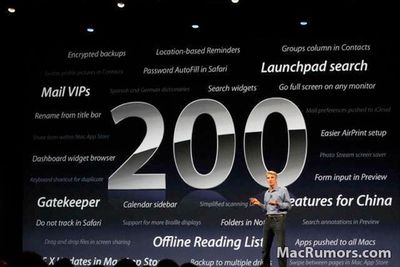
"200 New Features" Mountain Lion slide shown at WWDC
Apple released the Golden Master (GM) version of OS X Mountain Lion to developers today. The "golden master" designation indicates that this version of the software is intended to be the final version released to the public, barring any last-minute issues. The Build is 12A269.
Apple first previewed Mountain Lion in February, highlighting many features already present in iOS, including Messages, Reminders, Notes, Notification Center, Game Center and more at that time. At WWDC, Apple announced additional features, including Dictation, iCloud Tabs, and 'Power Nap'.
We previously highlighted this video which shows off many of the new features found in Mountain Lion:
Mountain Lion will be priced at $19.99 and released to the Mac App Store in July.
Popular Stories
In iOS 27, available now, CarPlay gets its biggest update in years, but some features depend on what type of car you have rather than your iPhone model. Some of the biggest additions won't do anything in the vast majority of vehicles on the road today. Here's how the new features pan out.
Works in Any CarPlay Vehicle
Custom widgets: In iOS 27, CarPlay is no longer limited to Apple's handful ...
The new Apple Watch Series 12 and Apple Watch Ultra 4 have hardware changes that allow for faster charging, but you will need to use the new version of the Apple Watch Magnetic Fast Charger included in the box in order to achieve this boost. If you need extra ones for your own charging stands or travel or so forth, Apple released the new version of the charger on its online store last week, with...
The iPhone 18 Pro Max has a battery capacity over 20 watt-hours, which means there are additional shipping requirements. If an iPhone 18 Pro Max needs to be shipped somewhere, its maximum battery capacity has to be limited through firmware.
According to Apple, the iPhone 18 Pro Max uses an "innovative battery-firmware solution" that limits battery capacity to below 20Wh between when the...






/https://forums.macrumors.com/proxy.php%3Fimage=http://i.imgur.com/Gombu.png&hash=db3bf751e34343935e0d325d6496a2ef)
/https://forums.macrumors.com/proxy.php%3Fimage=http://i.imgur.com/rx0Kt.png&hash=7e3ce51d99485c9d93ce7c3af7507ecb)


/https://forums.macrumors.com/proxy.php%3Fimage=http://i.imgur.com/Ylcjz.png&hash=cf45cc0858ec767419e3d470a6b54dc8)
/https://forums.macrumors.com/proxy.php%3Fimage=http://i.imgur.com/lC0tJ.png&hash=138ae0702ceb3b3911f94ff54a6ccf14)
/https://forums.macrumors.com/proxy.php%3Fimage=http://i.imgur.com/r6Kok.png&hash=5bc721f476d746be1200dbfbf06399be)
/https://forums.macrumors.com/proxy.php%3Fimage=http://i.imgur.com/Bk3Bj.png&hash=955868f086e8d4d527376998c5e5dd3f)
/https://forums.macrumors.com/proxy.php%3Fimage=http://i.imgur.com/JXZKn.png&hash=314a87cf2f2c34627174ab143e68fb1c)















