New Skylake MacBook Pros coming October 27.
OS X Mountain Lion's Documents in the Cloud Simplifies File Access Across Devices
iCloud document storage, and the biggest change to Open and Save dialog boxes in the 28-year history of the Mac. Mac App Store apps effectively have two modes for opening/saving documents: iCloud or the traditional local hierarchical file system. The traditional way is mostly unchanged from Lion (and, really, from all previous versions of Mac OS X). The iCloud way is visually distinctive: it looks like the iPad springboard — linen background, iOS-style one-level-only drag-one-on-top-of-another-to-create-one “folders”. It’s not a replacement of traditional Mac file management and organization. It’s a radically simplified alternative.
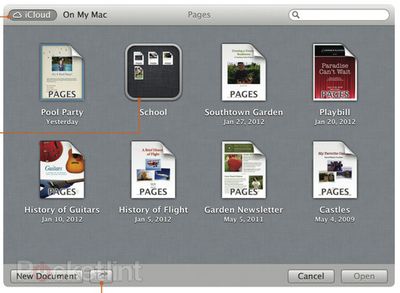
iCloud Documents in Pages (Source: Pocket-lint)
Apple is of course already extending this functionality beyond iWork in OS X Mountain Lion, with the iCloud file storage showing up in other apps such as TextEdit. Apple is also releasing APIs to allow third-party apps to take advantage of the feature.
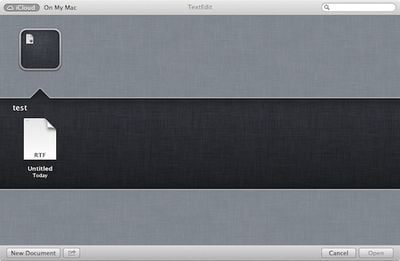
iCloud Document within a folder in TextEdit
The functionality is naturally being compared to that of Dropbox, which allows users to save files directly to their Dropbox accounts for access anywhere, but Apple's new iCloud solution offers the advantage of displaying only those files intended for use with the app being used, helping to filter the list of documents and offering iOS-like folder organization of files.

Top Rated Comments
(View all)Makes me wonder if they're getting rid of Terminal.app too...
NOoooooooOOOOOO
Apple is soo moving in the right direction.
It's just great.
And if you can't access the Cloud or have bumped into a data cap?
Makes me wonder if they're getting rid of Terminal.app too...
“Too”? They’re not getting rid of anything. This is something added; nothing subtracted.
And a very good thing for most users I’ve met! Time will tell how much I use it myself as a power user... change is frightening (remember how mice terrified “power users”?) but where would we be without it?
The "cloud" is not as great as they're making it out to be. It is a city thing. Out in rural areas the cloud is often not accessible. Bandwidth is low. Coverage is spotty or non-existent. Apple is ostracizing rural users. If you don't live in the urban areas you're not worth of being their customer. Fact: the world is not connected.
Good thing Apple hasn’t removed traditional non-iCloud file management (and they won’t until people stip taking laptops places with no Internet). Can’t or won’t use iCloud? No problem. It’s absurd to think that Apple only caters to people with Internet 24/7 on even their portable machines. Nobody has that much access!
But I wonder how well it will work for those of us who organize our files by project rather than by application...
The "cloud" is not as great as they're making it out to be. It is a city thing. Out in rural areas the cloud is often not accessible. Bandwidth is low. Coverage is spotty or non-existent. Apple is ostracizing rural users. If you don't live in the urban areas you're not worth of being their customer. Fact: the world is not connected.
Agreed. I operate in four locations. One has godly speed, one consumer class speed, and two have either dial-up only or spotty cellular data (LA/SB mountains). We have not arrived yet in 60% of the geographic USA. Yes 80%+ of the population is covered. I get that. They are stationary physically near an enabled CO or urban mobile.Rocketman
Image (http://media.litdrift.com/uploads/2009/05/man.jpg)
**** you new technologies!
Actually, am I the only one who has given up on keeping up with Mac OS? I mean, they've already made Snow Leopard outdated in some ways. They need a little more backward-compatibility.
Has Finder been updated with an option to see files stored in iCloud?
[ Read All Comments ]