Apple has released updates to its Wi-Fi base stations and to the Airport Utility program that controls them.
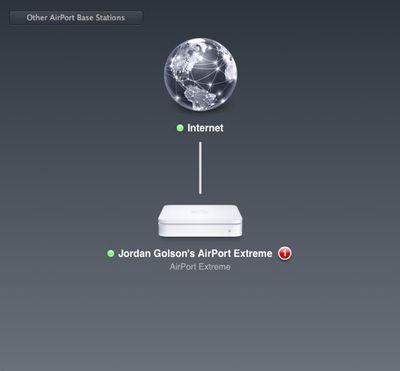
AirPort Utility 6.0 for Mac OS X Lion weighs in at 14.13MB and requires Mac OS X 10.7.2. The user interface has been redesigned to look more like the iOS Airport Utility application available through the App Store for the iPhone and iPad. It is also streamlined, with fewer windows required to access the full range of Airport Base Station settings.
This update is for all 802.11n AirPort Express, 802.11n AirPort Extreme and Time Capsule models. It fixes an issue with wireless performance and provides support for remote access to an AirPort disk or a Time Capsule hard drive with an iCloud account.
Apple also released AirPort Utility 5.6 for Mac OS X Lion, which retains the previous look of AirPort Utility and is required for configuring some older AirPort hardware.
Sunday September 20, 2026 7:24 pm PDT by Joe Rossignol
In May, Apple agreed to pay $250 million to settle a U.S. class action lawsuit over Siri AI's delayed launch, and the settlement website is now live.
Apple will pay an estimated $25 per eligible iPhone to eligible customers, who can submit a claim via the settlement website between September 21 and December 21 of this year. The exact payment may be higher or lower than $25 depending on the...
Friday September 18, 2026 4:27 pm PDT by Juli Clover
The iPhone 18 Pro Max has a battery capacity over 20 watt-hours, which means there are additional shipping requirements. If an iPhone 18 Pro Max needs to be shipped somewhere, its maximum battery capacity has to be limited through firmware.
According to Apple, the iPhone 18 Pro Max uses an "innovative battery-firmware solution" that limits battery capacity to below 20Wh between when the...
Friday September 18, 2026 9:51 pm PDT by Juli Clover
Apple hardware engineering VP Tom Marieb spoke with TechRadar and shared some candid thoughts about Apple's upcoming iPhone Duo.
The iPhone Duo uses a matte nano-texture display, which is meant to cut down on glare and minimize the visibility of the crease. When asked if the iPhone Duo's crease would be more visible over time, as that's what tends to happen on other foldables, Marieb said...
An so continues the total dumbing down of all products Apple.
Can no longer configure printers, can no longer see wireless and DHCP clients, lost IPv6, lost logs and stats, lost multicast rate, lost transmit power, lost wide channels, lost interference robustness etc etc etc
Gained: A Nice big Internet globe icon and a nice big Base Station icon.
An so continues the total dumbing down of all products Apple.
Can no longer configure printers, can no longer see wireless and DHCP clients, lost IPv6, lost logs and stats, lost multicast rate, lost transmit power, lost wide channels, lost interference robustness etc etc etc
Gained: A Nice big Internet globe icon and a nice big Base Station icon.
What. The. ****.
Okay, I'm about to jump ship. **** this ****.
I am so sick and tired of Apple targeting the idiots of this world. Especially when I invested $10K in their ****ing hardware, and this is how I get treated? You take away all the options that I use, give me NO SUITABLE REPLACEMENT, then proceed to tell me that I can't actually use older versions of the software because it won't run on the latest greatest Apple OS and I absolutely -must- be current to use the things that I actually rely on (ie, Xcode)?
This is pure ****ing madness. Pure. ****ing. Madness.
What the hell is wrong with options? O P T I O N S. You know, check boxes and drop down menus and stuff. What is wrong with giving us advanced UI pages that normal users don't have to use, so those of us who can't stand the bling bling blingety bling UI interfaces can actually still get to the things that matter to us?
"Our way or the highway" is ****ing arrogant, that's what it is. I have seen Apple go from a professional company making truly high end stuff, to a consumer company targeting everyone, to this ****ing fischer-price mammoth obsessed with building toys for people who can't even comprehend a ****ing folder on their desktop.
This **** needs to end. Give us our ****ing options, and stop being lazy ass programmers. I swear to god this company is going to implode like a goddam atomic bomb if they don't smarten the **** up soon.
An so continues the total dumbing down of all products Apple.
Can no longer configure printers, can no longer see wireless and DHCP clients, lost IPv6, lost logs and stats, lost multicast rate, lost transmit power, lost wide channels, lost interference robustness etc etc etc
Gained: A Nice big Internet globe icon and a nice big Base Station icon.
This is lame - why would they completely dumb down the utility and *remove* functionality? What a crock.
Is it me, or is the logging option gone? In the previous version you were able to view the number of connected clients, a graph showing signal strength, logs and you were able to configure an external host to sent log information over snmp. The only thing which I can find at the moment is a summary of connected clients when you click on one of the airport devices, but the more advanced stuff seems to be gone? Has anybody been able to locate it?
Also, it seems it is not possible to create configuration profiles anymore?
Apple's first foldable iPhone, with a book-style design featuring a 5.4-inch outer display and a 7.6-inch inner display with a minimal crease down the middle.


 Apple has released updates to its Wi-Fi base stations and to the Airport Utility program that controls them.