

Since Lion's release, we've been collecting tips on reverting changes found in Lion back to behavior found in Snow Leopard. Now some might argue its better to get used to the stock installation, but if that's not you, here are the tips we've seen.
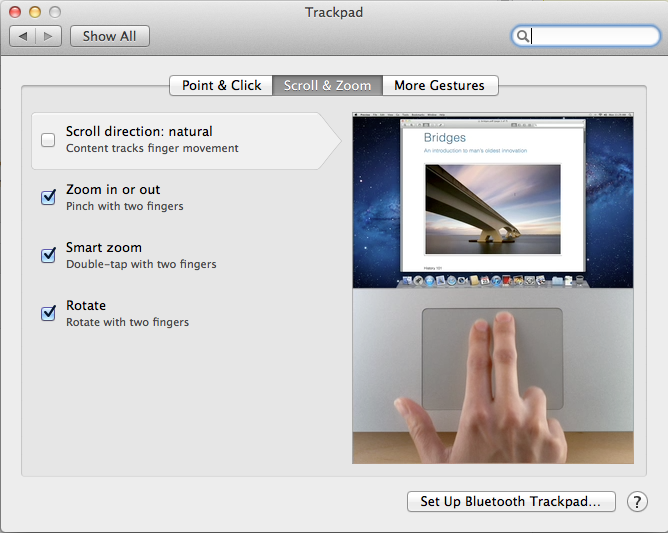
• Natural Scroll: This change seems to have generated the most outcry. In Lion, Apple has reversed the normal scrolling direction for trackpads and scroll wheels. In the past, the metaphor has been that swiping down has caused the page to scroll up. Now, swiping down means scrolling down. It takes a few days to get used to, but if you can't there's an option to revert back.
• Key Repeat: @mikeindustries (requires Terminal):
To turn off Lion's stupid ban on key repeating, quit apps and type "defaults write -g ApplePressAndHoldEnabled -bool false" in Terminal.
• New Window Animations: @tomasf (requires Terminal):
Want to turn off window opening animations in Lion? defaults write NSGlobalDomain NSAutomaticWindowAnimationsEnabled -bool NO
• Don't Save: @tomasf (requires Terminal):
Restore ⌘D to mean "Don't Save" in Lion! defaults write NSGlobalDomain NSSavePanelStandardDesktopShortcutOnly -bool YES
• Resume: Disable resume in Lion.
• Spaces: Assigning apps to one space or all spaces.
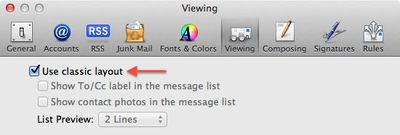
• Classic Mail: Lion's Mail takes on a distinct iOS look, but the classic Mac OS X Mail look is available through a checkbox preference in Mail.
• Front Row: Mad Hatter has instructions on how to re-enable FrontRow on Lion, though we've heard some mixed results about it working. - Use at your own risk, we've heard it has caused problems.
• LimeiBook86 posts some instructions which duplicate ones we have shown here, but also includes restoring Finder Window's Path and Status Bar as well as turning off Dashboard as a space.
















Top Rated Comments
Just requires a click instead of mouse movement for me, IMO this is much better as it greatly reduces the chance of accidentally waking your Mac up.
The most stupidest things that i ever hear is people who blindly accept everything Apple does as the best way.
Just because Apple "know why and because" they've made a change, doesn't make it right. And certainly not right for everyone.
Check your EULA. There is no condition of owning Apple products that you must agree with and like everything Apple does.
It's a reasonable thing that people would want to turn again.
Resume might be useful to some, but I don't want my last used things to reappear when I re-open that app. Might have personal stuff there, or open a document that you don't want to work on, so you end up having to close it anyway.
I'm not a 'true' Apple user by your definition, but I'm a power user. And small changes like ones described here can really interrupt my workflow. Whether I have to "re-learn" isn't always the case, I've got my workflow adapted to how previous OS X versions worked. Lion has changed a lot of that, some for the better, some of the worse.
Only if its for the better ;)
I'll never understand people who insist on dictating how others should use their computers... :rolleyes: