With the new fourth-generation iPod touch launching today, Apple has released an update to its iMovie application for iOS, adding compatibility for the new device to the existing support for iPhone 4. The updates also adds several new features, including the ability split video clips, automatic music looping, and more.
What's new
- Compatible with iPod touch (4th generation). - Ability to split video clips. - Automatic music looping when video extends beyond music track. - Scrub to preview clips in Video Browser. - In-app Tips page that illustrates how to use key features. - Updated Photos Browser with newest images at top. - Mute badge to indicate video clips with audio disabled. - Additional performance and reliability improvements.
iMovie, priced at $4.99, debuted in late June for the iPhone 4, offering users the ability to edit footage shot on their devices without having to transfer it to a computer. A number of filmmakers quickly demonstrated how films could be easily shot and edited entirely on the iPhone 4.
Thursday September 17, 2026 4:17 am PDT by Tim Hardwick
In iOS 27, available now, CarPlay gets its biggest update in years, but some features depend on what type of car you have rather than your iPhone model. Some of the biggest additions won't do anything in the vast majority of vehicles on the road today. Here's how the new features pan out.
Works in Any CarPlay Vehicle
Custom widgets: In iOS 27, CarPlay is no longer limited to Apple's handful ...
Wednesday September 16, 2026 8:53 am PDT by Joe Rossignol
The new Apple Watch Series 12 and Apple Watch Ultra 4 have hardware changes that allow for faster charging, but you will need to use the new version of the Apple Watch Magnetic Fast Charger included in the box in order to achieve this boost. If you need extra ones for your own charging stands or travel or so forth, Apple released the new version of the charger on its online store last week, with...
Wednesday September 16, 2026 1:32 pm PDT by Juli Clover
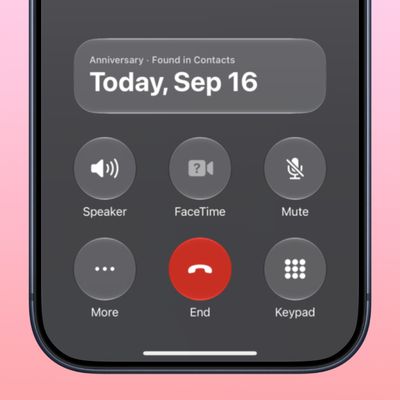
The iOS 27.2 beta that Apple released today adds a feature that reminds you it's your anniversary when you call someone, as long as you've added the date in the Contacts app.
On the date of your anniversary, when you go to call the person, you'll see a reminder that it's an important day so you don't forget to say something. The anniversary alert uses Call Context, a feature Apple added in...