Got a tip for us? Share it...

Apple Adds 'Genius' Tab to iPad App Store

Several readers have noted that Apple has rolled out a new "Genius" feature for its App Store application on the iPad. Similar to other Genius offerings from Apple, the new tab offers automatic suggestions on applications users might be interested in based on other applications that have already downloaded.
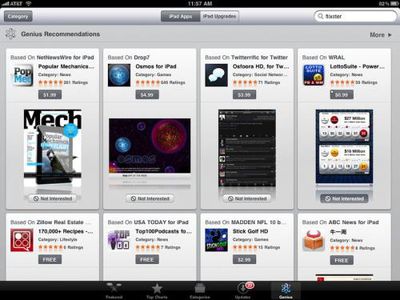

After activating the service by agreeing to the terms and conditions, which note that titles in users' application libraries will be anonymously uploaded to Apple to allow recommendations to be made, users are taken to a page offering the recommendations.

Two sections are offered: One recommending new applications and one recommending upgraded versions of applications the user already owns, such as full versions of free "lite" applications or pro versions of lower-level paid applications. The upgrade section seems to be part of a broader initiative undertaken by Apple, which includes a new Try Before You Buy section of the App Store that seeks to encourage users to test out free, lite versions of applications and then upgrade the ones they like to full, paid versions.

The iPad Genius Recommendations feature also allows users to note that they are "not interested" in a particular recommended title, an aspect that will allow the Genius feature to continually refine its recommendations for users.


Top Rated Comments

(View all)

20 months ago
About time i have been waiting for this, i look forward to seeing this try before you buy section. Could come in quite handy.

Also love the layout.
Rating: 0 Positives / 0 Negatives
20 months ago
I always thought it was weird that you had to agree to transmit your app library list to Apple... since they sold you those apps to begin with.
Rating: 0 Positives / 0 Negatives
20 months ago
about freakin time, wow apple
Rating: 0 Positives / 0 Negatives
20 months ago
Apple should have waited with the Genius function until its working properly.
You can't delete suggestions, they keep reappearing. (the deletion mark does not work)
When you finished checking an App in detail, it just jumps back to the beginning of the Genius list.
So Genius is useless and annoying on the iPad with these bugs.
Rating: 0 Positives / 0 Negatives
20 months ago
Another bug is that it shows all apps ratings as 5 stars.
Rating: 0 Positives / 0 Negatives
20 months ago

Another bug is that it shows all apps ratings as 5 stars.


Genius!
Rating: 0 Positives / 0 Negatives
20 months ago
Now that I see that they do make improvements to the store, I'd much rather have had a wishlist. I often stumble across apps that I might not care about purchasing now, either because it's a game that looks fun but I haven't finished my current games yet, or it lacks a critical feature that it might be updated to have later. And I would like to somehow mark it so that I have an easy way to find and check in on it later. Right now, I record the app names as a note in the Notes app. And that's pretty sad considering the iPad is the pinnacle of convenient technology.
Rating: 0 Positives / 0 Negatives
20 months ago
Like I don't have enough apps already. =p

Half of my iPad storage used are already apps!
Rating: 0 Positives / 0 Negatives
20 months ago
No use for it. Genius is just an alternative to a banner ad.
Rating: 0 Positives / 0 Negatives
20 months ago

No use for it. Genius is just an alternative to a banner ad.


Not a useful way to browse the maze that is the app store?
Rating: 0 Positives / 0 Negatives

[ Read All Comments ]