Apple's New 27-Inch iMac Supports Secondary Solid State Hard Drive

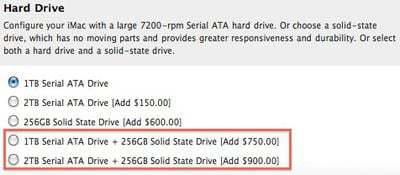
Several MacRumors readers have pointed out that Apple's new 27-inch iMac released today offers support for dual hard drives: one traditional Serial ATA in 1 TB or 2 TB capacity and one 256 GB solid state drive (SSD). Alternatively, customers can opt for a single 256 GB SSD, as described on the iMac features page.
To give your iMac a real performance boost, configure your 27-inch iMac on the Apple Online Store with an optional 256GB solid-state drive. You can choose it as your only drive or have it installed in addition to the built-in hard drive, allowing you to store the operating system, critical applications, and important files on the solid-state drive and your other files on the hard drive. Because solid-state drives have no moving parts, the computer can access data at over twice the speed of hard drives. Which makes starting up your iMac and launching applications faster than you ever thought possible.
The new offering marks the first time Apple has offered dual hard drives as build-to-order options for its iMac line, taking advantage of the space available in the 27-inch iMac's chassis to squeeze in another drive bay. The SSD options do not come cheaply, however, with a simple swap of the standard 1 TB traditional drive for a 256 GB SSD coming in at a $600 price premium. Customers looking to add the SSD as a second drive on top of the 1 TB traditional drive will find themselves looking at a $750 price boost.Top Rated Comments
(View all)I bought a 27" i7 only two months ago, and I've been giving serious thought to ripping my optical drive out so I can install a 2.5" SSD in there as a boot/apps/scratch drive. I'll probably end up doing this soon.
I wonder how the internals were rejiggered to make room. Logic board shrinkage, I guess?
I'd love to have a Mac Pro, and would love to have an SSD HDD, I can't imagine the speed!
* Cost-effective, big 1TB (or more) drive now.
* Then, after warranty ends, self-install an additional solid-state drive. They’ll be cheaper by then!
And then, one day after warranty, just the screen goes kapuuuttt and there goes your 3000 dollars machine...
Nah, I’d probably just pay Apple to fix the screen. Or toss an external display on, and put the iMac on the floor as the world’s thinnest tower. Out-of-warranty failures always carry a cost—even if the screen that dies is external.
And this is a $1699 machine, not a $3k machine, FYI. And this $1699 computer-plus-screen costs about the same as a 2560-pixel screen alone from other companies! So with those units, maybe just your screen dies... but it cost as much as a whole Mac + screen :o
Of course, those other screens use fluo backlights, and they probably WILL go kapuuuttt. Apple’s LED system is longer-lasting.
All-in-ones have disadvantages. And advantages too! Cable clutter and wasted space aren’t always good :)
[ Read All Comments ]

Analytics firm Chitika today released a report showing that by its metrics iOS has now surpassed OS X in overall web traffic share in the United States. Chitika's methodology involves an analysis...
One of the most frequent reasons for an iPhone to go on a trip to the Apple Store's Genius Bar is because of water damage. Typically, a water damaged iPhone can be replaced for a flat $199...
TheVerge's Joshua Topolsky summarizes the iPad 3 casing findings reported earlier today, but also adds his own sources regarding some details of the iPad 3.
Image from RepairLabs
As...
Last July, Apple discontinued the white MacBook from its consumer lineup, pushing consumers toward the company's popular MacBook Air line or the 13-inch MacBook Pro. The company didn't kill...
Popular iPhone Twitter client Tweetbot has finally arrived on the iPad, with a user interface instantly familiar to any current Tweetbot user. Designed for the Twitter power-user, Tweetbot packs a...