

Got a tip for us? Share it...

Steve Jobs on Future Wireless iPhone Syncing, Replacement of 'Hold' Button With FaceTime

With the release of iPhone 4, Apple CEO Steve Jobs has fired up his email account again and is responding to a number of customer emails. First it was his description of the signal strength concerns as a non issue. And in another pair of publicized responses, Jobs has briefly addressed both future wireless syncing of iOS devices and the replacement of the iPhone's on-screen "hold" button available during calls with a button for activating the new FaceTime video calling feature.

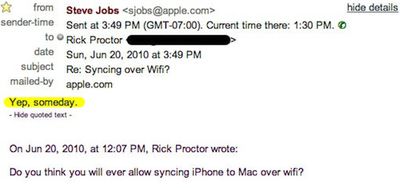
Mashable first reported on the Wi-Fi phone syncing topic earlier this week amidst the excitement of the iPhone 4 launch, noting that Jobs replied "Yep, someday," to a question from a customer about possible future wireless syncing of his iPhone to his Mac. Jobs offered no timeframe for a launch of the feature.

Earlier this year, one developer created his own Wi-Fi syncing solution and hoped that Apple would distribute it through the App Store, but the company rejected the application last month. It is now available for jailbroken devices connecting to both Mac and Windows computers at a price of $9.99.

The second issue comes to our attention via TechCrunch, which points to a LiveJournal posting from a user who asked about the removal of the "hold" button from the iPhone's on-screen calling screen to make room for a new button for initiating FaceTime video calls. Jobs' response: "Hold doesnt do anything more than Mute."
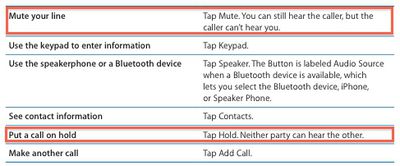

Table from Page 50 of iPhone OS 3.1 User Guide (PDF link)

Interestingly, Jobs was neither entirely correct nor thorough in his answer. As noted in Apple's own user guide for devices running iPhone OS 3.1, the "mute" functionality silences the user's own voice in the conversation while continuing to allow them to hear the party on the other end of the line. The "hold" functionality silences both ends of the conversation.

Fortunately for users looking to make use of the hold functionality that seemed to have disappeared, a commenter on the TechCrunch piece notes that simply holding down the "mute" button for a few seconds will activate the "hold" functionality.


Top Rated Comments

(View all)

25 months ago
I had a client call me yesterday and I absentmindedly pressed the facetime button to put them on hold.

Thanks for the tip. Holding mute does actually enable Hold.
Rating: 0 Positives / 0 Negatives
25 months ago
Does the hold button only disappear and show the Facetime button when you meet the requirements to make a facetime call?

Because my hold button is still there, I assumed when I was talking to another iPhone 4 both on Wi-Fi it would change.
Rating: 0 Positives / 0 Negatives
25 months ago
Its always there for me but I'm always on WiFi and I haven't looked for when i'm not. I'm sure my customer wasn't using an iPhone 4 so it may always be there when you are on WiFi
Rating: 0 Positives / 0 Negatives
25 months ago
I have never used the hold button, but I hate losing a feature. So thanks for the holding the button tip. Now we gained a button and lost nothing. :)
Rating: 0 Positives / 0 Negatives
25 months ago
I bet he has had a lot of email to get through the last few days. Good on him for replying as well. Perhaps he should operate a tech support line on the side!
Rating: 0 Positives / 0 Negatives
25 months ago
I'm increasingly getting the impression that Steve doesn’t actually do anything in Apple anymore. Just sits in a empty room, save for a Corb armchair, thumbing through his emails on an iPad, sniping at whichever ones catch his attention.
Rating: 0 Positives / 0 Negatives
25 months ago
I love people who share these responses and block out their own e-mail and leave Steve's visible. If your gonna write Steve, and you get a response, and want to share it with the planet, why don't you share your e-mail address? I would.
Rating: 0 Positives / 0 Negatives
25 months ago
I guess Jobs has a point -- for all practical purposes, mute does the same thing hold does from the iPhone users perspective. How often do you put a call on hold just so you can silence the -other- end of the call?

Now, what I'd really like to see is music on hold :). The music is right there, should be trivial to implement. Probably violates some kind of music license, but I don't really care...
Rating: 0 Positives / 0 Negatives
25 months ago

I love people who share these responses and block out their own e-mail and leave Steve's visible. If your gonna write Steve, and you get a response, and want to share it with the planet, why don't you share your e-mail address? I would.


Because not everyone's retarded?
Rating: 0 Positives / 0 Negatives
25 months ago
the hold button is what i would consider a non-issue.
Rating: 0 Positives / 0 Negatives

[ Read All Comments ]













