

Got a tip for us? Share it...

More iPad First Impressions and Discussion


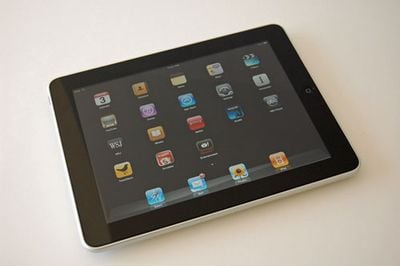
As today's launch progresses, iPads are starting to get into the hands of many across the U.S. As we get settled with our own iPads, here are a few first impressions:

- The iPad feels very substantial in the hand. At 1.5 lbs, it takes a bit of getting used to compared to an iPhone or Kindle.
- The screen is bright and crisp with wide viewing angles. Despite the oleophobic coating, it collects and shows fingerprints more than expected.
- The Apple logo on the back is black with a smooth finish, not with a chromed finish like on the iPhone 3GS.
- The iPad must be connected to iTunes in order to set it up. Out of the box, it shows a connect to iTunes screen (you must have iTunes 9.1).
- Set-up via iTunes is similar to that of the iPhone, allowing you to select the apps and media content to be synced to the iPad.
- The capacitive touchscreen is fast and responsive. Screen orientation changes take place almost instantly.
- The on-screen keyboard in portrait orientation is usable with two thumbs but the middle keys will be a bit of a stretch for those with smaller hands. The keys are nice and large so it's hard to miss the intended key and the predictive entry also found on the iPhone helps as well.
- Typing with two thumbs in landscape orientation is much harder and a case or some other way to prop it up to see the screen while typing with two hands is the best approach.
- Apps not yet optimized for the iPad are usable in 2x mode but leave much to be desired. iPad-optimized apps are really where it's going to be.
- Sound out of the iPad's speaker is richer and louder than expected and is sufficient for watching a movie in a quiet environment.
- The standard apps have been adapted very well to the iPad's larger screen. The iTunes Store and the App Store are a pleasure to browse on the iPad.

Just us in our iPad forum for questions/discussion. Meanwhile, other reader first impressions are still being collected in this thread.

TouchArcade is covering iPad gaming in detail, while AppShopper has a running list of iPad apps and discounts.


Top Rated Comments

(View all)

24 months ago
Im still going to wait, it sounds great. I have too many other projects at home that require $$$$ right now.
Rating: 0 Positives / 0 Negatives
24 months ago
It looks so beautiful :p

I think i'm in love:p
Rating: 0 Positives / 0 Negatives
24 months ago
Well that's cool. Glad you like it.
Rating: 0 Positives / 0 Negatives
24 months ago
This will decide if I get one or not:

Can the iPad use bluetooth DUN? I have free software on my Droid that will create a bluetooth host so I can access the internet from devices that allow bluetooth networking. Sorry for using the wrong terms, I'm not too familiar with bluetooth as I rarely use it.
Rating: 0 Positives / 0 Negatives
24 months ago
Gorgeous.
Rating: 0 Positives / 0 Negatives
24 months ago
This all is wonderful information. Glad to hear that you need to hook it up to iTunes like I thought and tried to tell others.

I need to wait for Version 2 to see if Marketcircle and other devos make the apps I'd like for the iPad.
Rating: 0 Positives / 0 Negatives
24 months ago
What is wrong with people????

All pictures are of the iPad alone. No perspective of it in relation to a human. For sizing, perspective. It could be any size when shown alone! OK Steve Jobs held it. How about some attractive women holding it?


As today's launch progresses, iPads are started to get into the hands of many across the U.S. As we get settled with our own iPads, here are a few first impressions:

- The iPad feels very substantial in the hand. At 1.5 lbs, it takes a bit of getting used to compared to an iPhone or Kindle.
- The screen is bright and crisp with wide viewing angles. Despite the oleophobic coating, it collects and shows fingerprints more than expected.
- The Apple logo on the back is black with a smooth finish, not with a chromed finish like on the iPhone 3GS.
- The iPad must be connected to iTunes in order to set it up. Out of the box, it shows a connect to iTunes screen (you must have iTunes 9.1).
- Set-up via iTunes is similar to that of the iPhone, allowing you to select the apps and media content to be synced to the iPad.
- The capacitive touchscreen is fast and responsive. Screen orientation changes take place almost instantly.
- The on-screen keyboard in portrait orientation is usable with two thumbs but the middle keys will be a bit of a stretch for those with smaller hands. The keys are nice and large so it's hard to miss the intended key and the predictive entry also found on the iPhone helps as well.
- Typing with two thumbs in landscape orientation is much harder and a case or some other way to prop it up to see the screen while typing with two hands is the best approach.
- Apps not yet optimized for the iPad are usable in 2x mode but leave much to be desired. iPad-optimized apps are really where it's going to be.
- Sound out of the iPad's speaker is richer and louder than expected and is sufficient for watching a movie in a quiet environment.
- The standard apps have been adapted very well to the iPad's larger screen. The iTunes Store and the App Store are a pleasure to browse on the iPad.

Just us in our iPad forum for questions/discussion. Meanwhile, other reader first impressions are still being collected in this thread.

TouchArcade is covering iPad gaming in detail, while AppShopper has a running list of iPad apps and discounts.




Article Link: More iPad First Impressions and Discussion

Rating: 0 Positives / 0 Negatives
24 months ago
I arrived at Best Buy around 8:15 this morning and was 5th in line. With a flood in Kentucky causing some brief shipping delays, I was able to buy the iPad at noon.

I played around with a floor model before. It's real nice. This is going to be fun.
Rating: 0 Positives / 0 Negatives
24 months ago
I played with one for over half an hour but still didn't buy. Pretty sure I want one but I want to see how people feel after the newness wears off.
Rating: 0 Positives / 0 Negatives
24 months ago
This thing needs at least 100 gigs !! all app usability
Check out www.cloudo.com and you can get the idea I have for this device.
Rating: 0 Positives / 0 Negatives

[ Read All Comments ]











