Apple Releases iPhone OS 3.1.3: Addresses iPhone 3GS Battery Level Accuracy, App Launching Issues

Apple today released iPhone OS 3.1.3 for all iPhone and iPod touch models, addressing several specific bugs as well as offering fixes for a handful of security issues.
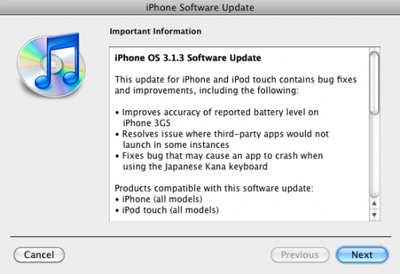
This update for the iPhone and iPod touch contains bug fixes and improvements, including the following:
- Improves accuracy of reported battery level on iPhone 3GS
- Resolves issue where third-party apps would not launch in some instances
- Fixes bug that may cause an app to crash when using the Japanese Kana keyboard
Top Rated Comments
(View all)26 months ago
Got this link to info on 3.1.3 in the RSS feed.
http://support.apple.com/kb/HT4013
So it should be live in iTunes shortly.
http://support.apple.com/kb/HT4013
So it should be live in iTunes shortly.
26 months ago
APPLE-SA-2010-02-02-1 iPhone OS 3.1.3 and iPhone OS 3.1.3 for iPod
touch
iPhone OS 3.1.3 and iPhone OS 3.1.3 for iPod touch is now available
and addresses the following:
CoreAudio
CVE-ID: CVE-2010-0036
Available for: iPhone OS 1.0 through 3.1.2,
iPhone OS for iPod touch 1.1 through 3.1.2
Impact: Playing a maliciously crafted mp4 audio file may lead to an
unexpected application termination or arbitrary code execution
Description: A buffer overflow exists in the handling of mp4 audio
files. Playing a maliciously crafted mp4 audio file may lead to an
unexpected application termination or arbitrary code execution. This
issue is addressed through improved bounds checking. Credit to Credit
to Tobias Klein of trapkit.de for reporting this issue.
ImageIO
CVE-ID: CVE-2009-2285
Available for: iPhone OS 1.0 through 3.1.2,
iPhone OS for iPod touch 1.1 through 3.1.2
Impact: Viewing a maliciously crafted TIFF image may lead to an
unexpected application termination or arbitrary code execution
Description: A buffer underflow exists in ImageIO's handling of TIFF
images. Viewing a maliciously crafted TIFF image may lead to an
unexpected application termination or arbitrary code execution. This
issue is addressed through improved bounds checking.
Recovery Mode
CVE-ID: CVE-2010-0038
Available for: iPhone OS 1.0 through 3.1.2,
iPhone OS for iPod touch 1.1 through 3.1.2
Impact: A person with physical access to a locked device may be able
to access the user's data
Description: A memory corruption issue exists in the handling of a
certain USB control message. A person with physical access to the
device could use this to bypass the passcode and access the user's
data. This issue is addressed through improved handling of the USB
control message.
WebKit
CVE-ID: CVE-2009-3384
Available for: iPhone OS 1.0 through 3.1.2,
iPhone OS for iPod touch 1.1 through 3.1.2
Impact: Accessing a maliciously crafted FTP server could result in
an unexpected application termination, information disclosure, or
arbitrary code execution
Description: Multiple input validation issues exist in WebKit's
handling of FTP directory listings. Accessing a maliciously crafted
FTP server may lead to information disclosure, unexpected application
termination, or execution of arbitrary code. This update addresses
the issues through improved parsing of FTP directory listings. Credit
to Michal Zalewski of Google Inc. for reporting these issues.
WebKit
CVE-ID: CVE-2009-2841
Available for: iPhone OS 1.0 through 3.1.2,
iPhone OS for iPod touch 1.1 through 3.1.2
Impact: Mail may load remote audio and video content when remote
image loading is disabled
Description: When WebKit encounters an HTML 5 Media Element pointing
to an external resource, it does not issue a resource load callback
to determine if the resource should be loaded. This may result in
undesired requests to remote servers. As an example, the sender of an
HTML-formatted email message could use this to determine that the
message was read. This issue is addressed by generating resource load
callbacks when WebKit encounters an HTML 5 Media Element.
Installation note:
These updates are only available through iTunes, and will not appear
in your computer's Software Update application, or in the Apple
Downloads site. Make sure you have an Internet connection and have
installed the latest version of iTunes from www.apple.com/itunes/
iTunes will automatically check Apple's update server on its weekly
schedule. When an update is detected, it will download it. When
the iPhone or iPod touch is docked, iTunes will present the user with
the option to install the update. We recommend applying the update
immediately if possible. Selecting Don't Install will present the
option the next time you connect your iPhone or iPod touch.
The automatic update process may take up to a week depending on the
day that iTunes checks for updates. You may manually obtain the
update via the Check for Updates button within iTunes. After doing
this, the update can be applied when your iPhone or iPod touch is
docked to your computer.
To check that the iPhone or iPod touch has been updated:
* Navigate to Settings
* Select General
* Select About. The version after applying this update will be
"3.1.3 (7E18)" or later.
Information will also be posted to the Apple Security Updates
web site: http://support.apple.com/kb/HT1222
touch
iPhone OS 3.1.3 and iPhone OS 3.1.3 for iPod touch is now available
and addresses the following:
CoreAudio
CVE-ID: CVE-2010-0036
Available for: iPhone OS 1.0 through 3.1.2,
iPhone OS for iPod touch 1.1 through 3.1.2
Impact: Playing a maliciously crafted mp4 audio file may lead to an
unexpected application termination or arbitrary code execution
Description: A buffer overflow exists in the handling of mp4 audio
files. Playing a maliciously crafted mp4 audio file may lead to an
unexpected application termination or arbitrary code execution. This
issue is addressed through improved bounds checking. Credit to Credit
to Tobias Klein of trapkit.de for reporting this issue.
ImageIO
CVE-ID: CVE-2009-2285
Available for: iPhone OS 1.0 through 3.1.2,
iPhone OS for iPod touch 1.1 through 3.1.2
Impact: Viewing a maliciously crafted TIFF image may lead to an
unexpected application termination or arbitrary code execution
Description: A buffer underflow exists in ImageIO's handling of TIFF
images. Viewing a maliciously crafted TIFF image may lead to an
unexpected application termination or arbitrary code execution. This
issue is addressed through improved bounds checking.
Recovery Mode
CVE-ID: CVE-2010-0038
Available for: iPhone OS 1.0 through 3.1.2,
iPhone OS for iPod touch 1.1 through 3.1.2
Impact: A person with physical access to a locked device may be able
to access the user's data
Description: A memory corruption issue exists in the handling of a
certain USB control message. A person with physical access to the
device could use this to bypass the passcode and access the user's
data. This issue is addressed through improved handling of the USB
control message.
WebKit
CVE-ID: CVE-2009-3384
Available for: iPhone OS 1.0 through 3.1.2,
iPhone OS for iPod touch 1.1 through 3.1.2
Impact: Accessing a maliciously crafted FTP server could result in
an unexpected application termination, information disclosure, or
arbitrary code execution
Description: Multiple input validation issues exist in WebKit's
handling of FTP directory listings. Accessing a maliciously crafted
FTP server may lead to information disclosure, unexpected application
termination, or execution of arbitrary code. This update addresses
the issues through improved parsing of FTP directory listings. Credit
to Michal Zalewski of Google Inc. for reporting these issues.
WebKit
CVE-ID: CVE-2009-2841
Available for: iPhone OS 1.0 through 3.1.2,
iPhone OS for iPod touch 1.1 through 3.1.2
Impact: Mail may load remote audio and video content when remote
image loading is disabled
Description: When WebKit encounters an HTML 5 Media Element pointing
to an external resource, it does not issue a resource load callback
to determine if the resource should be loaded. This may result in
undesired requests to remote servers. As an example, the sender of an
HTML-formatted email message could use this to determine that the
message was read. This issue is addressed by generating resource load
callbacks when WebKit encounters an HTML 5 Media Element.
Installation note:
These updates are only available through iTunes, and will not appear
in your computer's Software Update application, or in the Apple
Downloads site. Make sure you have an Internet connection and have
installed the latest version of iTunes from www.apple.com/itunes/
iTunes will automatically check Apple's update server on its weekly
schedule. When an update is detected, it will download it. When
the iPhone or iPod touch is docked, iTunes will present the user with
the option to install the update. We recommend applying the update
immediately if possible. Selecting Don't Install will present the
option the next time you connect your iPhone or iPod touch.
The automatic update process may take up to a week depending on the
day that iTunes checks for updates. You may manually obtain the
update via the Check for Updates button within iTunes. After doing
this, the update can be applied when your iPhone or iPod touch is
docked to your computer.
To check that the iPhone or iPod touch has been updated:
* Navigate to Settings
* Select General
* Select About. The version after applying this update will be
"3.1.3 (7E18)" or later.
Information will also be posted to the Apple Security Updates
web site: http://support.apple.com/kb/HT1222
26 months ago
It's out now. iTunes is prompting me to download.
As always, jailbreakers and unlockers are encouraged to leave it the heck alone until it has been vetted by Dev Team and the like. :)
-- Nathan
As always, jailbreakers and unlockers are encouraged to leave it the heck alone until it has been vetted by Dev Team and the like. :)
-- Nathan
26 months ago
Yeah, see the entry in the post above that says "Recovery Mode CVE-ID: CVE-2010-0038"?
That means Apple closed off the iBoot vulnerability that both blackra1n and the latest redsn0w (0.9.x) use to jailbreak your phones.
If you have iPhone, iPhone 3G, iPod Touch 1G or 2G, you can downgrade if you accidentially update (there is no news yet as to whether or not 3.1.3 contains a baseband update for 3G/3GS though).
If you have iPhone 3GS (either the earlier OR later/tethered-jailbreak version) or iPod Touch 3G or 2G 8GB "MC" model, and you update, for now you're screwed. No way to downgrade, and no way to jailbreak again.
-- Nathan
That means Apple closed off the iBoot vulnerability that both blackra1n and the latest redsn0w (0.9.x) use to jailbreak your phones.
If you have iPhone, iPhone 3G, iPod Touch 1G or 2G, you can downgrade if you accidentially update (there is no news yet as to whether or not 3.1.3 contains a baseband update for 3G/3GS though).
If you have iPhone 3GS (either the earlier OR later/tethered-jailbreak version) or iPod Touch 3G or 2G 8GB "MC" model, and you update, for now you're screwed. No way to downgrade, and no way to jailbreak again.
-- Nathan
[ Read All Comments ]

One of the most frequent reasons for an iPhone to go on a trip to the Apple Store's Genius Bar is because of water damage. Typically, a water damaged iPhone can be replaced for a flat $199...
TheVerge's Joshua Topolsky summarizes the iPad 3 casing findings reported earlier today, but also adds his own sources regarding some details of the iPad 3.
Image from RepairLabs
As...
Last July, Apple discontinued the white MacBook from its consumer lineup, pushing consumers toward the company's popular MacBook Air line or the 13-inch MacBook Pro. The company didn't kill...
Popular iPhone Twitter client Tweetbot has finally arrived on the iPad, with a user interface instantly familiar to any current Tweetbot user. Designed for the Twitter power-user, Tweetbot packs a...
Last month, we noted that Apple had signed a pair of leases for over 300,000 square feet of space in Sunnyvale, the company's first venture into the city next door to its home in Cupertino,...