

Got a tip for us? Share it...

MobileMe File Sharing Now Available


Apple has announced on their MobileMe news page that they have enabled file sharing via iDisk.

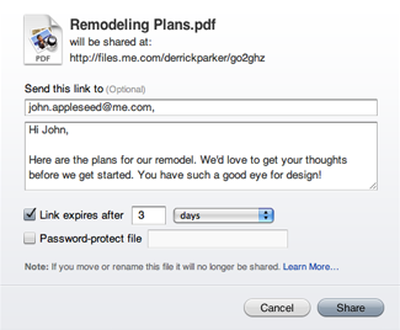
We're pleased to announce that you can now use your MobileMe iDisk to share files with others simply and easily. Instead of attaching a large document to an email and hoping it's not too big to be received, you can place the file in your iDisk and use the new Share File command in the iDisk web app. It lets you send your friends, family, or colleagues a link they can click to download the file directly. You can password protect the link if you choose to and even set how long it will be available.

Apple has also provided a video tutorial demonstrating the process, which involves simply selecting a file, clicking a "Share File" button, and customizing options and the message to accompany the link to be sent to the recipient.

iDisk file sharing was targeted to be included in the July 2008 launch of MobileMe, but was removed at the last minute, although Apple's iDisk page continued to promise that the feature was in the works.

The MobileMe launch was marred by a series of problems, acknowledged by Steve Jobs and resulting in customers being offered several free extensions to their MobileMe subscriptions. In particular, Jobs expressed regret that Apple had attempted to launch MobileMe in a single, complicated transition rather than in stages.


Top Rated Comments

(View all)

39 months ago
If you have a MobileMe account you should be able to see this too. Navigate to /idisk/ on your MobileMe account. There should be a "Shared Files" tab located under the Home, Public tabs above. I am quite sure this is new, I haven't noticed this before and am not certain what its use is for. I am, however guessing it has something to do with 'iTunes Replay' ( http://www.macrumors.com/2009/02/11/itunes-replay-on-demand-video-coming/).

-Virtuo
Rating: 0 Positives / 0 Negatives
39 months ago
I noticed it, too. Since it's on the iDisk page, I was thinking it was the long-awaited (by some) large file sharing feature.
Rating: 0 Positives / 0 Negatives
39 months ago
The long awaited feature is now here!

I just messed around with it. Honestly, this is a HUGE feature. Makes MobileMe worth it for me. You can choose when the links expire, put a password on the shared file, etc.

Links go to files.me.com/username/filename

EDIT: saw after posting that it was kinda mentioned here.
Rating: 0 Positives / 0 Negatives
39 months ago
Yep, its the file sharing feature.
Rating: 0 Positives / 0 Negatives
39 months ago
Oh finally.....
Rating: 0 Positives / 0 Negatives
39 months ago
Just went and played around with it. Pretty sweet. Now here's the $25,000 Question: How do I share a file from my desktop (meaning: without going into the MobileMe website)?
Rating: 0 Positives / 0 Negatives
39 months ago
Nah.. you really cant...

From Apple

The process is a simple matter of going to iDisk on me.com, selecting the file you want to share, and clicking the Share File button.

Rating: 0 Positives / 0 Negatives
39 months ago
I'm happy it's finally here. Not sure if it would be used a lot, but one feature missing that was in the original MM guided tour video is the ability to expire the link after a specific number of downloads. So far, it expires only based on time.

But, it's really cool that they finally turned on this feature. Too many times have I gotten auto-replies about my message not being delivered because the attachment was too large.
Rating: 0 Positives / 0 Negatives
39 months ago
This has to be asked with anything related to mobile me, does it actually work?
Rating: 0 Positives / 0 Negatives
39 months ago
Hummmm.... cool?
Rating: 0 Positives / 0 Negatives

[ Read All Comments ]













