Got a tip for us? Share it...

FlipBook and Flickbook: Animation Apps for iPhone


Two iPhone apps with similar names and similar functionality have appeared to offer those with artistic ability a chance to create their own flip book type animations on their iPhone.

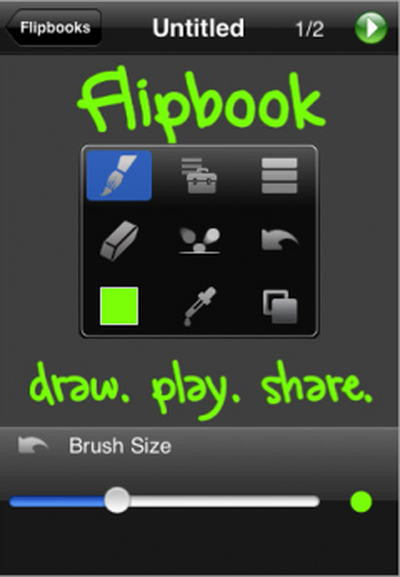
FlipBook [$9.99, App Store] by Josh Anon provides what appears to be a relatively sophisticated set of tools to create animations right on your iPhone.

FlipBook has everything you need to get started animating, from an eraser to onion skinning to layered drawing. Load images from your photo library, including images taken with your iPhone's camera, and draw on top of them. If you make a mistake, just touch Undo or double-tap for Redo. Touch Play when you're ready to see how your movie looks.

Unique to Flipbook is the ability to export movies onto the Flipbook.tv. Those movies can later be downloaded and reuploaded to Youtube. Forum member, TimothyB, has posted a couple of his early creations: chase scene, Fox.

FlipBook provides multiple tour videos to walk you through the application.

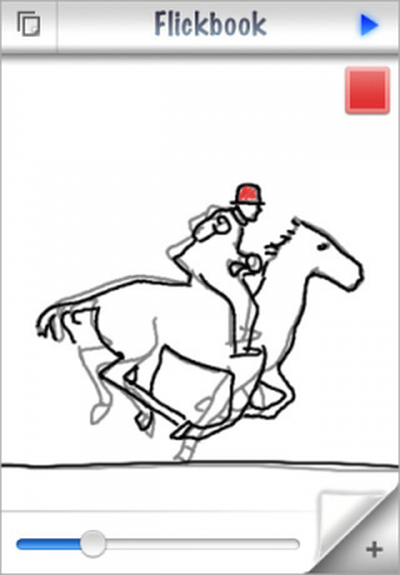
Flickbook [$4.99, App Store] by Geoff Pado offers a simpler flipbook interface that allows you to quickly create animations. Features listed include:

- Faint reminder of your previous frame making it easier to draw the next.
- Unlimited undo
- Smooth playback
- "Painless shading"

A video demo is offered at the developer's site: Flickbookapp.com. There is no way to export Flickbook's videos at this time, but the developer is said to be working on it for a later update.


Top Rated Comments

(View all)

Posted: 50 months ago
Pretty nice app "if I want my nephew to thrash my 3G iPhone like he did my v1 iPhone!" My v1 iPhone looked like it had been beaten with a Hershey's Chocolate Bar after 4-6 hours of his watching videos and TV shows I'd downloaded from iTunes. (I'm not mad at him, his Dad bought me a big bottle of iKlear). :p
Rating: 0 Positives / 0 Negatives
Posted: 50 months ago
Man, this looks really cool. Something to fiddle with when bored. I'm somewhat interested in FlipBook, that looks worth the $10 especially with the photo drawing feature.
Rating: 0 Positives / 0 Negatives
Posted: 50 months ago
which is the best one?
Rating: 0 Positives / 0 Negatives
Posted: 50 months ago

which is the best one?


depends on your needs.

Here's a closer look at Flickbook

http://arstechnica.com/journals/apple.ars/2008/08/06/review-hand-draw-animations-on-your-iphone-with-flickbook

arn
Rating: 0 Positives / 0 Negatives
Posted: 50 months ago

which is the best one?


They are both good, but on different playing levels with equally different price range.

1: The lower price $5 Flickbook is a great price for everyone that wants to sketch and animate. A simple clean UI with basic tools to make it easy to pick up and use. Has the unique color build up feature.

2: If you need something more advance, with layers, brush sizes, eraser, duplicate, eyedropper, color slider, drag, copy and paste, redo, load pictures, zooming so you can draw smaller details easier, delete any frame you want or go back and duplicate frames at an earlier point, several framerate options, onion skin forward, then the $10 one is your ticket. Because of all that it can do, it may be a overwhelming at first until you read the tips, know of the quick menu bar and get a sense of where all the tools are and extra hidden commands with double taps. I found myself quickly loving it thanks to the well designed UI to quickly access all the most used tools.

Does anyone know if the $5 Flickbook app has brush size options? I like that it has the color buildup option for what it says is effortless shading, but if you wanted to fill something with a color, then the thin brush might not be so effortless (unless you leave it sketchy and not solid). Does it have an eraser, or is it only undos? EDIT: The last post made clear out the simplicity of Flickbook, as by design, so there's no multiple brush sizes, eraser, or color sliders, but it does have unlimited undos.

Overall:
I feel the $10 Flipbook isn't just for animating, but also is one of the most full fledged drawing programs in the app store, especially thanks to layers. While the $5 Flickbook seems designed well for quick easy animation for everyone, but the drawing side is just enough to get that job done, while it may disappoint artist that hope to do more. But these app are priced right for those that want to have fun and those that want to push things to the limits.
Rating: 0 Positives / 0 Negatives
Posted: 50 months ago
Also, on exporting your animations:

It's an unfair comparison right now, as $5 Flickbook has no export option, but said that it will soon.

The $10 Flipbook offers 2 options, plus more in updates. Right now, it can export each frame to your camera roll as separate images. I then created a gif animation uses those, or a nice way if you just do a painting and want to export it.

The 2nd option is with a free account at flipbook.tv, it uploads your animation there and creates a quicktime h.264 video. And at any time on the website, with edit, you don't need to upload it again to make playback changes. So you can type in any frame rate, change it from portrait to landscape, turn on loop, and public and private view. Further, once online, you have a direct download link for the .mp4 video file that works with youtube. The author has said they are working on improving the website, possibly to have rating systems and such.
Rating: 0 Positives / 0 Negatives
Posted: 50 months ago
I have Flipbook and it rocks! after getting a few test out of the way a just playing with the features to get the hang of what it does, Flipbook uses 3 finger, 2 fingers, and 1 finger and has a quick menu when you hold one finger to the screen. I love the move feature so you don't have to redraw what doesn't need to be redrawn. But by far the best feature is the LAYERS - with multiple layers you are able to move some object and not others or you can easily erase something since it it on it's own layer.

And in case some of you think I am developer of the APP or a friend or something -I wish I worked at Pixar and had his photographic talents but I don't and I do not know him except for what can be read on the Flipbook web site. I just appreciate a full featured APP and not just another App that works ok on a multi-touch screen but doen not fully exploit its capabilities.

iI no-ways am I saying that Flickbook is a bad app I haven't tryed it but I want to try it (just not to pay for it since I already have Flipbook)

All I can say is that Flipbook just kept amazing me with all of its features - definitely worth the price!
Rating: 0 Positives / 0 Negatives
Posted: 50 months ago
With my two animations done so far, featured in the first post...

The chase scene is doable in $5 Flickbook, but more work since you can't duplicate frames or drag the drawing around to create quick movement. Like the top view of the truck as to shots were fired at it. The ground was a bottom layer and I duplicated the frame then dragged that layer slightly to make it appear to move in each frame. Now, sometimes when I dragged the truck, I purposely erased and redrew parts just to give it some change.

But the toon Fox animation quality, I don't think I could replicate that in Flickbook, this is where $10 Flipbook's features turn it into a Photoshop like app. Layers were greatly needed for the moon background to be separate and brush sizes to color it, plus eye dropper to fix areas with the same color.

I used a layer to do rough sketches first, then another layer to do a cleaner version on top, which I needed the eraser and zoom tool to have enough control with my finger.

Then a 3rd layer to do the fox's color behind the top line layer. Oh, and of course duplicate or copy and paste to animate just the fox's eye blinking without redrawing the entire character. And I added that eye blink at the very end of the drawing, even though it's at the beginning of the animation, as with a menu feature, you can duplicate any frame at anytime, but you can't rearrange them, at least yet.
Rating: 0 Positives / 0 Negatives
Posted: 50 months ago
flickbook looks nicer to me (the ball bounce screen cap)
if i had an iphone i would buy both just to make sure i have the better one
Rating: 0 Positives / 0 Negatives
Posted: 50 months ago
Hi,
I'm the developer of FlipBook, and I wanted to just take a second to say that if you have any questions, comments, feature requests, bug reports, etc., please use the contact form on flipbook.tv to tell us! We answer every email we receive promptly, because we are trying to create a great app for a great platform. We think we've set the bar high with FlipBook 1.0 and want to keep it above everyone else as we move forward. People are even starting to use FlipBook just to make 1-frame drawings; check out http://blog.hellotim.com to see a one-pane comic drawn with FlipBook.

For a more detailed review of FlipBook, check out the TUAW review. They decided that "[FlipBook is] incredibly easy to use" and concluded that "FlipBook is a well-designed program with excellent interaction details."

For those of you still on the fence, we have a free, "lite" edition in the AppStore approval queue. It's FlipBook, but limited to 2 movies (with at most 10 frames and 2 layers each) and 1 hosted movie on flipbook.tv. Let's try to get FlipBook Lite onto the free apps top 10!

We also have an update to FlipBook coming out that fixes an autosave bug, fixes an onion skinning-related crash, and improves playback performance.

Have fun drawing, and let us know if you draw something awesome. If you haven't seen TimothyB's fox, check it out. it is outstanding!
Rating: 0 Positives / 0 Negatives

[ Read All Comments ]