

Cloud-based services like iCloud and Dropbox are useful because they make documents, photos, and other media easily shareable and accessible anywhere, but there is a downside -- that content is stored offsite on an unknown server not under an individual user's control.
With Apollo, a new personal cloud device launching today, Promise Technology aims to combine the cloud's ease of use with the security of local storage. The Apollo, Promise Technology's first consumer-facing product, is also the first network-attached storage option for families and small businesses, designed specifically to allow for multiple individuals to share dedicated storage space.
The Apollo, priced at $299, is being sold exclusively through Apple.com and in Apple retail stores starting on June 7.
Design and Specs
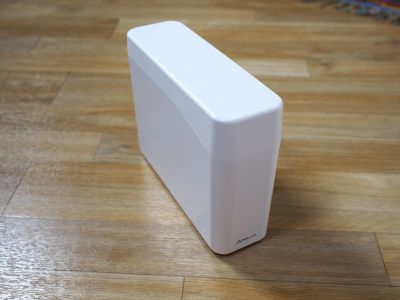
Apollo is a 4TB network-attached storage device, which plugs into a router to connect to a home (or small business) Wi-Fi network. The Apollo is compact and sleek looking, with an aesthetic that easily matches Apple's own line of devices. Made from a clean white plastic, the Apollo measures in at 5.6 inches by 7.5 inches and it is 2.4 inches thick with a rectangular shape.
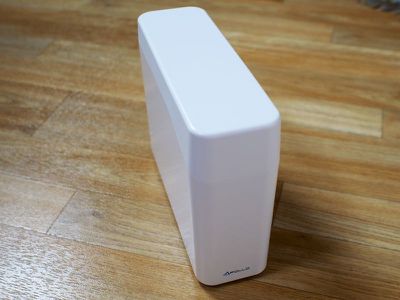
As seen in the photo below, it's not much taller than an iPhone 6s Plus, and it's similar in size to many home cable modems and routers. It includes a Gigabit Ethernet port, a USB 3.0 port (for plugging into a computer and for attaching an additional hard drive for backing up the Apollo), 1GB RAM, a 1GHz Marvell ARMADA 380 CPU, and the aforementioned 4TB SATA hard drive. In my testing, the Apollo was quiet during operation.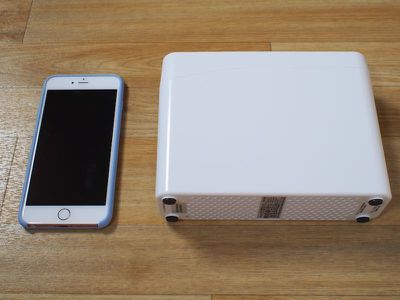
With its small size, the Apollo fits well on a desk, media stand, or shelf, allowing it to be discretely placed wherever a router is located. It is small enough that I was able to stash it behind my TV set where it wasn't visible.
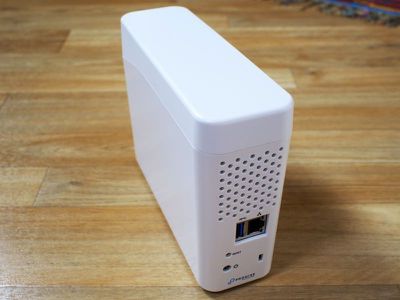
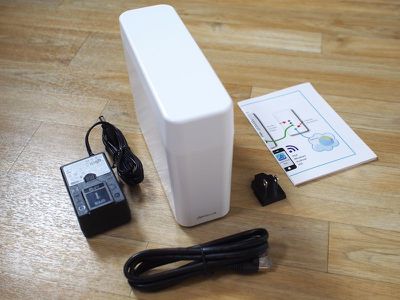
The Apollo will need to be connected to a router through an included Ethernet cable and plugged into a power source. Setting up the Apollo was straightforward -- I plugged in the necessary cables and then followed a setup process through the iOS app that involved creating an account and establishing a connection. The Apollo can be set up using any of the available apps.
Functionality
Apollo is a network-attached storage device, which means the files uploaded to it are available anywhere an Internet connection is available, much like a full cloud-based service like Dropbox. Uploading and streaming content from Apollo is restricted by your home Internet speeds, so file transfer and streaming speeds are not always going to match speeds downloading from a cloud service.
The Apollo works across multiple platforms, with apps available for PCs, Macs, Android, and iOS devices, and it can be used to share, store, and back up any type of file. Video and music files can be streamed from the Apollo directly onto your devices, while photos and other files can be viewed or opened on compatible devices. For example, if I upload a Pages document to Apollo from my Mac, I can then access it on the Apollo app on my iPhone and open it up in the Pages iOS app for editing.
Apollo is perfectly functional for a single user, but it also supports up to 10 users, so it works as a cloud sharing platform for the whole family or for all of the members of a small business. Every person who uses the Apollo gets their own dedicated storage space, which can be set up through the app by the primary user, established as the first person that connects to the Apollo.
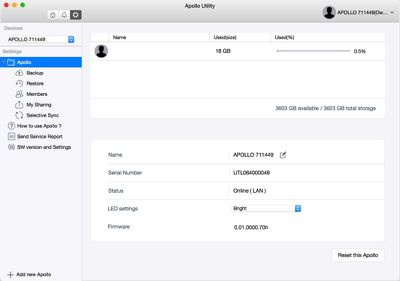
Every user is given completely private storage access and no one else can view or touch the files that are uploaded, including the Apollo's primary user, so it's just like each person having a personal Dropbox account, but stored locally. Apollo settings and account creation are controlled by the owner, but individual users have full access to everything else -- uploading files, downloading files, and sharing files. In my experience, the multi-user setup worked flawlessly.
All Apollo users can share files uploaded to the Apollo, either with other Apollo users through a private link or with any person (even a non-Apollo user) with a public link. When uploading a file and creating a public link, it can be messaged, emailed, or sent via AirDrop to any contact and it will be available for 30 days. Users will see a browser page with a link to a zipped file, and the Apollo supports public link file sizes up to 1GB.

All file transfers to and from the Apollo are fully encrypted, using the same encryption built into Promise's professional line of storage devices. With shared files and folders, Apollo members can leave comments on files, making it ideal for sharing commentary on photos or collaborating on documents.
As mentioned above, file transfer speeds are limited by your home connection. I have a home connection that probably matches the speeds the average user has access to, with 120Mb/s for downloads and 6Mb/s for uploads. When sharing a file with someone from the Apollo, their download speed is limited by my upload speed.
With a 1GB test file, it took approximately two minutes to upload to the Apollo from my computer, but when I shared the link with a coworker, it took 40 minutes to download. Comparatively, it took me 30 minutes to upload a 1GB file to Dropbox, and only 90 seconds for my coworker to download. With Dropbox, downloads aren't hindered by my upload speeds once they're on the company's servers. As another speed example, it took just about 15 minutes to upload the entire camera roll from my iPhone, about 2,300 images.
There are a lot of network-attached storage systems out there, each with varying degrees of complexity. Apollo is designed to be as easy to use as Dropbox, with a simple setup process and apps that are straightforward and basic. Getting the Apollo set up and using it was definitely simple, so anyone who's savvy enough to use Dropbox or iCloud is going to be able to use Apollo.
It's not so simple that I could buy it for my mom, but it's not as complex as something like a Synology NAS, and Promise is offering 90 days of phone support, a 2-year warranty, and chat/online support.
Because it's designed to be simple, the Apollo is lacking in features. It's basically a place to dump, share, and store files. There's a feature that supports automatic camera roll backups from iOS devices for each user, but there are no other bells and whistles like tools for automatically backing up files on the Mac (there's no support for Time Machine), accessing content from a browser, editing files directly on the device, or setting up automatic file downloads or website hosting, all things that are possible with more advanced devices.
Software
The Apollo can do a lot of useful things, but it is hindered by the software Promise has designed to go along with it. I used the Apollo with a dedicated Mac app and an iOS app, both of which I thought were disappointing. Dedicated apps are the only way to access Apollo's content -- there is no web option.
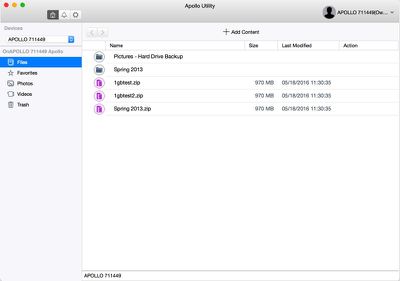
The Apollo Mac app is a simple file viewer, displaying all of the content that's been uploaded to Apollo. It has four sections: Files, Favorites, Photos, and Videos, and that's the total extent of the organization on Apollo, aside from the folders you create yourself, and there are no options for sorting based on date, file size, file type, or other metric.
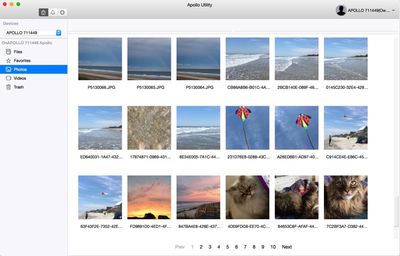
Every photo uploaded to Apollo, for example, is visible through the Photos section and organized in a grid by date, but there are no viewing options beyond that. I can't sort by file name, I can't scroll through photos, and I can't search for specific photos, making it impossible to find anything. Photos are organized on numbered pages and to sort through them, I have to click through each page. It's tedious, time consuming, and makes browsing through photos unpleasant.
The same is true of the videos tab, and I'm not sure why, but there is no tab for music, so there's no simple way to aggregate all music files into one place except through user-designated folders.
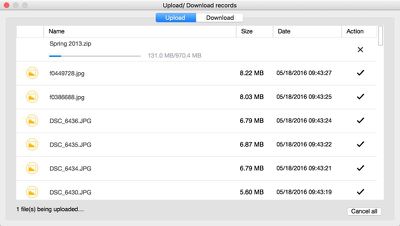
When uploading content, there's a pop-up progress window, but it does have a tendency to freeze up when attempting to upload a lot of files at once. When that happens, there's no way to check syncing progress because once the window is closed, the app doesn't have another method for keeping tabs on transfers. There's also no time estimate for uploads on the Mac app. Everything I dragged to the Apollo Mac app uploaded successfully, with the exception of a 50GB folder that completely stalled. There is a 30GB size limit for each individual file uploaded to the Apollo, and folders can support up to 30,000 files.
Apollo's iOS app is basically the same as the Mac app, with an identical layout. I can scroll through content on iOS, though, so the user experience is better despite the fact that there are still no organizational and sorting options for content. With the iOS app, there's an option to automatically back up the camera roll, syncing all files to the Apollo whenever they're taken. Camera roll syncing is one-way only - deleting files from the camera roll won't delete them from Apollo once uploaded.
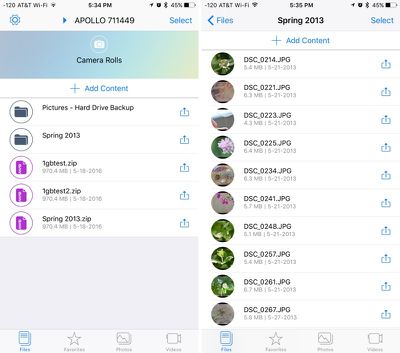
Both the iOS and Mac apps support multiple video and audio files, so content can be streamed in the app. I tested .MKV, .MOV, .MP4, and .MP3 files and most of these played well directly on my Mac or iPhone from the Apollo apps. Apollo officially lists .MOV, .MP4, and .M4V as supported on iOS devices.
Video controls are rudimentary, limited to pausing and fast forwarding/rewinding, but videos do play (both at home and when away) as long as you've got a decent Wi-Fi connection. This isn't my preferred method for watching videos when away from home, but it works in a pinch.

Apollo's Mac app also installs a sync folder accessible through the Finder. Files put into this folder will automatically sync to the Apollo, and all files added to the Apollo (from the iOS app, for example) will sync to the folder. Folders do not sync automatically, but can be set to sync through selective syncing options. Dropbox users will be familiar with the behavior of the syncing folder.
iOS 8 or later, OS X 10.8 or later, and Android 4.4 or later are required to use the various apps. On Windows machines, the Windows app is compatible with Windows 7, 8, Vista, and 10, and while basic at the current time, it is being updated with new features in the future.
Bottom Line
For small businesses and families that want the option to easily share files in a safe, secure way, the Apollo is a useful device. At home, it's a good way for multiple family members to share photos, music, videos, and other media types so that content is always accessible to everyone wherever they are, and it's an alternative to cloud services that are ultimately going to be more expensive. At work, it's useful for collaboration.
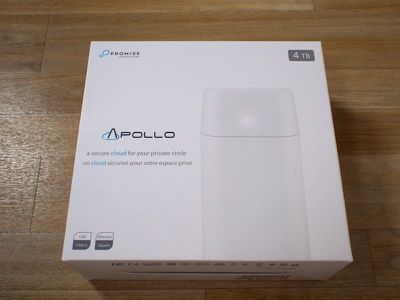
The Apollo is priced at $299 for 4TB of storage space, which is cheaper than Dropbox or iCloud after 2-3 years. Dropbox charges $99 per year for 1TB of storage space, while Apple charges $9.99 per month for 1TB. With 4TB of storage, there's plenty to share among several users.
Apollo is functionally identical to many online cloud storage services, so it's best to think of it as a private version of Dropbox or Box rather something like a NAS running DiskStation. It's going to meet the needs of someone looking for a cloud storage replacement or extra backup option, but if you want something beyond what Dropbox can do, the Apollo may be a disappointment.
During my testing, the Apollo worked well. It was easy to use and it did what Promise said it would. Aside from some hiccups when attempting to upload massive folders, file transfers were smooth, it stayed online, and my files were accessible through the Mac and iOS apps.
I was unimpressed with the Apollo apps, mainly due to the lack of search and the inability to sort and view my files in a useful way. Such a simple file system is fine for a small number of files, but when you have a couple of terabytes of content uploaded to the Apollo, it gets a lot more frustrating. Luckily, software is easy to fix, so I'm hopeful the Apollo apps will improve over time to meet customer needs.
Pros:
- No storage fees
- Easy to set up and use
- Data transfers AES256 encrypted
- Multi-user support
- Public and private sharing available
- Can back up Apollo through USB port
Cons:
- Only 4TB capacity available
- Functionality is basic compared to other NAS options
- No search
- Poor file organization
- Software needs improvement in general
How to Buy
Apollo can be purchased from the Apple online store and from Apple retail stores for $299 on June 7.
Note: Promise Technology provided an Apollo to MacRumors free of charge for the purposes of this review. No other compensation was received.



















Top Rated Comments
[doublepost=1464102760][/doublepost]It's simpler. I'd say for the average user, Diskstation is a bit complicated to use. This isn't. You plug it in and it works like Dropbox.
[doublepost=1464102862][/doublepost]Listed as a con because there aren't other options (smaller and larger). Some competing products have higher storage capacities as an option.
Single disk (no redundancy) to the list of cons....