

I've covered a lot of Thunderbolt 3 docks in recent months, but there's one more upcoming model that's worth taking a look at. The TBT3-UDV is Plugable's upcoming flagship Thunderbolt 3 dock, featuring five USB 3.0 Type-A ports, Gigabit Ethernet, DisplayPort, stereo in/out, and a pair of Thunderbolt 3 ports. The dock isn't available for purchase yet, as Plugable is still awaiting Thunderbolt certification, but the company tells me it's aiming for an early October launch assuming the certification comes through in a timely fashion.
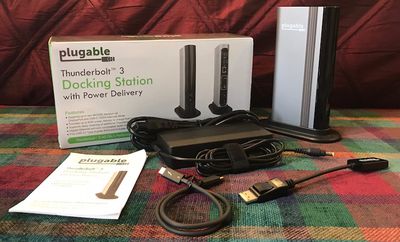
In the box, you'll find the typical components including the dock itself, an external power brick, and a 0.5-meter Thunderbolt 3 cable. One nice touch I haven't seen with other docks is an included DisplayPort to HDMI 2.0 active adapter, normally sold separately for $19, which makes it easier to hook up a broader array of displays, televisions, and projectors to the dock.
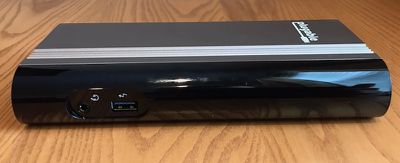
Notably, the TBT3-UDV can be oriented either horizontally like most other Thunderbolt 3 docks or vertically using an included stand. It's a nice feature that the dock has in common with CalDigit's TS3, but differences in their designs mean the Plugable dock is taller and more slender in its vertical orientation compared to the TS3's block-like design.
Design
While it might have an awful name, the design of the TBT3-UDV stands out on a desk, particularly in its vertical orientation. The enclosure is constructed of a matte aluminum that's fairly close to Apple's Space Gray color and which has a few deep grooves on each side to add some style. The curved front edge of the dock is made of a glossy black plastic, as is the rear port panel.
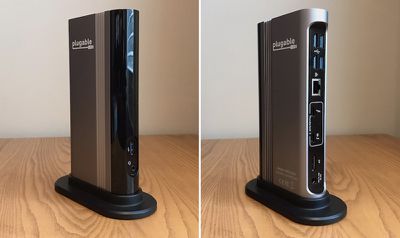
There are somewhat prominent white Plugable logos on each side, as well as some model and regulatory information near the bottom of one of the sides. A bit cleaner look would have been nicer, especially considering the eye-catching hardware design, but it's not terrible. A pair of status lights, green for power and blue for data connection to a computer, are hidden beneath the black plastic on the front edge of the dock.
USB Ports
One of the key features of the TBT3-UDV is its five USB Type-A ports, four on the rear and one on the front. This array of USB ports is only matched by OWC's Thunderbolt 3 Dock, with nearly every other dock on the market offering only three ports.

All five ports are 5 Gbps USB 3.0/3.1 Gen 1, so you'll get solid transfer speeds like the 325 MB/s write and 350 MB/s read I saw with a fast external SSD, typical for these types of docks. If you want even more speed, you'll have to use the available Thunderbolt 3/USB-C port on the rear for 10 Gbps USB 3.1 Gen 2 support, which clocked in at 470 MB/s write and 495 MB/s read with the external SSD.

Unfortunately, the four USB ports on the rear of the dock are clustered very closely together. It helps keep the overall dock footprint compact, but it means if you have oversized USB peripherals like card readers or certain flash drives plugged into the back, they will likely block access to some of the other USB ports.
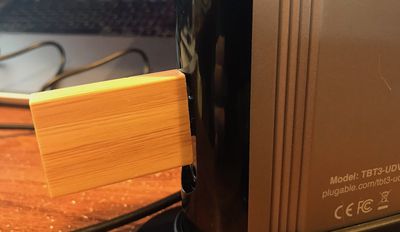
I also have one fairly wide flash drive that won’t even plug into the front USB port because of the recessed design. It doesn't really even fit in the two rear USB ports closest to the edge of the dock, although I can insert it just far enough to make a connection. This might not be a deal breaker if you're mostly connecting USB cables and skinny sticks, but it's something to be aware of.
Displays
As with other Thunderbolt 3 docks, the TBT3-UDV can support up to either a single 5K display over Thunderbolt 3 or two 4K displays using a Thunderbolt 3/USB-C port and the DisplayPort port (potentially with adapters to convert to other standards). Hooking up an LG UltraFine 5K display to the downstream Thunderbolt 3 port worked fine, with the display running at 60 Hz and experiencing no lag or other hiccups.
In addition to the DisplayPort to HDMI 2.0 cable included in the box with the dock, Plugable also sent me two of the company's USB-C cables: the USB-C to DisplayPort and USB-C to HDMI 2.0 cables that have proven popular with customers on Amazon for their quality and pricing (currently $21.95 each).
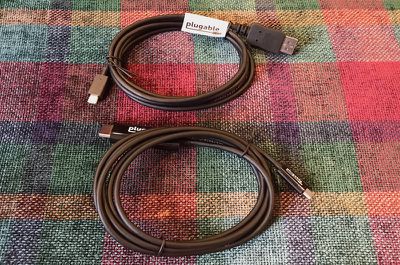
The cables, which it's important to emphasize are sold separately and not included with the TBT3-UDV dock, expand the number of display options for use with the dock, and can also be used on a standalone basis with USB-C Macs to connect to external displays that don't directly support USB-C.
I tested hooking up to an LG 27UD88 Ultra HD display in a variety of configurations, including direct DisplayPort to DisplayPort connection from the dock, DisplayPort to HDMI via the dock using the included adapter, and USB-C to DisplayPort and HDMI from both the dock and directly from the MacBook Pro using the additional cables supplied by Plugable.
All of the connections to the DisplayPort port on the 27UD88 worked perfectly, running at 60 Hz with no issues. The HDMI connections, however, only ran at 30 Hz by default, despite the fact that everything in the chain should support HDMI 2.0 at 60 Hz.
Plugable was extremely helpful and responsive with troubleshooting, but ultimately the only way to get 60 Hz over HDMI was to force the refresh rate using SwitchResX, and even then it only worked with one of the two HDMI ports on the LG display. Testing with an Anker USB-C to HDMI adapter also required using SwitchResX to reach 60 Hz, so it seems likely my refresh rate problems are related more to the LG display than any issue with Plugable's products, and Plugable is in touch with LG in an attempt to diagnose the issue.
Charging
One important area of difference among the various Thunderbolt 3 docks is the amount of charging power they are able to output over Thunderbolt 3/USB-C to power a connected computer. Some are as low as 15 watts, which won't be nearly enough to power a MacBook Pro. Others are capable of pushing out either 60 or 85 watts, and Plugable's TBT3-UDV comes in at the lower 60-watt figure. That's enough to fully power a 13-inch MacBook Pro, but it won't be able to maximize charging of the larger 15-inch model.
If you're a 15-inch MacBook Pro owner, whether Plugable's dock will be able to provide enough power depends on your usage. In my testing, the 60-watt charging power was able to keep my MacBook Pro battery at 100 percent during an entire work day, but I wasn't doing highly demanding work like processing video.
Those users putting heavy workloads on their 15-inch MacBook Pro models will likely find the battery running down even while plugged in, albeit at a much slower rate than if you were on battery alone. If the work you do is less demanding, 60 watts might be enough to keep your battery topped off. Regardless, if your battery isn't already at full capacity, charging will be slower from the dock than from the MacBook Pro's own 87-watt adapter.
Wrap-up
As I noted up top, the TBT3-UDV isn't yet available for purchase, but Plugable says the pre-release unit I received for review should be identical to the shipping version unless any issues crop up during the final Thunderbolt certification process. Plugable is targeting early October for launch, with pricing set at $249.95 including the DisplayPort to HDMI 2.0 active adapter. It's a competitive price point for such a full-featured dock that's really only lacking the full 85-watt charging power compared to other top-tier docks, with most of those priced in the $300–$350 range.
In addition to the relatively good pricing, the five USB ports offer great flexibility for connecting multiple peripherals like iPhone or Apple Watch charging docks, card readers, external drives, and more, although a bit more spacing between the ports would have been a good idea and a built-in SD card slot like on the OWC dock would have been nice bonus.
The option for vertical or horizontal orientation of the dock is also a nice feature to fit in with a variety of desk setups, and I like the slender vertical design with the separate stand to keep it stable. As a result, the TBT3-UDV looks like it'll be a great option for those considering a Thunderbolt 3 dock, as long as the 60 watts of charging is sufficient for your needs.
Note: Plugable provided the TBT3-UDV and the USB-C cables to MacRumors free of charge for the purposes of this review. No other compensation was received. MacRumors is an affiliate partner with Amazon and may earn commissions on purchases made through links in this article.












































Top Rated Comments
I'm curious how widespread e-sata is. Are there particular industries applications where this is used? Is there a need for e-sata that is not met by USB?
As much as I groan seeing VGA ports on things these days, I have to assume that a VGA port is 100 times more likely to be used than an e-sata port.
Additionally, the full size Caldigit exists for eSATA users already, anyway.
Of course both are stuck with 60 watts, so neither are exactly ideal. At this stage, it's the power issue that's holding virtually all these docks back.
Maybe so, but Thunderbolt hard drive pricing is arguably obscene.
Also, I doubt all these companies are weaving their own TB3 sock chipsets and designs out of the raw firmament: its pretty obvious that several of the TB2 & TB3 docks on the market are the same OEM product re-badged - and who knows what you'd find if you opened up the box and compared the circuit boards and chipsets? So it depends on what third party products are available. Then there's the matter of demand (not just for the finished product as sold by a Mac-friendly outfit like OWC, but for the components): as far as I can see, the 15" MBP is the only laptop out there that (a) needs more than 60W and (b) doesn't have any USB-A, DisplayPort, HDMI or charger ports, making a dock almost essential for many users. That's not a huge market when developing bespoke electronics.
OK, so unless that particular flash drive has some insane capacity I'd be inclined to go mediaeval on it with a hammer - but that recessed socket looks like it would be a problem even with less ridiculous devices. What on earth are designer thinking when they do this sort of thing? I can see that the arrangement of ports on the back is a cost-cutting thing to save circuit board space by using double-decker sockets (the sort you typically get on the back of PC motherboards) but all the more reason not to put a stupid moulding around the one isolated port...
NB: One thing that would be interesting for these reviews is to do a bit of drilling down using System Report and other tools to find out how they are configured.... E.g. are all of the USB ports "first class" ports running from a PCIe controller, or is there an internal USB hub? Is the Ethernet controller PCIe or USB?
Well, I assume that Caldigit did some market research before including eSATA on their dock.
https://english.stackexchange.com/questions/77373/plugable-or-pluggable