Create a Custom Pass in the Wallet App on iPhone - MacRumors
Skip to Content

Create a Custom Pass in the Wallet App on iPhone

by

In iOS 27, Apple's Wallet app lets you create custom passes for things like event tickets, gift cards, loyalty cards, and more. Here's how it works.
wallet app create a pass
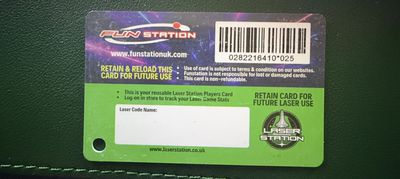
If you have a ticket for an event and there's not a digital version available for the Wallet app, you can create one using the physical pass you have. The same goes for other cards, like a membership card, for example.

The Wallet app can use ‌Visual Intelligence‌ to scan your card, and it will match it to a template with corresponding fields that you can tweak before adding it to your Wallet.

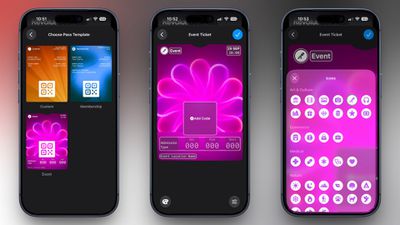
Alternatively, you can create the pass manually, choose a template ("Membership," "Event," or "Custom") and then adjust the color and other details. All you need to do then is scan the barcode or QR code from your physical pass.

Each template includes relevant information like name, location, or admission type. There are 12 background colors to choose from, or seven custom backgrounds for categories like theater, music, sports, and movies.

Fields can be added or removed when creating a custom pass, with options like label, date, membership, contact, coupon code, VIN, insurance, and more, so most physical cards should be able to be stored digitally.

Here's how you create a pass with ‌Visual Intelligence‌:

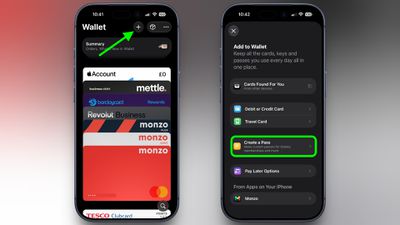
  1. Open the Wallet app on your iPhone and tap the + button at the top.
  2. Choose Create a Pass.
    wallet

  3. To let Visual Intelligence scan the pass, tap Continue, then take a photo of it in the next screen.
    pass example scaled

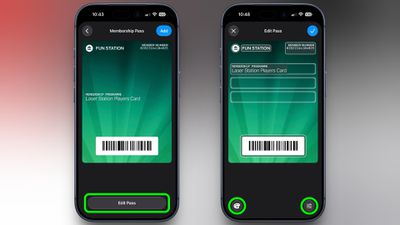
  4. After Visual Intelligence matches the pass to a template, tap Edit Pass.
  5. Use the palette icon in the bottom-left corner to change the look of the pass – you can the background colour, or use an image from your Photos library. Tap the icon in the bottom-right corner to add or remove fields.
    wallet

  6. Tap the blue checkmark at the top when you're done.
Your custom pass will now be added to your Wallet, ready for use. To edit it at any time, simply select it in Wallet, tap the three dots in the top-right corner of the screen, then tap Edit Pass.
Top Rated Comments

adrianlondon Avatar
18 minutes ago at 04:13 am

Why would any venue or business accept a modified document?
It's just a way to put an email / pdf containing a QR code or barcode into the wallet.

Of course, for things which regularly regenerate the code in its own app, this won't work. Or if the ticket requires someone to actually look at it rather than just scan it, it also won't work, as you say.
Score: 1 Votes (Like | Disagree)

Popular Stories

bmw car key photo

iPhone Car Keys in Apple Wallet Expanding to Three More Vehicle Brands

Tuesday September 15, 2026 6:35 am PDT by
Apple Wallet car keys are coming to three more vehicle brands, including Lincoln, Lucid Motors, and China's Freelander, according to code uncovered by MacRumors contributor Aaron Perris. However, the code does not provide a timeframe for availability. The digital key feature allows you to lock, unlock, and start a compatible vehicle with an iPhone or Apple Watch. It is already offered by...


apple wallet drivers license feature iPhone 15 pro

iPhone Driver's License Feature in Apple Wallet Launches in Oklahoma

Wednesday September 2, 2026 6:38 am PDT by
Starting today, Oklahoma residents can add a digital version of their driver's license to the Apple Wallet app on the iPhone and Apple Watch. The digital ID can be used to display proof of identity or age at TSA checkpoints in select airports, at select businesses, and in select apps, but the number of places where it is accepted is still quite limited. Oklahoma is the 16th state to...
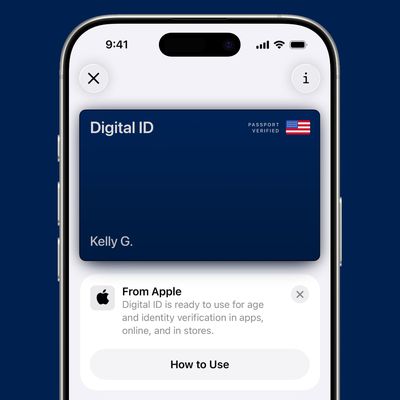
ios 26 digital id passport wallet

iOS 27 Tweaks Apple Wallet's U.S. Passport Feature

Wednesday August 26, 2026 6:46 am PDT by
iOS 27 tweaks some of the information and menus shown alongside the Digital ID passport feature in the Apple Wallet app. As a result of these changes and/or a related bug, some iPhone users have seen their Digital ID deactivated on recent iOS 27 beta versions. Apple says affected users must remove the card and re-add it to the Apple Wallet app in order to use it...
Latest Stories
Create a Custom Pass in the Wallet App on iPhone
47 minutes ago
How to Check Your Mac's Manufacture Date in macOS 27
4 hours ago
What's Gone in macOS Golden Gate and What's Next in macOS 28
12 hours ago
TestFlight App Gets New iOS 27 Features
13 hours ago
Google Photos Wardrobe Feature Comes to iOS
15 hours ago
Apple Music to Host Free Head Trip Festival Livestream
16 hours ago
watchOS 27.2 Code Hints at iPhone-Style Screenshot Previews
18 hours ago
Beats 360 Headphones Now Available in Apple Stores
18 hours ago
Apple Shares New Video Promoting iOS 27 Parental Controls
19 hours ago
Apple Has Announced 12 New Products in the Past Month
19 hours ago
Apple Watch Ultra 2 vs. Ultra 4 Buyer's Guide: Should You Upgrade?
20 hours ago
Here's When Apple TV is Airing Free 'Peanuts' Holiday Specials This Year
20 hours ago
Square Announces Apple Business Integration
21 hours ago
AirPods Pro 3 on Sale for $199 This Week on Amazon
22 hours ago
Qualcomm Announces Renewed Agreement With Apple
22 hours ago
Apple Confirms iPhone 18 Pro Bug Fix Update is Coming Next Week
22 hours ago
Full iPhone 4 'Antennagate' Q&A Video Surfaces After 16 Years
23 hours ago
Meta Did a 'One More Thing' and It's an AI Tamagotchi
1 day ago
iPhone Handoff in iOS 27: How It Works, Pricing, and Carrier Support
1 day ago
ChatGPT in Siri 'Persistently Underperforming,' Says OpenAI
1 day ago
You Can Now Try Apple's Unreleased Copland OS in Your Browser
2 days ago
iOS 27.0.1 is Coming Soon
2 days ago
Apple Releases watchOS 27.0.1 With Fix for Restart Bug
2 days ago
Disney+ and Hulu Raise Prices Again, Ad-Free Plans Now $21.49
2 days ago
Apple Sports App Updated With Even More Soccer Leagues
2 days ago
AirTag 2 4-Pack Hits $79.99 on Amazon, Matching Record Low
2 days ago
Siri AI Coming to HomePod
2 days ago
iPhone Air vs. iPhone 18 Pro Buyer's Guide: Which Should You Buy?
2 days ago
Apple Podcasts Subscriptions Will Soon Support Video
2 days ago
Apple Watch Ultra 3 Drops to Record Low $599.97 on Amazon [Updated]
2 days ago