

At this year's Consumer Electronics Show, Seagate-owned hardware company LaCie debuted its newest design-focused hard drive, the $280 USB 3.0 LaCie Mirror Portable Hard Drive, which has recently become available for purchase. MacRumors met up with LaCie at CES, and we managed to get our hands on one of the company's new hard drives to share with our readers.


LaCie has a history of producing "Extreme Design" products that are aimed at people looking for an attention-catching desk accessory that also performs a useful function, which last year resulted in the LaCie Sphere, a silver-plated sphere that housed a 1TB hard drive. This year's LaCie Mirror follows in the footsteps of the Sphere, offering a 1TB hard drive in a mirrored enclosure, albeit with a slightly more traditional shape.
What's in the Box?
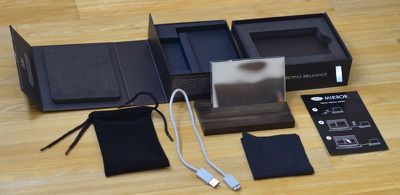
As a premium product, the LaCie Mirror ships in a premium box, which folds out in two tiers to unveil the hard drive in a padded compartment, a cord to connect it to a computer, and a wooden stand.
There's also a carrying pouch for keeping the Mirror free from scratches during transport, a cleaning cloth for removing fingerprints from the surface and a Quick Install Guide for getting the hard drive set up right out of the box. The hard drive itself ships covered with adhesive plastic screen protectors, so make sure to remove those before use.
Design
The LaCie Mirror was designed by French designer Pauline Deltour, who has created a range of modern furniture and home accessories, including several pieces that are sold by Alessi and MUJI. The Mirror is similar to much of Deltour's previous work, with a simple, clean look that's able to fit in with any office design, from opulent to minimalistic.
It can easily pass as a decorative art object rather than being immediately recognizable as a hard drive, and this is definitely an accessory you want out on your desk, not hidden away in a drawer or cabinet.
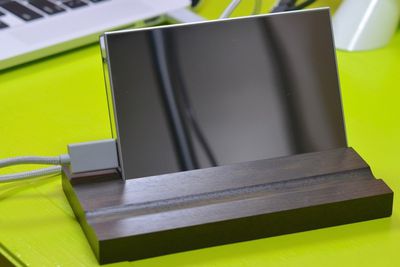
About as wide as an iPhone 6 Plus (but not quite as tall), the Mirror feels well-built and sturdy. It weighs in at half a pound and it is half an inch thick. The entire hard drive is mirrored, from the front and back to the sides. The mirrored surface is covered with Corning's Gorilla Glass 3, which ensures that it's going to stay free from scratches both when on the desk and when in travel.
Unfortunately, the Gorilla Glass doesn't repel fingerprints, which cover the LaCie Mirror in seconds when its picked up. The hard drive's tendency to attract fingerprints and dust explains why it ships with a cleaning cloth. Keep that nearby if you purchase the Mirror -- it will need a quick polish each time it's picked up.
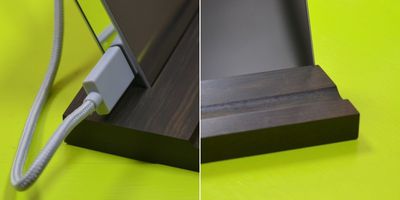
The Mirror ships with a quality ebony wood stand, which has a slot for the hard drive itself and an extra slot where a pen can be stored. The dark wood contrasts nicely with the mirrored design of the hard drive and allows it to be positioned in either a portrait or landscape orientation.
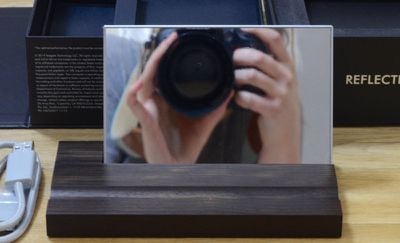
Depending on how the hard drive is positioned on a desk or table, it will show your reflection, which can be mildly distracting. It also has a tendency to reflect sunlight or bright light that shines on it, another small distraction. Both of these situations can be avoided by simple repositioning and there are some benefits to the mirrored surface -- in offices where seeing people approach your desk is helpful, the LaCie Mirror offers a subtle way to keep an eye on your surroundings.
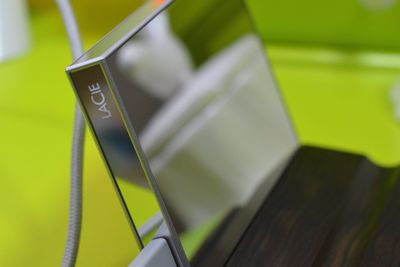
The Mirror has a LaCie logo on the side with the USB port, which is used as a status light. When the hard drive is on, the logo lights up, and when it flickers, data is being accessed. When it flickers on for one second and then turns off for 30 seconds, the hard drive is in sleep or "Eco Mode" and when it is not lit, the hard drive is not powered on.
Software and Performance
The LaCie Mirror offers 1TB of storage space and connects to a hard drive via USB 3.0 with the included flexible, fabric-covered USB cable. It requires a USB 3.0 port for optimal performance, but it also supports USB 2.0 and can be used with older machines. The Mirror is bus-powered and draws its power from a computer so it does not require an external power source.
In our testing, the LaCie Mirror saw average read/write speeds of about 100MB/s and top speeds of 117MB/s (with read speeds that were ever-so-slightly higher than write speeds), which is in the range of other similar USB 3.0 hard drives. It's not super fast, but it's not underperforming compared to other USB 3.0 hard drives.
When the Mirror is plugged in for the first time in a Mac or Windows machine, it prompts you to open the included LaCie Setup Assistant to get the hard drive up and running quickly. The first setup option helps users partition the drive, either for use entirely with Mac systems or for use between Mac and Windows systems. Choosing a Mac only setup opts for the HFS+ format, while choosing a dual setup uses the FAT32 format.
HFS+ is not compatible with Windows machines, and while FAT32 is compatible with both systems, it limits the maximum single file size to 4GB. Windows users also have an NTFS formatting option.
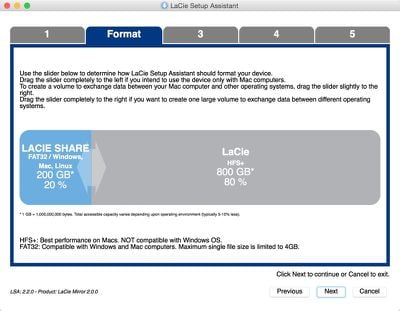
Once formatted, the setup process moves on to a registration process that activates the two-year warranty and then offers to install LaCie software including the Intego Backup Assistant for backing up files, the LaCie Desktop Manager for managing multiple LaCie devices from any computer, and the LaCie Private Public software to protect files with AES 256-bit encryption.
With the LaCie Desktop Manager software installed, the Mirror will enter "Eco Mode" after five minutes of inactivity, conserving energy. The hard drive exits Eco Mode when data is accessed.
The LaCie Mirror is compatible with computers running Mac OS X 10.5 or later or Windows Vista or later. It comes with a two-year limited warranty that includes web-based resources, support, and device repair or replacement.
Who's it For?
At $279.99 for a 1TB hard drive, the LaCie Mirror is not for the average consumer just looking for some additional storage space. Companies like Western Digital, Toshiba, Seagate, and more, offer 1TB hard drives at a fraction of the price, as low as $60. The fact that it's not a solid state drive and does not have a Thunderbolt port also means that it's unsuitable for users who are looking for above average speeds.
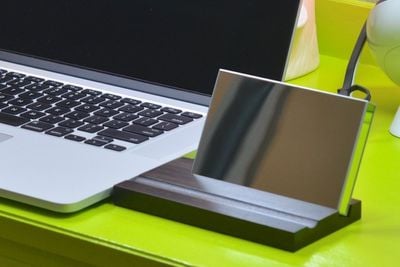
The LaCie Mirror is marketed as a showpiece that's aimed at people who value design above cost. If you're looking for a hard drive that looks more like a fancy piece of desk art than a hard drive or if you love shiny things, then the LaCie Mirror is a solid choice. People who build minimalist, design-oriented workspaces will likely appreciate the aesthetic of the LaCie Mirror and the value in a conversation piece that's built on form as well as function.
Pros:
- Slim design
- Portability
- Unique look
- Gorilla Glass enclosure
Cons:
- Expensive for 1TB of storage
- Prone to fingerprints
- Reflective surface can be distracting
How to Buy
The LaCie Mirror Portable Hard Drive can currently be purchased from Amazon for $279.99.















































Top Rated Comments