WhatsApp: How to Set a Message Reminder - MacRumors
Skip to Content

WhatsApp: How to Set a Message Reminder

by

WhatsApp has rolled out a new feature on iPhone that lets you set reminder alerts for specific messages that you want to come back to later.

Whatsapp Feature
Available in version 25.25.74 of WhatsApp, the feature allows you to long press on any message in a conversation thread and select a new "Remind me" option in the popup menu. You can then choose between 2 hours, 8 hours, and 24 hours, or set a custom duration after which you will be alerted about it.

The new feature is useful for keeping track of important details that might otherwise get lost in busy chats. It's also a simple way to make sure you don't forget to reply to a message at a later time. Here's how to set your first message reminder in WhatsApp:

How to Set a Message Reminder in WhatsApp

  1. Open a WhatsApp conversation thread and long press on a message bubble that you want to be reminded about later.
  2. Tap More... in the popup menu.
  3. Select Remind Me.
  4. Select in 2 hours, in 8 hours, in 24 hours, or choose Custom to set a more specific reminder time and date.
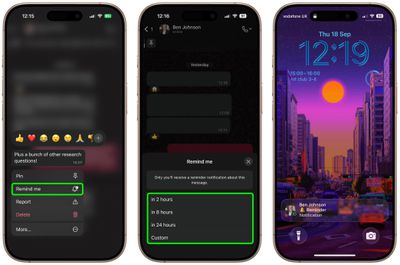
whatsapp

A bell symbol appears in the corner of the message bubble to indicate a reminder has been set. When the reminder alert comes through as a notification, depending on your message preview settings you may see the message content, the conversation in which it's located, and a preview of any accompanying media.

The ability to schedule a reminder about a message should be a lot more convenient and foolproof than, say, starring a message or taking a screenshot of it and hoping you'll remember to come back to it.

How to Cancel a WhatsApp Message Reminder

If you want to cancel a reminder that you've set, simply long press a message showing the bell symbol, tap More... then choose Cancel Reminder.


Top Rated Comments

wanha Avatar
26 weeks ago
pay me no mind but how cool would it be able to set a regular reminder to forget all about our phones for another hour
Score: 2 Votes (Like | Disagree)
26 weeks ago
Good to know about this. Will be useful for users who use the app very much. I use it occasionally only and don't think I have a need for this.
Score: 1 Votes (Like | Disagree)
calzon65 Avatar
26 weeks ago
Since the iPhone has allowed multiple numbers (SIM/eSIM) on the same phone for several years, I wish WhatApp would support multiple numbers on the same phone.
Score: 1 Votes (Like | Disagree)

Popular Stories

iPhone 18 Pro Deep Red Feature

iPhone 18 Pro Launching Later This Year With These 12 New Features

Wednesday March 18, 2026 7:39 am PDT by
While the iPhone 18 Pro and iPhone 18 Pro Max are not expected to launch for another six months or so, there are already plenty of rumors about the devices. It was initially reported that the iPhone 18 Pro models would have fully under-screen Face ID, with only a front camera visible in the top-left corner of the screen. However, the latest rumors indicate that only one Face ID component...
ios 26 4 yellow

Here Are Apple's Release Notes for iOS 26.4

Wednesday March 18, 2026 11:56 am PDT by
Apple provided developers and public beta testers with the release candidate versions of iOS 26.4 and iPadOS 26.4, which means we're going to see a public launch as soon as next week. The RC versions of the software include Apple's official release notes, giving us final details on what's included in the update. Apple Music - Playlist Playground (beta) generates a playlist from your...
Apple Logo Sketch Feature

Apple Has Now Unveiled Eight New Products This Month

Tuesday March 17, 2026 9:25 am PDT by
Apple has unveiled a whopping eight new products so far this March, including an iPhone 17e, iPad Air models with the M4 chip, MacBook Air models with the M5 chip, MacBook Pro models with M5 Pro and M5 Max chips, an updated Studio Display, a higher-end Studio Display XDR, and now the AirPods Max 2 this week. iPhone 17e features the same overall design as the iPhone 16e, but it gains Apple's...