How to Use Your iPhone's Hidden Sleep Timer to Fall Asleep to Music - MacRumors
Skip to Content

How to Use Your iPhone's Hidden Sleep Timer to Fall Asleep to Music

by

Apple's native Clock app in iOS has a hidden feature that allows you to go to bed at night with audio playing on your iPhone and it will automatically stop playing after a set time – ideally, after you've fallen asleep.

how to use sleep timer ios
It's really handy if you don't want your ‌iPhone‌ playing through that audiobook, ambient playlist or podcast series when you're not awake to enjoy it. It can also help save your battery, and potentially your data allowance if you're streaming music or radio over cellular. Here's how it works.

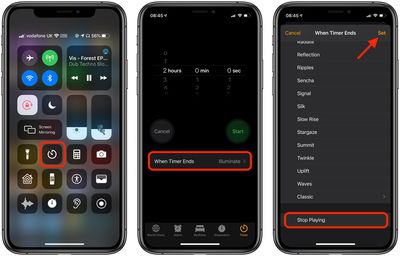
  1. Launch the Control Center on your iPhone – on iPhone 8 or earlier, swipe up from the bottom of the screen; on iPhone X or later, swipe down from the upper right "ear" of the screen.
  2. Tap the Timer button.
  3. Using the dials, select a time that you want your audio to play for.
  4. Tap When Timer Ends.
    timer

  5. Scroll down to the bottom and select Stop Playing.
  6. Tap Set in the top-right corner of the screen.
  7. Tap Start to start your timer.

You can now turn off the screen on your iPhone and tuck into bed. If the timer ends and you haven't fallen asleep yet, just resume whatever audio was playing and restart the timer.


Popular Stories

imac video apple feature

Apple Released Yet Another New Product Today

Friday March 20, 2026 2:39 pm PDT by
Apple has unveiled a whopping nine new products so far this March, including an iPhone 17e, iPad Air models with the M4 chip, MacBook Air models with the M5 chip, MacBook Pro models with M5 Pro and M5 Max chips, the all-new MacBook Neo, an updated Studio Display, a higher-end Studio Display XDR, AirPods Max 2, and now the Nike Powerbeats Pro 2. iPhone 17e features the same overall design as...
ios 26 4 pastel

iOS 26.4: Top 10 New Features Coming to Your iPhone

Friday March 20, 2026 2:44 pm PDT by
iOS 26.4 isn't the major update with new Siri features that we hoped for, but there are some useful quality of life improvements, and a little bit of fun with an AI playlist generator and new emoji characters. Playlist Playground - Apple Music has a Playlist Playground option that lets you generate playlists from text-based descriptions. You can include moods, feelings, activities, or...
iPhone 18 Pro Deep Red Feature

iPhone 18 Pro Launching Later This Year With These 12 New Features

Wednesday March 18, 2026 7:39 am PDT by
While the iPhone 18 Pro and iPhone 18 Pro Max are not expected to launch for another six months or so, there are already plenty of rumors about the devices. It was initially reported that the iPhone 18 Pro models would have fully under-screen Face ID, with only a front camera visible in the top-left corner of the screen. However, the latest rumors indicate that only one Face ID component...