On Apple Watch Ultra, Apple Watch SE, and Apple Watch Series 6 and later models running watchOS 9 and newer, you can use the Compass app's Backtrack feature to track your route and then help you retrace your steps in case you get lost.
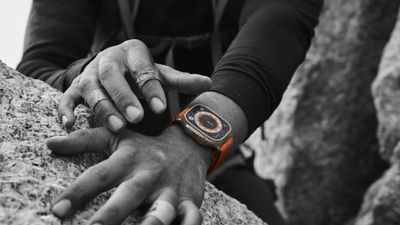
Backtrack uses the GPS on your Apple Watch to create a virtual breadcrumb trail of your route so you don't have to worry about keeping track of where you're going. According to Apple, Backtrack is designed to be used in remote settings, away from familiar places like your home or workplace, and outside densely populated areas without Wi-Fi, but there's nothing stopping you from using it anywhere you need it.
The following steps show you how to use the feature. Note that Backtrack doesn't account for external conditions, such as changes in elevation or objects in the environment.
- Open the Compass app on your Apple Watch.
- Tap the Backtrack button in the bottom-right of the screen, then tap Record Path to begin recording your route.

- When you're ready to retrace your steps, tap the now-highlighted Backtrack button in the bottom-right of the screen, then tap Retrace Steps.
- The path back to the location where you first tapped the Backtrack button will appear on the screen, while the initial location appears as a white dot at the beginning of the path. Follow the path back to return to where you first turned on Backtrack.
- When you've arrived at your starting location, tap the Backtrack button again, then tap Delete Path.
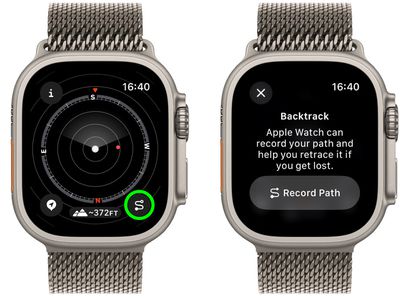
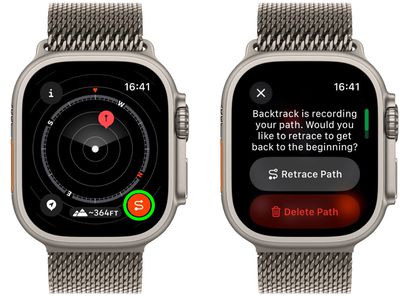
If you have an Apple Watch Ultra, you can start Backtrack with the Action button: Go to the Settings app on your watch and tap Action Button ➝ Action ➝ Backtrack, then tap the chevron to return to the list of actions. Then simply press the Action button to start Backtrack and tap Record Path. You can press the Action and side buttons at the same time to switch between recording your path and retracing your steps.
The Compass app also lets you create Compass Waypoints while you're on the move, which you can also use in combination with Backtrack. Click the link to learn more.