

How to Use Apple Fitness+ Audio Hints on Apple TV - MacRumors
Skip to Content

How to Use Apple Fitness+ Audio Hints on Apple TV

by

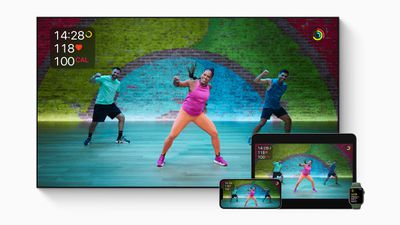
Apple Fitness+ supports an accessibility feature developed by Apple called Audio Hints, which provides verbal cues in addition to those given by trainers for the benefit of blind and low vision users. This article explains how to enable them on Apple TV, but you can also use them on iPhone and iPad.
apple fitness plus
Apple in March 2022 announced a spate of new accessibility features that combine the power of its hardware and software with machine learning, and one of those features is Audio Hints.

As part of an ongoing effort to make fitness more accessible to all, Audio Hints provide short descriptive verbal cues to support users who are blind or low vision. The feature clarifies the trainer's spoken instructions by adding synthesized audio cues to parts of a workout that are only visually demonstrated.

Audio Hints are included for things like the start and end of a workout, equipment adjustments, changes in body position and exercise modifications. If you have VoiceOver turned on when you begin a workout, Audio Hints will be automatically enabled. Otherwise, you can turn them on manually by following these steps.

  1. Launch the Fitness app on your ‌Apple TV‌.
  2. Select who is working out.
  3. Select the workout you want to follow.
  4. Select the Play button.
  5. Tap the Metrics Editor button.
  6. Select Audio Hints to turn them on or off.

That's all there is to it. Note that you can use the same menu screen to adjust the speed of audio cues to help you move at your own pace.


Popular Stories

iOS 26

iOS 26.4 Adds Two New Features to CarPlay

Tuesday March 24, 2026 1:55 pm PDT by
iOS 26.4 was released today, and it includes a couple of new features for CarPlay: an Ambient Music widget and support for voice-based chatbot apps. To update your iPhone 11 or newer to iOS 26.4, open the Settings app and tap on General → Software Update. CarPlay will automatically offer the new features so long as the iPhone connected to your vehicle is running iOS 26.4 or later....
AirPods Pro Firmware Feature

Apple Releases New Firmware for AirPods Pro 3, AirPods Pro 2 and AirPods 4

Tuesday March 24, 2026 12:31 pm PDT by
Apple today released new firmware for the AirPods Pro 2, AirPods Pro 3, and the AirPods 4. The firmware has a version number of 8B39, up from 8B34 on the AirPods Pro 3, 8B28 on the AirPods Pro 2, and 8B21 on the AirPods 4. There is no word on what's included in the firmware, but Apple has a support document with limited notes. Most updates are limited to bug fixes and performance...
apple tv 4k new orange

tvOS 26.4 Adds These New Features to Your Apple TV

Wednesday March 25, 2026 3:33 pm PDT by
Apple this week released tvOS 26.4, and the software update includes a handful of new features and changes for the Apple TV. tvOS 26.4 is compatible with all Apple TV 4K and Apple TV HD models released since 2015. To update your Apple TV, open the Settings app on the device, navigate to System → Software Updates, and select Update Software. Below, we have recapped what is new in tvOS...















